B4A=true
Group=Default Group\Pages
ModulesStructureVersion=1
Type=Class
Version=13.4
@EndOfDesignText@
#IgnoreWarnings: 12
'/**
' * @class B4XPageNavScrollDock
' * @description
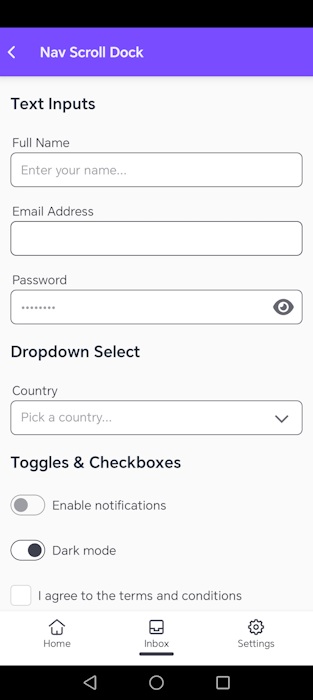
' *  Demonstrates a full-screen layout with three fixed zones:
' *    - A Navbar pinned to the top of the screen.
' *    - A scrollable PageScroll area that fills the space between them.
' *    - A Dock pinned to the bottom of the screen.
' *  The Navbar and Dock are added directly to Root so they never scroll.
' *  The PageScroll is inset (top = navbar height, bottom = dock height) so
' *  its content area is exactly the visible space between the two bars.
' */
#Region Variables
' ELI15: Class_Globals is our page's inventory box.
' Any variables declared here exist as long as the page is in memory and can be accessed/modified
' by any Sub (method) on this page. Local variables inside a Sub vanish when that Sub ends.
' ELI15: Class_Globals is our page's inventory box.
' Any variables declared here exist as long as the page is in memory and can be accessed/modified
' by any Sub (method) on this page. Local variables inside a Sub vanish when that Sub ends.
Sub Class_Globals
    ' ELI15: Root is the main parent panel (canvas) that represents this entire screen.
    Private Root As B4XView

    ' ELI15: xui is a translation helper that lets us write color and drawing code once,
    ' and have it compile natively on Android (B4A), iOS (B4i), and Desktop (B4J).
    Private xui As XUI
    ' ELI15: navbar is the header component pinned at the very top of our screen.
    Private navbar As B4XDaisyNavbar
    ' ELI15: pageScroll is the custom helper that creates the scrollable area in the middle.
    Private pageScroll As B4XDaisyPageScroll

    ' ELI15: pnlHost is the actual scrollable canvas inside pageScroll where our form inputs sit.
    Private pnlHost As B4XView
    ' ELI15: dock is the footer navigation bar pinned at the very bottom of our screen.
    Private dock As B4XDaisyDock
    ' ELI15: Height values in dip (Density Independent Pixels) to keep sizing uniform on low and high resolution screens.
    Private NAVBAR_H As Int
    Private DOCK_H As Int

    ' ELI15: Declared as global so we can request focus on it inside B4XPage_Appear (when the page slides into view).
    Private inp2 As B4XDaisyInput
End Sub
#End Region
#Region Initialization
' ELI15: The constructor. Prepares this class object so it can be added to the B4XPages manager.
Public Sub Initialize As Object
    Return Me
End Sub
' ELI15: Automatically runs exactly once when this page is loaded into memory.
' This is where we build our UI layout structure.
Private Sub B4XPage_Created(Root1 As B4XView)
    ' Save the main screen parent container.
    Root = Root1
    ' Define standard heights for our top and bottom bars.
    NAVBAR_H = 56dip
    DOCK_H   = 64dip
    ' ELI15: CRITICAL ORDER: In B4A, views added later are stacked on top of views added earlier.
    ' We build the scrollable content container FIRST so it lies at the bottom of the stack,
    ' then we build the navbar and dock so they float on top and stay visible while scrolling.
    '
    ' ELI15: Imagine you are laying transparent sheets on a table. The first sheet goes at the bottom.
    ' If you put a photo on top, you can still see the bottom sheet around the edges.
    ' Here, the scrollable page content is the bottom sheet, and the navbar/dock are photos on top.
    BuildScroll
    BuildNavbar
    BuildDock
    ' ELI15: BringToFront/SendToBack are our insurance policy. Even if another part of the code
    ' adds more views later, these commands force the navbar to stay on top and the page scroll
    ' to stay behind, so the header and footer are never hidden by scrolling text or buttons.
    ' Draw all form inputs inside the scroll panel.
    RenderContent
End Sub
#End Region
#Region Layout Builders
' ELI15: Builds the top header navbar and stretches it across the screen width.
Private Sub BuildNavbar
    navbar.Initialize(Me, "navbar")
    navbar.AddToParent(Root, 0, 0, Root.Width, NAVBAR_H)
    ' ELI15: BringToFront lifts this view above every other view in the same parent.
    ' Think of it like taking a piece of paper and placing it on top of the pile.
    ' This guarantees the navbar header is never covered by scrolling form content.
    navbar.getView.BringToFront
    navbar.Title = "Nav Scroll Dock"
    navbar.Variant = "primary"
    navbar.BackVisible = True
End Sub
' ELI15: Builds the bottom footer dock and pins it to the screen's bottom edge.
Private Sub BuildDock
    dock.Initialize(Me, "dock")
    dock.Size = "md"
    dock.ActiveIndex = 0
    ' Y coordinate starts at Root.Height minus the dock's height so it stays at the very bottom.
    dock.AddToParent(Root, 0, Root.Height - DOCK_H, Root.Width, DOCK_H)
    ' ELI15: The dock is added after the scroll view, so it naturally sits on top.
    ' We position it at Root.Height - DOCK_H so its bottom edge lines up with the screen bottom.
    dock.AddItem("home",     "Home",     "dock-home.svg")
    dock.AddItem("inbox",    "Inbox",    "dock-inbox.svg")
    dock.AddItem("settings", "Settings", "dock-settings.svg")
End Sub
' ELI15: Builds the scrollable container. We place it directly between the navbar and the dock.
Private Sub BuildScroll
    Dim scrollTop As Int = NAVBAR_H
    ' Height is calculated as: Total Screen Height - Top Bar Height - Bottom Bar Height.
    Dim scrollH   As Int = Root.Height - NAVBAR_H - DOCK_H
    pageScroll.Initialize(Me, "pageScroll")
    pageScroll.AddToParent(Root, 0, scrollTop, Root.Width, scrollH)
    ' ELI15: SendToBack pushes this view to the very bottom of the pile.
    ' Even though we added it first, this command makes absolutely sure the scrollable content
    ' stays behind the navbar and dock, so the user can scroll without the bars blocking clicks.
    pageScroll.mBase.SendToBack
    pnlHost = pageScroll.Panel
End Sub
#End Region
#Region Content Rendering
' ELI15: Draws the form controls inside the scrollable content canvas.
Private Sub RenderContent
    ' Clear any previous elements to avoid duplication.
    pageScroll.Clear
    ' Fetch dimensions relative to screen padding and setup a vertical stack coordinate 'y'.
    Dim maxW   As Int = pageScroll.UsableWidth
    Dim pad    As Int = pageScroll.PagePadding
    Dim gap    As Int = pageScroll.YGap
    Dim y      As Int = pad
    ' -- Section: Text Inputs --
    ' We call AddSectionTitle with False for the third parameter so the title aligns Left.
    y = pageScroll.AddSectionTitle("Text Inputs", y, False)
    Dim inp1 As B4XDaisyInput
    inp1.Initialize(Me, "inp1")
    inp1.AddToParent(pnlHost, pad, y, maxW, 40dip)
    inp1.LabelAbove = "Full Name"
    inp1.Placeholder = "Enter your name..."
    ' Move our vertical coordinate down: current Y + height of input + vertical gap.
    y = y + inp1.GetComputedHeight + gap
    inp2.Initialize(Me, "inp2")
    inp2.AddToParent(pnlHost, pad, y, maxW, 40dip)
    inp2.LabelAbove = "Email Address"
    inp2.Placeholder = "[email protected]"
    inp2.InputType = "email"
    y = y + inp2.GetComputedHeight + gap
    Dim inp3 As B4XDaisyInput
    inp3.Initialize(Me, "inp3")
    inp3.AddToParent(pnlHost, pad, y, maxW, 40dip)
    inp3.LabelAbove = "Password"
    inp3.Placeholder = "••••••••"
    inp3.InputType = "password"
    y = y + inp3.GetComputedHeight + gap
    ' -- Section: Select --
    y = pageScroll.AddSectionTitle("Dropdown Select", y, False)
    Dim sel1 As B4XDaisySelect
    sel1.Initialize(Me, "sel1")
    sel1.AddToParent(pnlHost, pad, y, maxW, 40dip)
    sel1.LabelAbove = "Country"
    sel1.Placeholder = "Pick a country..."
    sel1.Items = CreateMap("za": "South Africa", "us": "United States", "gb": "United Kingdom", "de": "Germany")
    y = y + sel1.GetComputedHeight + gap
    ' -- Section: Toggles & Checkboxes --
    y = pageScroll.AddSectionTitle("Toggles & Checkboxes", y, False)
    Dim tgl1 As B4XDaisyToggle
    tgl1.Initialize(Me, "tgl1")
    tgl1.AddToParent(pnlHost, pad, y, maxW, 40dip)
    tgl1.Text = "Enable notifications"
    y = y + tgl1.GetComputedHeight + gap
    Dim tgl2 As B4XDaisyToggle
    tgl2.Initialize(Me, "tgl2")
    tgl2.AddToParent(pnlHost, pad, y, maxW, 40dip)
    tgl2.Text = "Dark mode"
    tgl2.Checked = True
    y = y + tgl2.GetComputedHeight + gap
    Dim chk1 As B4XDaisyCheckbox
    chk1.Initialize(Me, "chk1")
    chk1.AddToParent(pnlHost, pad, y, maxW, 40dip)
    chk1.Text = "I agree to the terms and conditions"
    y = y + chk1.GetComputedHeight + gap
    ' -- Section: Range Slider --
    y = pageScroll.AddSectionTitle("Range Slider", y, False)
    Dim rng1 As B4XDaisyRange
    rng1.Initialize(Me, "rng1")
    rng1.AddToParent(pnlHost, pad, y, maxW, 24dip)
    rng1.Value = 40
    y = y + rng1.GetComputedHeight + gap
    ' -- Section: Rating --
    y = pageScroll.AddSectionTitle("Star Rating", y, False)
    Dim rat1 As B4XDaisyRating
    rat1.Initialize(Me, "rat1")
    rat1.AddToParent(pnlHost, pad, y, maxW, 32dip)
    rat1.Value = 4
    y = y + rat1.GetComputedHeight + gap
    ' -- Section: Action Buttons --
    y = pageScroll.AddSectionTitle("Actions", y, False)
    Dim btnW As Int = (maxW - 8dip) / 2
    Dim btnSave As B4XDaisyButton
    btnSave.Initialize(Me, "btnSave")
    btnSave.AddToParent(pnlHost, pad, y, btnW, 44dip)
    btnSave.Text = "Save"
    btnSave.Variant = "primary"
    Dim btnCancel As B4XDaisyButton
    btnCancel.Initialize(Me, "btnCancel")
    btnCancel.AddToParent(pnlHost, pad + btnW + 8dip, y, btnW, 44dip)
    btnCancel.Text = "Cancel"
    btnCancel.Variant = "secondary"
    y = y + btnSave.GetComputedHeight + gap
    Dim btnDelete As B4XDaisyButton
    btnDelete.Initialize(Me, "btnDelete")
    btnDelete.AddToParent(pnlHost, pad, y, maxW, 44dip)
    btnDelete.Text = "Delete Account"
    btnDelete.Variant = "error"
    y = y + btnDelete.GetComputedHeight + gap
    ' ELI15: Tell the ScrollView to calculate the total height of all views inside it,
    ' so the user can scroll all the way down to see the final Delete button without it getting cut off.
    pageScroll.AutoFit
End Sub
#End Region
#Region Page Events
' ELI15: Runs whenever the device is rotated or resized (like split-screen mode).
' We recalculate and stretch the top navbar, bottom dock, and scroll panel to fit the new size.
Private Sub B4XPage_Resize(Width As Int, Height As Int)
    If navbar.IsInitialized Then
        navbar.getView.SetLayoutAnimated(0, 0, 0, Width, NAVBAR_H)
    End If
    If dock.IsInitialized Then
        dock.View.SetLayoutAnimated(0, 0, Height - DOCK_H, Width, DOCK_H)
    End If
    If pageScroll.IsInitialized Then
        pageScroll.Base_Resize(Width, Height - NAVBAR_H - DOCK_H)
    End If
    ' Redraw content to fit the new width.
    RenderContent
End Sub
' ELI15: Runs every single time the user navigates and opens this page on their screen.
' Excellent place to set keyboard focus onto the primary text input.
Private Sub B4XPage_Appear
    ' Notify the main loader that loading is complete.
    CallSubDelayed(B4XPages.MainPage, "Page_Ready")
    ' If our email input field is fully initialized, focus the typing cursor there.
    If inp2.IsInitialized Then
        inp2.Focus = True
    End If
End Sub
#End Region
#Region Event Handlers
' ELI15: Triggers when the user taps the back navigation arrow on the navbar.
Private Sub navbar_Back(Tag As Object)
    B4XPages.ShowPage("Dashboard")
End Sub
' ELI15: Triggers when the user taps one of the bottom dock navigation items.
Private Sub dock_ItemClick(ItemId As String)
    #If B4A
    ' Display a short native Android pop-up toast message at the bottom of the screen.
    ToastMessageShow("Dock: " & ItemId, False)
    #End If
End Sub
' ELI15: Triggers when the Save button is clicked.
Private Sub btnSave_Click(Tag As Object)
    #If B4A
    ToastMessageShow("Saved!", False)
    #End If
End Sub
' ELI15: Triggers when the Cancel button is clicked.
Private Sub btnCancel_Click(Tag As Object)
    B4XPages.ShowPage("Dashboard")
End Sub
' ELI15: Triggers when the Delete Account button is clicked.
Private Sub btnDelete_Click(Tag As Object)
    #If B4A
    ToastMessageShow("Delete tapped", False)
    #End If
End Sub
#End Region