B4A Library Android Zebra SE4710 1D, 2D/QR barcode scan engine

Hello All,
This is a simple library I wrapped for Android 1D/2D barcode scanners that uses the Zebra SE4710 hardware scan engine. A new client had previously purchased some SE4710 based barcode scanners (not pictured below). After their in-house developer left a few months ago, they reached out to me for assistance. My first step was to locate and wrap this library for the B4A project.

Obviously you don't need a library to use a Android 1D/2D hardware scan engine. To receive barcode data, you can use an Intent via a Receiver Module without the need for a library, but this can cause conflicts. For instance, the camera does not work while the scan engine is open (on/activated). This is because in Android the hardware barcode scan engine itself is classified as a camera and you can't run two cameras at the same time. I use the library to close (off/deactivate) the hardware barcode scan engine, then I can use the built-in rear camera to take a photograph, for example taking a photograph of an item of stock. Afterwards I use the library to open (on/activate) the hardware barcode scan engine again.

Take note: This library does not work with mobile phone built-in cameras, it only works with Android powered devices that use the Zebra scan engine that is mentioned in the main title above.

B4A library tab
1730205207425.png


Important: There are 3 files in the attached zipped library file, place all 3 files in your B4A additional libraries folder.

I've changed some of the original java functions for continuity purposes in B4A.

SS_ZebraSE4710

Author:
Peter Simpson
Version: 1.0
  • ZebraSE4710
    • Functions:
      • CloseScanner As Boolean
        Turn off the power for the scanner.
      • Initialize (EventName As String)
        Initializes the object.
      • IsInitialized As Boolean
        Tests whether the object was initialized.
      • OpenScanner As Boolean
        Turn on the power for the scanner.
      • SetScanLaserMode (Mode As Boolean) As Boolean
        Set the laser continuous scan mode.
        Param mode start continuous scan True(On), stop continuous scan False(Off).
      • StartScan As Boolean
        Start decoding.
      • StopScan As Boolean
        Stop decoding.
Note: I personally manually control the opening and closing of the barcode scanner (on a per B4XPage basis) thus I use the B4XPage_KeyPress event for this library. I've included the B4XPage_KeyPress event in the attached example source code, but it's not really necessary and you do not need B4XPage_KeyPress if you are letting the scanner manage the scan buttons for you.

Below are two examples of Android powered 1D/2D barcode scanners, the right hand scanner scanner is using the SE4710 scan engine. This library should work with hardware scanners that use the Zebra SE4710 scan engine, No guarantees thought. To use this library, when ordering your 1D/2D barcode scanners, you will need to look for scanners that have the option of using the Zebra SE4710 scan engine. You may need to double check your scanner broadcast details and update the manifest and receiver module to receive the scanned data.
PXL_20241029_121005262.jpg


Enjoy...
 

Attachments

  • SS_ZebraSE4710.zip
    3.1 KB · Views: 268
  • ZebraSE4710.zip
    56.9 KB · Views: 318
Last edited:

amorosik

Expert
Licensed User
I see that this type of barcode scanner is frequently recalled and described as a plus feature compared to terminals that use other hardware
But what exactly would this scanner have better than other models?
 

amorosik

Expert
Licensed User
I am trying to run the example on a Custom RP310 terminal that has a Zebra SE4710 scanner (on Product Information)
But when the code gets to the BarcodeScanner.Initialize(Null) line it crashes and throws this error

B4X:
Private Sub B4XPage_Created (Root1 As B4XView)
    Root = Root1
    Root.LoadLayout("MainPage")

    BarcodeScanner.Initialize(Null)
    Log($"BarcodeScanner Initialized: ${BarcodeScanner.IsInitialized}"$)
   
    If BarcodeScanner.IsInitialized Then
        BarcodeScanner.OpenScanner
        StartReceiver(BarcodeReceiver) 'Start instantly
    End If
End Sub

B4X:
Logger connesso a:  Custom P-Ranger
--------- beginning of system
--------- beginning of main
*** Service (starter) Create ***
** Service (starter) Start **
** Activity (main) Create (first time) **
Error occurred on line: 26 (B4XMainPage)
java.lang.reflect.InvocationTargetException
    at java.lang.reflect.Method.invoke(Native Method)
    at anywheresoftware.b4a.keywords.Common.CallSubDebug2(Common.java:1087)
    at b4a.example.b4xpagesmanager._createpageifneeded(b4xpagesmanager.java:1069)
    at b4a.example.b4xpagesmanager._showpage(b4xpagesmanager.java:501)
    at b4a.example.b4xpagesmanager._addpage(b4xpagesmanager.java:321)
    at b4a.example.b4xpagesmanager._addpageandcreate(b4xpagesmanager.java:335)
    at b4a.example.b4xpagesmanager._initialize(b4xpagesmanager.java:166)
    at b4a.example.main._activity_create(main.java:416)
    at java.lang.reflect.Method.invoke(Native Method)
    at anywheresoftware.b4a.shell.Shell.runMethod(Shell.java:732)
    at anywheresoftware.b4a.shell.Shell.raiseEventImpl(Shell.java:351)
    at anywheresoftware.b4a.shell.Shell.raiseEvent(Shell.java:255)
    at java.lang.reflect.Method.invoke(Native Method)
    at anywheresoftware.b4a.ShellBA.raiseEvent2(ShellBA.java:157)
    at b4a.example.main.afterFirstLayout(main.java:105)
    at b4a.example.main.access$000(main.java:17)
    at b4a.example.main$WaitForLayout.run(main.java:83)
    at android.os.Handler.handleCallback(Handler.java:873)
    at android.os.Handler.dispatchMessage(Handler.java:99)
    at android.os.Looper.loop(Looper.java:193)
    at android.app.ActivityThread.main(ActivityThread.java:6702)
    at java.lang.reflect.Method.invoke(Native Method)
    at com.android.internal.os.RuntimeInit$MethodAndArgsCaller.run(RuntimeInit.java:493)
    at com.android.internal.os.ZygoteInit.main(ZygoteInit.java:911)
Caused by: java.lang.RuntimeException: java.lang.reflect.InvocationTargetException
    at anywheresoftware.b4a.debug.Debug.CallSub4(Debug.java:336)
    at anywheresoftware.b4a.debug.Debug.CallSubNew2(Debug.java:285)
    ... 24 more
Caused by: java.lang.reflect.InvocationTargetException
    at java.lang.reflect.Method.invoke(Native Method)
    at anywheresoftware.b4a.debug.Debug.CallSub4(Debug.java:318)
    ... 25 more
Caused by: java.lang.NoClassDefFoundError: Failed resolution of: Landroid/hardware/ScanModel;
    at android.hardware.ScanDevice.<init>(ScanDevice.java:16)
    at com.simplysoftware.ZebraSE4710.ZebraSE4710.Initialize(ZebraSE4710.java:63)
    at b4a.example.b4xmainpage._b4xpage_created(b4xmainpage.java:69)
    ... 27 more
Caused by: java.lang.ClassNotFoundException: Didn't find class "android.hardware.ScanModel" on path: DexPathList[[zip file "/data/app/b4a.example-VRR4KZ7EiGnD4Ut4EUQk_g==/base.apk"],nativeLibraryDirectories=[/data/app/b4a.example-VRR4KZ7EiGnD4Ut4EUQk_g==/lib/arm64, /system/lib64]]
    at dalvik.system.BaseDexClassLoader.findClass(BaseDexClassLoader.java:134)
    at java.lang.ClassLoader.loadClass(ClassLoader.java:379)
    at java.lang.ClassLoader.loadClass(ClassLoader.java:312)
    ... 30 more
** Activity (main) Resume **

What could it be due to?
(Win10, B4a 13.01, Jdk 19.02, Android.jar 34)
 
Last edited:

Peter Simpson

Expert
Licensed User
Longtime User
Hello @amorosik ,
Caused by: java.lang.NoClassDefFoundError: Failed resolution of: Landroid/hardware/ScanModel;
at android.hardware.ScanDevice.<init>(ScanDevice.java:16)
at com.simplysoftware.ZebraSE4710.ZebraSE4710.Initialize(ZebraSE4710.java:63)
at b4a.example.b4xmainpage._b4xpage_created(b4xmainpage.java:69)
... 27 more
Caused by: java.lang.ClassNotFoundException: Didn't find class "android.hardware.ScanModel"

Hmm, hmm, hmm. Well, cleaning the project will not work this time, that's for sure. Let me check later, I have another brand of SE4710 that boxed and never opened, I'll check that and DM you.

It's a bit baffling to me though, I'll get back to you later @amorosik.
 

Peter Simpson

Expert
Licensed User
Longtime User
I see that this type of barcode scanner is frequently recalled and described as a plus feature compared to terminals that use other hardware
But what exactly would this scanner have better than other models?
Hmm, one has absolutely no idea. I was basically forced to use this barcode scanner because my new client already had them, they just didn't have an app that suited their business to run in them. So I wrapped this library and I got to working on an app for them.

The barcode 1D/2D scanner module/imager is a lot better than I thought it was going to be. One of my tests was to place a QR code image (one of their stock items) on my spare phone screen (Pixel 7 Pro) to see how it performed. It scanned the QR code from a distance of 7.5 to 8 feet away from my phone screen, I was expecting about 5 feet.
 

maverickbluer1

New Member
Hello All,
This is a simple library I wrapped for Android 1D/2D barcode scanners that uses the Zebra SE4710 hardware scan engine. A new client had previously purchased some SE4710 based barcode scanners (not pictured below). After their in-house developer left a few months ago, they reached out to me for assistance. My first step was to locate and wrap this library for the B4A project.

Obviously you don't need a library to use a Android 1D/2D hardware scan engine. To receive barcode data, you can use an Intent via a Receiver Module without the need for a library, but this can cause conflicts. For instance, the camera does not work while the scan engine is open (on/activated). This is because in Android the hardware barcode scan engine itself is classified as a camera and you can't run two cameras at the same time. I use the library to close (off/deactivate) the hardware barcode scan engine, then I can use the built-in rear camera to take a photograph, for example taking a photograph of an item of stock. Afterwards I use the library to open (on/activate) the hardware barcode scan engine again.

Take note: This library does not work with mobile phone built-in cameras, it only works with Android powered devices that use the Zebra scan engine that is mentioned in the main title above.

B4A library tab
View attachment 158070

Important: There are 3 files in the attached zipped library file, place all 3 files in your B4A additional libraries folder.

I've changed some of the original java functions for continuity purposes in B4A.

SS_ZebraSE4710

Author:
Peter Simpson
Version: 1.0
  • ZebraSE4710
    • Functions:
      • CloseScanner As Boolean
        Turn off the power for the scanner.
      • Initialize (EventName As String)
        Initializes the object.
      • IsInitialized As Boolean
        Tests whether the object was initialized.
      • OpenScanner As Boolean
        Turn on the power for the scanner.
      • SetScanLaserMode (Mode As Boolean) As Boolean
        Set the laser continuous scan mode.
        Param mode start continuous scan True(On), stop continuous scan False(Off).
      • StartScan As Boolean
        Start decoding.
      • StopScan As Boolean
        Stop decoding.
Note: I personally manually control the opening and closing of the barcode scanner (on a per B4XPage basis) thus I use the B4XPage_KeyPress event for this library. I've included the B4XPage_KeyPress event in the attached example source code, but it's not really necessary and you do not need B4XPage_KeyPress if you are letting the scanner manage the scan buttons for you.

Below are two examples of Android powered 1D/2D barcode scanners, the right hand scanner scanner is using the SE4710 scan engine. This library should work with hardware scanners that use the Zebra SE4710 scan engine, No guarantees thought. To use this library, when ordering your 1D/2D barcode scanners, you will need to look for scanners that have the option of using the Zebra SE4710 scan engine. You may need to double check your scanner broadcast details and update the manifest and receiver module to receive the scanned data.
View attachment 158082


Enjoy...
I can't get your sample code to run on my scanner that has tlhe se4710 engine. Below is the code and the error message. Line 26 is the problem code. BarcodeScanner.Initialize(Null) Any suggestions?

'This event will be called once, before the page becomes visible.
Private Sub B4XPage_Created (Root1 As B4XView)
Root = Root1
Root.LoadLayout("MainPage")

BarcodeScanner.Initialize(Null)
Log($"BarcodeScanner Initialized: ${BarcodeScanner.IsInitialized}"$)

If BarcodeScanner.IsInitialized Then
BarcodeScanner.OpenScanner
StartReceiver(BarcodeReceiver) 'Start instantly
End If

Error occurred on line: 26 (B4XMainPage)
java.lang.reflect.InvocationTargetException
at java.lang.reflect.Method.invoke(Native Method)
at anywheresoftware.b4a.keywords.Common.CallSubDebug2(Common.java:1140)
at b4a.example.b4xpagesmanager._createpageifneeded(b4xpagesmanager.java:1069)
at b4a.example.b4xpagesmanager._showpage(b4xpagesmanager.java:501)
at b4a.example.b4xpagesmanager._addpage(b4xpagesmanager.java:321)
at b4a.example.b4xpagesmanager._addpageandcreate(b4xpagesmanager.java:335)
at b4a.example.b4xpagesmanager._initialize(b4xpagesmanager.java:166)
at b4a.example.main._activity_create(main.java:416)
at java.lang.reflect.Method.invoke(Native Method)
at anywheresoftware.b4a.shell.Shell.runMethod(Shell.java:732)
at anywheresoftware.b4a.shell.Shell.raiseEventImpl(Shell.java:351)
at anywheresoftware.b4a.shell.Shell.raiseEvent(Shell.java:255)
at java.lang.reflect.Method.invoke(Native Method)
at anywheresoftware.b4a.ShellBA.raiseEvent2(ShellBA.java:157)
at b4a.example.main.afterFirstLayout(main.java:105)
at b4a.example.main.access$000(main.java:17)
at b4a.example.main$WaitForLayout.run(main.java:83)
at android.os.Handler.handleCallback(Handler.java:958)
at android.os.Handler.dispatchMessage(Handler.java:99)
at android.os.Looper.loopOnce(Looper.java:205)
at android.os.Looper.loop(Looper.java:294)
at android.app.ActivityThread.main(ActivityThread.java:8223)
at java.lang.reflect.Method.invoke(Native Method)
at com.android.internal.os.RuntimeInit$MethodAndArgsCaller.run(RuntimeInit.java:552)
at com.android.internal.os.ZygoteInit.main(ZygoteInit.java:977)
Caused by: java.lang.RuntimeException: java.lang.reflect.InvocationTargetException
at anywheresoftware.b4a.debug.Debug.CallSub4(Debug.java:336)
at anywheresoftware.b4a.debug.Debug.CallSubNew2(Debug.java:285)
... 25 more
Caused by: java.lang.reflect.InvocationTargetException
at java.lang.reflect.Method.invoke(Native Method)
at anywheresoftware.b4a.debug.Debug.CallSub4(Debug.java:318)
... 26 more
Caused by: java.lang.NoClassDefFoundError: Failed resolution of: Landroid/hardware/ScanModel;
at android.hardware.ScanDevice.<init>(ScanDevice.java:16)
at com.simplysoftware.ZebraSE4710.ZebraSE4710.Initialize(ZebraSE4710.java:63)
at b4a.example.b4xmainpage._b4xpage_created(b4xmainpage.java:69)
... 28 more
Caused by: java.lang.ClassNotFoundException: android.hardware.ScanModel
... 31 more
 

Peter Simpson

Expert
Licensed User
Longtime User
Hello,

The crash is caused by the following line in the library.

java.lang.ClassNotFoundException: android.hardware.ScanModel indicates that the ZebraSE4710 library is trying to access an internal Android hardware class that exists only on specific industrial devices.

Based on the stack trace you provided, the example app is crashing because it cannot find the class android.hardware.ScanModel. This error only usually occurs when a library specifically designed for certain hardware (like a Zebra or honeywell rugged scanner) is executed on a device that does not contain the required manufacturer-specific system libraries.

You should wrap the Initialization method in a Try-Catch Block to prevent the entire application from crashing.

Can you post a photograph of your device, and do you by any chance have a copy of the original library.

If your scan engine is in an original Zebra scanner, this library will NOT work. If your scan engine is in a cheaper third party Chinese manufactured scanner, this library has a better chance of working.

What's the make and model of your actual barcode scanner, and as I asked previously, do you have (or can you request) the library for your specific barcode scanner.

When I get back later on today, I'll look more closely into the mater. But so far, it looks like your scanner is NOT fully compatible with this library.

Please let me know the make, model and if you have the library?
 

maverickbluer1

New Member
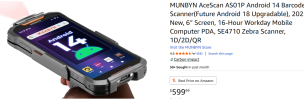
I'm using a Munbyn AS01. It claims to support the Zebra SE4710 scan engine. It does provide a scan interface called M-Scan, and I've decided to use it instead of the Zebra engine. Here is a pic of the scanner.

Let me now if you would like to have more info.
 

Attachments

  • scanner.png
    scanner.png
    264.2 KB · Views: 5
Top