
Context: A few years ago I created a music app for my own fairly large music archive - LPs and CDs transformed to .wav files.
It has worked well on my desktop driving Bluetooth speakers. I like to 'work' with music playing.
In January I decided to create a version for an extra tablet I had, we had some upcoming trips.
After solving problems with external storage (using a USB-C Splitter + external 1TB SSD), I had a working app.
It was not equivalent to the desktop version due to different storage and different mediaplayer solutions.
But it had features we liked.
So I started working on the desktop version to add those features.
Actually, as happens to me a lot, I started over fresh and added lots of features we wanted.
When finished, we were very pleased with the results - very good searching and reliable and responsive playback.
Now back to the tablet version...
I wanted to see how the subs in the tablet version were different from the new desktop version which was by then the gold standard.
Because of the build-in differences (storage, mediaplayer, and GUI) I expected valid discrepancies and differences due to changes.
Therefore I wanted to compare subs one by one to make the two systems behave the same.
I have used WinMerge for a long time time and it is great, but it doesn't show much context for differences.
Hence the creation of SubComparator. It is implemented as a #Macro (a button on the top row of the IDE).
It compares A to B using the Myer's Difference algorithm.
This algorithm finds the minimal number of transformations (inserts + deletes) required to turn one list of strings into another.
I knew about this algoritm but I thought I'd try AI (Gemini for convenience) to help me.
Aside from the fact that it was naive about B4X Type statements, Do While Loops, and B4X Keywords, it did fine with the logic of the algorithm.
So armed with that code I worked on the GUI. The perfect vehicle was a wide CustomListView with rows of panels holding two labels side by side.
It is scrollable and I could add some colors to designate rows and emphasize differences.
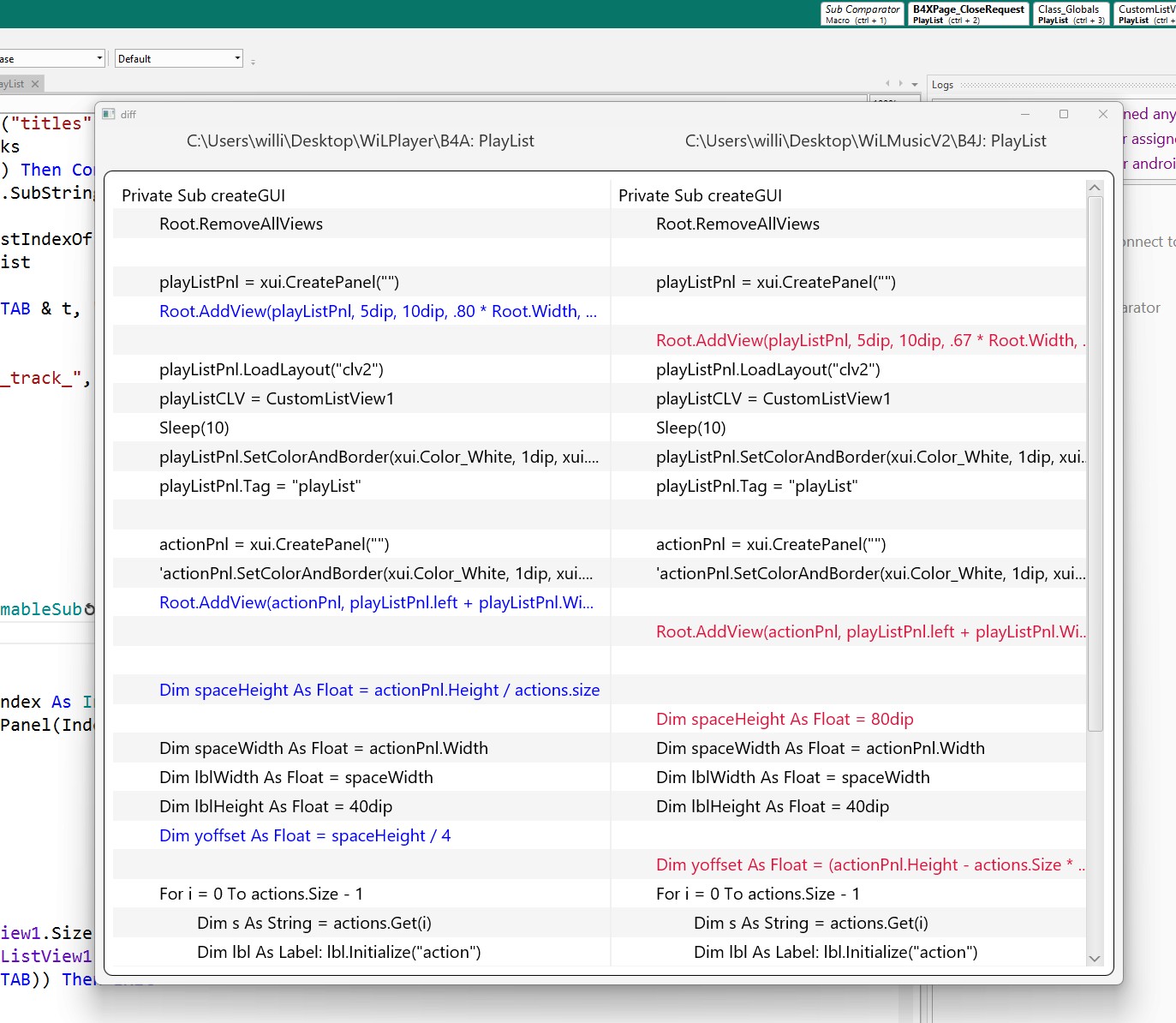
Clicking on left or right label of the rows, the code for A or B is copied to the clipboard to be inserted in the current App.
This way the code displayed by SubComparator does not need to be editable - which reduces complexity and confusion.
It is also convenient that the Myer's algorithm applied to the two subs yields two lists with the same number of lines.
Other features:
1. The current App's context is transmitted to the SubComparator via the #Macro statement.
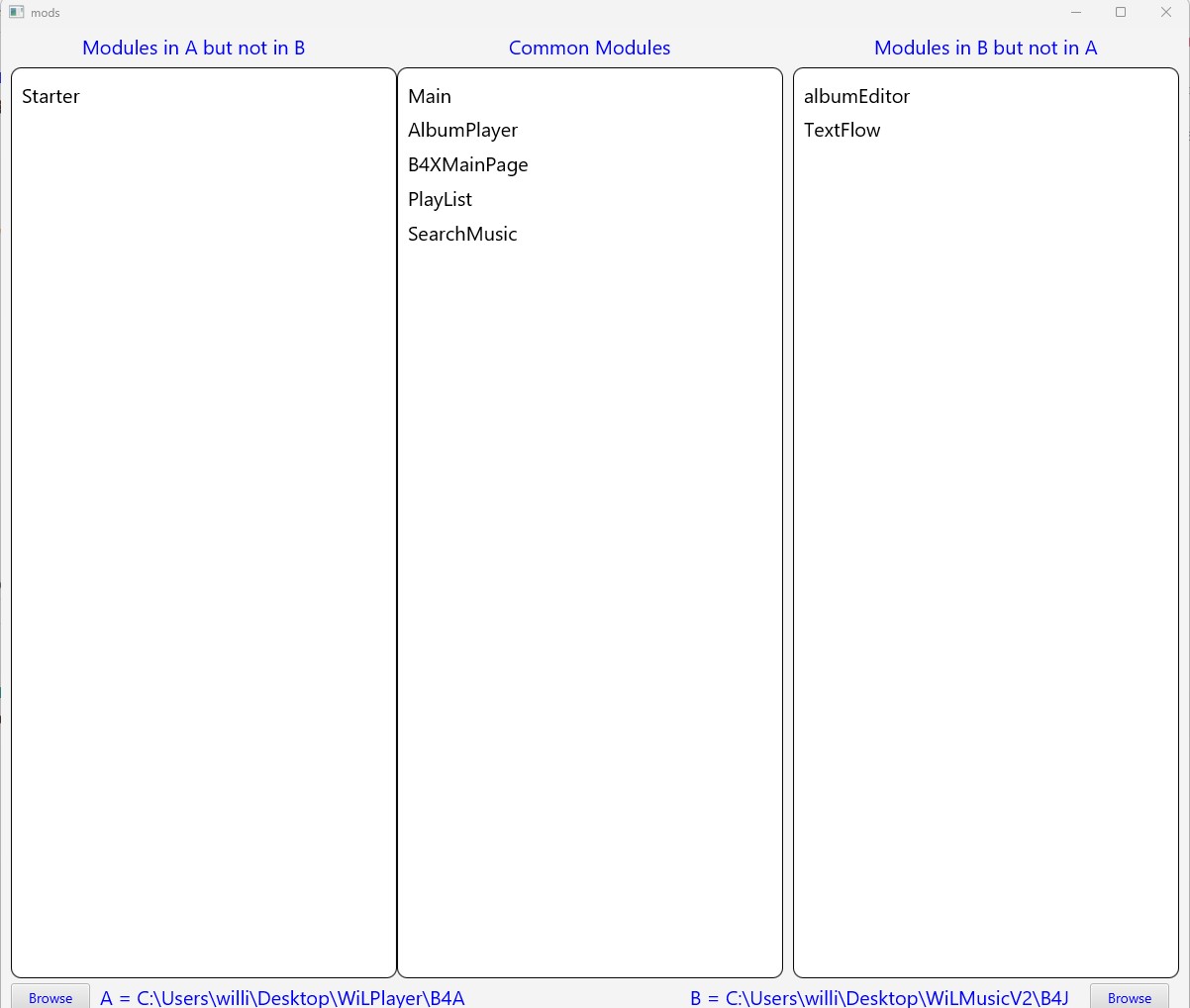
2. The comparison App is selected through a Folder Chooser that starts in the parent of the current project's folder.
3. After selecting Module B for comparison, you can select two Subs to compare.
Note 1: To prevent the helper app from timing out, I had to create a .bat file to invoke it with start "" javaw.
Therefore you have to copy BOTH the SubComparator.bat and SubComparator.jar to your Additional folder.
Note 2: The two SubComparator forms/B4XPages are synchronized with respect to size and location on the screen.
You can move and resize the visible form to your needs and the other (hidden) forms will also be moved and resized.
The fontsize on the two forms/B4XPages follows the resizing - within limits (TextSize = 16 to 22).
Note 3: The default "A" module is your current App that is invoking the macro. But the browse buttons allows you to override that.
You can compare any two subs from any two modules from any two projects.
Note 4: If you change the source code of SubComparator for your needs, compile in release mode and
copy the SubComparator.jar (in ..\Objects) to your Additional folder. Let me know if you run into problems.
Final Note: I tried to make the App flexible and I tested it thoroughly on my system.
If it doesn't work for or you find bugs or irritations, let me know.
You have to copy BOTH the SubComparator.bat and SubComparator.jar to your Additional folder
This is link to DropBox for:
Zipped folder containing all parts needed
It contains:
SubComparator.bat
SubComparator.jar
SubComparator.zip
SubComparatorMacro.txt
ReadMe.txt
It has worked well on my desktop driving Bluetooth speakers. I like to 'work' with music playing.
In January I decided to create a version for an extra tablet I had, we had some upcoming trips.
After solving problems with external storage (using a USB-C Splitter + external 1TB SSD), I had a working app.
It was not equivalent to the desktop version due to different storage and different mediaplayer solutions.
But it had features we liked.
So I started working on the desktop version to add those features.
Actually, as happens to me a lot, I started over fresh and added lots of features we wanted.
When finished, we were very pleased with the results - very good searching and reliable and responsive playback.
Now back to the tablet version...
I wanted to see how the subs in the tablet version were different from the new desktop version which was by then the gold standard.
Because of the build-in differences (storage, mediaplayer, and GUI) I expected valid discrepancies and differences due to changes.
Therefore I wanted to compare subs one by one to make the two systems behave the same.
I have used WinMerge for a long time time and it is great, but it doesn't show much context for differences.
Hence the creation of SubComparator. It is implemented as a #Macro (a button on the top row of the IDE).
It compares A to B using the Myer's Difference algorithm.
This algorithm finds the minimal number of transformations (inserts + deletes) required to turn one list of strings into another.
I knew about this algoritm but I thought I'd try AI (Gemini for convenience) to help me.
Aside from the fact that it was naive about B4X Type statements, Do While Loops, and B4X Keywords, it did fine with the logic of the algorithm.
So armed with that code I worked on the GUI. The perfect vehicle was a wide CustomListView with rows of panels holding two labels side by side.
It is scrollable and I could add some colors to designate rows and emphasize differences.
Clicking on left or right label of the rows, the code for A or B is copied to the clipboard to be inserted in the current App.
This way the code displayed by SubComparator does not need to be editable - which reduces complexity and confusion.
It is also convenient that the Myer's algorithm applied to the two subs yields two lists with the same number of lines.
Other features:
1. The current App's context is transmitted to the SubComparator via the #Macro statement.
2. The comparison App is selected through a Folder Chooser that starts in the parent of the current project's folder.
3. After selecting Module B for comparison, you can select two Subs to compare.
Note 1: To prevent the helper app from timing out, I had to create a .bat file to invoke it with start "" javaw.
Therefore you have to copy BOTH the SubComparator.bat and SubComparator.jar to your Additional folder.
Note 2: The two SubComparator forms/B4XPages are synchronized with respect to size and location on the screen.
You can move and resize the visible form to your needs and the other (hidden) forms will also be moved and resized.
The fontsize on the two forms/B4XPages follows the resizing - within limits (TextSize = 16 to 22).
Note 3: The default "A" module is your current App that is invoking the macro. But the browse buttons allows you to override that.
You can compare any two subs from any two modules from any two projects.
Note 4: If you change the source code of SubComparator for your needs, compile in release mode and
copy the SubComparator.jar (in ..\Objects) to your Additional folder. Let me know if you run into problems.
Final Note: I tried to make the App flexible and I tested it thoroughly on my system.
If it doesn't work for or you find bugs or irritations, let me know.
You have to copy BOTH the SubComparator.bat and SubComparator.jar to your Additional folder
This is link to DropBox for:
Zipped folder containing all parts needed
It contains:
SubComparator.bat
SubComparator.jar
SubComparator.zip
SubComparatorMacro.txt
ReadMe.txt
Last edited:


