
B4R Question Compatibility issue now with rIRremote library?

bdunkleysmith

Active Member
Licensed User
Longtime User
The project involving Resurrection of an old Android kiosk app includes an Arduino UNO receiving commands from the Android app via Bluetooth and sending associated codes via IR to control a TV and Foxtel (cable TV) box:
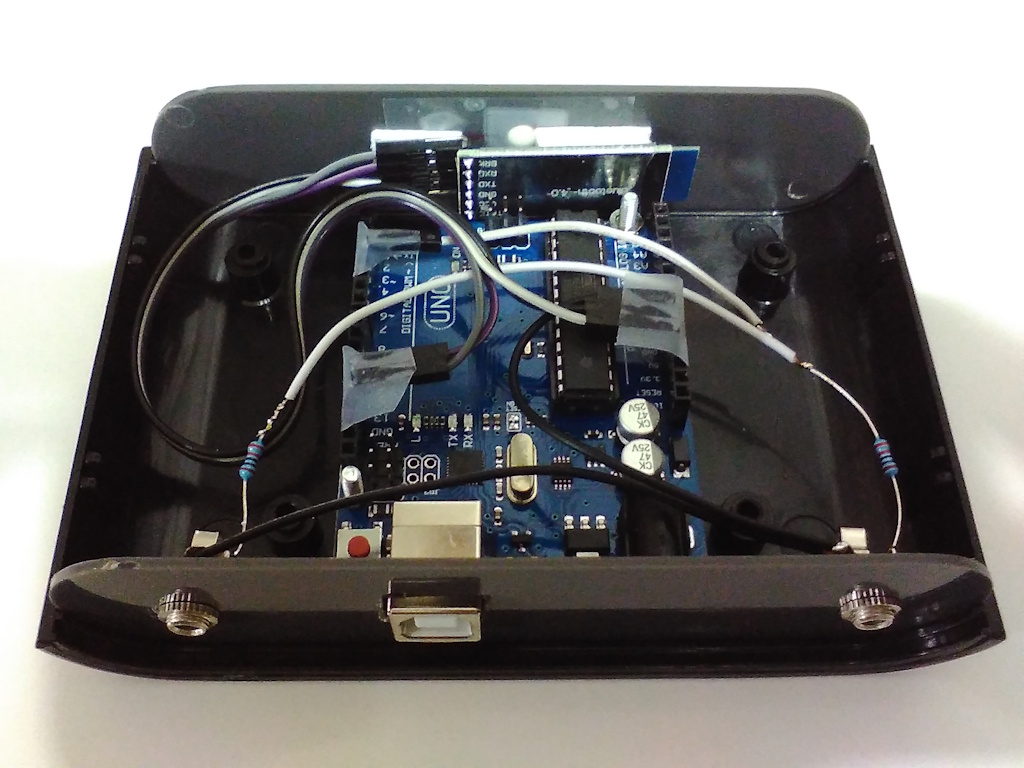
IMG_20181122_203616x.jpg


The brand of TV I need to target has changed from the one I successfully controlled 8 years ago and so I need to update the part of my B4R code which maps the command received via Bluetooth to the new TV IR code.

However the rIRremote library does appear to be producing the IR codes as it did 8 years ago and I wonder whether with the updates that have occurred with the Arduino ecosystem over that time whether there is now an incompatibility problem. The interesting thing is that as per this post, I updated iRremote to include IR support for Foxtel (cable TV) boxes in Australia at that time and that part of the library is working OK; it is just IR codes for manufacturers such as Panasonic and others which use the NEC format originally included in rIRremote.

Before I updated rIRremote, I used inline C code in conjunction with #include <skIRremote.h> and indeed reverting to that version of my code, I can successfully send IR codes to Panasonic TVs, and LG and Hisense TVs which use the NEC format. But when used with the same hardware, using code involving the rIRremote does not work.

I would appreciate any comments from those with knowledge in this area as to whether I'm dealing with a compatibility issue which has come about over the intervening 8 years or in any case, how can I overcome the problem because I would like to use the rIRremote library rather than be limited with my inline C code with #include <skIRremote.h> implementation.
 

Cableguy

Expert
Licensed User
Longtime User
Without seeing some code, we can't even expeculate about the possible reason for your issue!
 
Upvote 0

bdunkleysmith

Active Member
Licensed User
Longtime User
Thanks @Cableguy for the often used reply on this Forum of "we need to see your code" (and in most cases I understand why), but just as the solution to the Android component of my "resurrection" project had nothing to do with the code (which had worked OK 8 years ago) and just required a B4A update, I believe the solution to this Arduino component problem will be found in dealing with compatibility issues with related libraries.

However, in case the code reveals something, here it is, but if using the "standard" version of rIRremote, the Case statements below 'Foxtel commands need to be commented out, leaving just 'TV commands. It is these TV commands which now don't work.

B4X:
#Region Project Notes
'
'V2    Changed from using inline C by updating rIRremote library from 1.00 to 1.01 to implement sendFox
'        by including relevant parts of skIRemote library referenced here: http://sikkits.com/uncategorized/android-phone-bluetooth-tv-remote/
'V1    Receives a code attibuted to each Foxtel remote key via Bluetooth and transmits appropriate Foxtel remote key IR code with IRsend
'
'Hardware:    Duinotech Classic (UNO)
'            HM-10 Bluetooth module
'
'Wiring:    An IR LED in series with a 180r resistor must be connected to Arduino PWM pin 3 and GND. (Long LED lead To +ve)
'            Bluetooth module Tx to Arduino pin 12 and Rx to Arduino pin 13
'            If an IR emmitter such as Jaycar AR1811 is to be affixed directly to the Foxtel box or TV, the 180r restistor should be increased to 1.2kr
'
'Setup:        With bi-directional serial connection to HM-10 send:
'            AT+NAMEFoxtelRemote to set name
'            AT+NOTI0 to disable notifications so AT+CONN and AT+LOST are not sent & so do not affect commands sent by IR
'
#End Region

#Region Project Attributes
    #AutoFlushLogs: True
    #CheckArrayBounds: True
    #StackBufferSize: 300
#End Region

Sub Process_Globals
    Public sp As Serial
    Public ssp As SoftwareSerial
    Private astream As AsyncStreams
    Private receivedChar As Byte
    Private irsend As IrSend
End Sub

Private Sub AppStart
    sp.Initialize(9600)
    astream.Initialize(sp.Stream, "Astream_NewData", "Astream_Error")
    ssp.Initialize(9600, 12, 13)
    astream.Initialize(ssp.Stream, "Astream_NewData", "Astream_Error")
    Log("AppStart")
End Sub

Sub Astream_NewData (Buffer() As Byte)
       Log("Buffer: ", Buffer)
    For Each char In Buffer
        receivedChar = char
        sendNewData
        Delay(500)
       Next
End Sub

Sub AStream_Error
    Log("error")
End Sub

Sub sendNewData
    Log("Sending receivedChar: ", receivedChar)
    Select receivedChar
        'Foxtel commands
        Case 48 '0
            irsend.SendFox(0x00) 'IQ 0 command
        Case 49 '1
            irsend.SendFox(0x01) 'IQ 1 command
        Case 50 '2
            irsend.SendFox(0x02) 'IQ 2 command
        Case 51 '3
            irsend.SendFox(0x03) 'IQ 3 command
        Case 52 '4
            irsend.SendFox(0x04) 'IQ 4 command
        Case 53 '5
            irsend.SendFox(0x05) 'IQ 5 command
        Case 54 '6
            irsend.SendFox(0x06) 'IQ 6 command
        Case 55 '7
            irsend.SendFox(0x07) 'IQ 7 command
        Case 56 '8
            irsend.SendFox(0x08) 'IQ 8 command
        Case 57 '9
            irsend.SendFox(0x09) 'IQ 9 command
        Case 65 'A
            irsend.SendFox(0x0C) 'IQ Power command
        Case 66 'B
            irsend.SendFox(0x0D) 'IQ Mute command
        Case 67 'C
            irsend.SendFox(0x0F) 'IQ Info command
        Case 68 'D
            irsend.SendFox(0x10) 'IQ Vol+ command
        Case 69 'E
            irsend.SendFox(0x11) 'IQ Vol- command
        Case 70 'F
            irsend.SendFox(0x20) 'IQ Chn+ command
        Case 71 'G
            irsend.SendFox(0x21) 'IQ Chn- command
        Case 72 'H
            irsend.SendFox(0x28) 'IQ Fwd command
        Case 73 'I
            irsend.SendFox(0x29) 'IQ Rew command
        Case 74 'J
            irsend.SendFox(0x2C) 'IQ Play command
        Case 75 'K
            irsend.SendFox(0x30) 'IQ Pause command
        Case 76 'L
            irsend.SendFox(0x31) 'IQ Stop command
        Case 77 'M
            irsend.SendFox(0x37) 'IQ Record command
        Case 78 'N
            irsend.SendFox(0x38) 'IQ AV command
        Case 79 'O
            irsend.SendFox(0x4E) 'IQ Foxtel command
        Case 80 'P
            irsend.SendFox(0x54) 'IQ Setup command
        Case 81 'Q
            irsend.SendFox(0x58) 'IQ Up command
        Case 82 'R
            irsend.SendFox(0x59) 'IQ Down command
        Case 83 'S
            irsend.SendFox(0x5A) 'IQ Left command
        Case 84 'T
            irsend.SendFox(0x5B) 'IQ Right command
        Case 85 'U
            irsend.SendFox(0x5C) 'IQ Select command
        Case 86 'V
            irsend.SendFox(0x6D) 'IQ Red command
        Case 87 'W
            irsend.SendFox(0x6E) 'IQ Green command
        Case 88 'X
            irsend.SendFox(0x6F) 'IQ Yellow command
        Case 89 'Y
            irsend.SendFox(0x70) 'IQ Blue command
        Case 90 'Z
            irsend.SendFox(0x81) 'IQ Help command
        Case 97 'a
            irsend.SendFox(0x83) 'IQ Back command
        Case 98 'b
            irsend.SendFox(0xCC) 'IQ TV Guide command
        Case 99 'c
            irsend.SendFox(0xD5) 'IQ Box Office command
        Case 100 'd
            irsend.SendFox(0xF4) 'IQ Planner command
        Case 101 'e
            irsend.SendFox(0xFD) 'IQ Active command
        'TV commands
        Case 112 'p
            irsend.SendPanasonic(0x4004, 0x100BCBD) 'Panasonic power command
        Case 115 's
            irsend.sendSAMSUNG(0xE0E0D12E, 32) 'Samsung power command
        Case 105 'i
            irsend.sendSAMSUNG(0xE0E0D12E, 32) 'Samsung HDMI command
        Case 104 'h
            irsend.sendNEC(0x20DF10EF, 32) 'Hisense power command using NEC protocol
    End Select
End Sub

One thing I plan investigating today is that while I have the rIRremote library in a folder within the Additional libraries folder specified in the B4R IDE, I see in the Arduino IDE that I have a very late/current version (4.7.1) of the IRremote library installed. I'm just wondering if the B4R rIRremote library in some way references the Arduino IRremote and with this much later version installed than what would have been current 8 years ago, functionality is broken.

But as I mentioned above, it's interesting that the rIRremote version I created which added the necessary code derived from the skIRremote to provide Foxtel capability, does indeed still function correctly for Foxtel commands, but not the original manufacturer commands.
 
Upvote 0

bdunkleysmith

Active Member
Licensed User
Longtime User
I thought I'd look at what IR codes were being sent using the rIRremote library (which don't work) compared to the IR codes being sent using my inline C code with #include <skIRremote.h> (which do work).

For instance the IR code for power toggling of a Panasonic TV is 0x100BCBD, which is sent correctly from my code using inline C, but when I use the rIRremote library, it sends 0xFFFFBCBD. ChatGPT tells me:

That usually happens because the library is truncating or sign-extending the Panasonic value due to the wrong integer size or wrong protocol interpretation.

Your correct Panasonic power code is:

0x100BCBD

which is a 28-bit value.

But if a library treats the value as:

  • a signed 16-bit integer
  • or truncates the upper bits
  • or assumes NEC formatting

you can end up with:

0xFFFFBCBD

which is effectively:

  • only the lower 16 bits (0xBCBD)
  • with the upper bits filled with FFFF.

This is classic sign extension behaviour.

For the moment I'll just stick to using my "inline C code in conjunction with #include <skIRremote.h>" approach because at the moment, my biggest challenge is finding the correct IR codes for the up, down, left and right arrow keys a new Hisense TV remote. I've tried all of the ChatGPT suggestions and so now I've added an IR receiver module to my Arduino UNO with some code so I can see what the supplied remote is actually sending.

Incidentally, this project is all about providing a simple user interface remote control for my 97 year old mother-in-law who is understandably overwhelmed by all of the options and navigation system of these new smart TVs. Given all the smarts they have, I suggest the manufacturers should have a simple or basic mode that can be selected so just the basic features are displayed/selectable.
 
Upvote 0

Johan Schoeman

Expert
Licensed User
Longtime User
Not sure if this could be of any help. Codes will be different but this controlled my DSTV decoder

 
Upvote 0
Top