
B4J Question CoolTime sample - help

AnandGupta

Expert
Licensed User
Longtime User
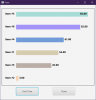
Erel uploaded a sample CoolTimeline.bas (I am unable to find the post now), which I was playing with.


I added two buttons. Instead of random, in original, I wanted button to execute it.

Now if I press the button while the animation is running then the animation changes to new random values.
I want the 'Cool Time" button to disable, till the animation finishes.

I studied the CoolTimeline.bas codes and understand that it is executing timer tick, but could not get/create a property to mark 'it is running'=true/false.

Any help on it is appreciated.

Regards,

Anand
 

Attachments
  • 2020-05-28_222042.png
    2020-05-28_222042.png
    8.6 KB · Views: 311
  • 1.zip
    5.7 KB · Views: 291
Last edited:

William Lancee

Well-Known Member
Licensed User
Longtime User
Hi

Interesting puzzle. That timer keeps on ticking forever.

However, this works.

B4X:
Sub Process_Globals
    Private fx As JFX
    Private MainForm As Form
    Private CoolTimeline1 As CoolTimeline
    Private Button1 As Button
    Private Button2 As Button
    Private busy As Boolean
End Sub

Sub AppStart (Form1 As Form, Args() As String)
    MainForm = Form1
    MainForm.RootPane.LoadLayout("1") 'Load the layout file.
    MainForm.Show
    CoolTimeline1.AddItem("Item #1", 50)
    CoolTimeline1.AddItem("Item #2", 20)
    CoolTimeline1.AddItem("Item #3", 80)
    CoolTimeline1.AddItem("Item #4", 80)
    CoolTimeline1.AddItem("Item #5", 80)

    CoolTimeline1.OneAtTheTime = True            'this causes the animation of the last to proceed to it's end
    CoolTimeline1.AddItem("Item #6", 80): wait for Item_Added
    CoolTimeline1.Timer.enabled = False
End Sub

Sub Button1_Click
    If busy Then Return        'ignore clicks until update complete
    busy = True
    CoolTimeline1.Timer.enabled = True
    CoolTimeline1.GetItem("Item #" & Rnd(1, 6)).TargetValue = Rnd(0, 99): wait for Item_Added
    CoolTimeline1.Timer.enabled = False
    busy = False
End Sub

Sub Button2_Click
    MainForm.Close
End Sub

'Changes to CoolTimeline.bas

'    Public Timer As Timer
'    Public OneAtTheTime As Boolean
'    Private NoChange As Boolean

'    If NoChange And OneAtTheTime Then CallSubDelayed(mCallBack, "Item_Added")  as last line in Timer_Tick

Also changes to:

B4X:
Private Sub CalcNewValue (CurrentValue As Float, TargetValue As Float, MaxDelta As Float) As Float
    If CurrentValue <= TargetValue Then
        If CurrentValue < TargetValue Then     NoChange = False    'change
        Return Min(TargetValue, CurrentValue + MaxDelta)
    Else
        NoChange = False    'change
        Return Max(TargetValue, CurrentValue - MaxDelta)
    End If
End Sub
 
Upvote 0

AnandGupta

Expert
Licensed User
Longtime User
Hi William ,

Thanks, but your suggestion does not work as I intend it to.

I want the animation of all bars to start on button1 click and then the button1 is disabled.
After all bars animation is complete, the button1 is enabled, automatically.

Have got idea from your codes. Will try to achieve what I want.

Regards,

Anand
 
Upvote 0
Top