Hello:
We have finally uploaded our first application to market.
https://play.google.com/store/apps/details?id=com.bgsoft.easyschedule
Thanks to Erel and other members who helped us with some doubts.
Although we have spent many years programming, this was our first experience in the world of Android.
Hope you like it and especially that they work as well as me.
Greetings:
Jesus
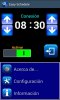
Easy Schedule is an application that allows you to set one time to Disconnect some features of your Android device, for example, when you go to sleep, and another time to Connect them back, e. g. when tou wake up at the morning.
This way an important saving of battery is achieved at night.
The application is optimized to consume few systems resources and it can be installed at external memory.
At Menu/Configuration screen are individually selected the elements to Activate/Deactivate at Connection and Disconnection times: Wifi, Data, Bluetooth, Sound and Airplane Mode (Airplane Mode only works with some Android versions).
Once configured Connection/Disconnection times you must slide to the right side the Activate button (green) to start the application on exit.
You can stop the application at any moment, sliding the Activate button to the left side and then pressing Exit button.
The Connection/Disconnection times changes, Activate/Deactivate elements and application operating status take effect on exit.
Press the Exit button to close the application, leaving it active on standby (Activate button at the right side) or stopped (Activate button at the left side).
The application will start at background if you restart the device when it is enabled.
We have finally uploaded our first application to market.
https://play.google.com/store/apps/details?id=com.bgsoft.easyschedule
Thanks to Erel and other members who helped us with some doubts.
Although we have spent many years programming, this was our first experience in the world of Android.
Hope you like it and especially that they work as well as me.
Greetings:
Jesus
Easy Schedule is an application that allows you to set one time to Disconnect some features of your Android device, for example, when you go to sleep, and another time to Connect them back, e. g. when tou wake up at the morning.
This way an important saving of battery is achieved at night.
The application is optimized to consume few systems resources and it can be installed at external memory.
At Menu/Configuration screen are individually selected the elements to Activate/Deactivate at Connection and Disconnection times: Wifi, Data, Bluetooth, Sound and Airplane Mode (Airplane Mode only works with some Android versions).
Once configured Connection/Disconnection times you must slide to the right side the Activate button (green) to start the application on exit.
You can stop the application at any moment, sliding the Activate button to the left side and then pressing Exit button.
The Connection/Disconnection times changes, Activate/Deactivate elements and application operating status take effect on exit.
Press the Exit button to close the application, leaving it active on standby (Activate button at the right side) or stopped (Activate button at the left side).
The application will start at background if you restart the device when it is enabled.