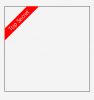
Android Question How to show a corner text badge on any view?

Inman

Well-Known Member
Licensed User
Longtime User
caapK.jpg


I am trying to create a UI like above. I saw a couple of Badger class/libraries here but they do not display like the above layout. Is such a library/class available? I don't need the 3D embossed wraparound kind of look seen above. Just need a corner text on a specific background colour.
 

William Lancee

Well-Known Member
Licensed User
Longtime User
I recently discovered that labels can be rotated.

B4X:
Private Sub B4XPage_Created (Root1 As B4XView)
    Root = Root1
    Root.LoadLayout("MainPage")
    Dim banner As Label
    banner.Initialize("")
    Dim bannerx As B4XView = banner
    banner.Text = "Top Secret"
    bannerx.Color = xui.color_Red
    bannerx.TextSize = 20
    bannerx.TextColor = xui.color_White
    bannerx.SetTextAlignment("CENTER", "CENTER")
    bannerx.Rotation = -45
    Dim box As B4XView = xui.CreatePanel("")
    box.SetColorAndBorder(xui.Color_Transparent, 1, xui.Color_Black, 0)
    Root.AddView(box, 200, 200, 300, 300)
    box.AddView(bannerx, -50, 35, 200, 20)
End Sub
 

Attachments

  • banner.PNG
    banner.PNG
    2.8 KB · Views: 429
Upvote 0

aeric

Expert
Licensed User
Longtime User
I am not expert to draw the view using code. What come to my mind is to use an ImageView to load a transparent background image.
 
Upvote 0
Top