Android Code Snippet iOS style MsgBox

Hi everyone,
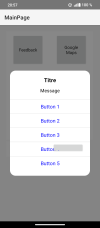
my programming skills are rather modest, but with the help of ChatGPT (and this forum) I managed to create a MsgBox with an iOS-like style. I find it more pleasant visually, and I also needed to keep the same look and feel between the iOS and Android versions of my app.
Maybe something like this already exists, but I couldn’t find it while searching 🙂
I’m attaching the class below.

Usage:

B4X:
                Dim Dlg As iOSMsgBox
                Dlg.Initialize(Root, Me, "Dlg")
                Dlg.Show(title, message, Array As String("button 1", "button 2", "button 3"))
                wait for Dlg_Result (Testo As String)

1765616811290.jpeg
 

Attachments

  • iOSMsgBox.zip
    1.3 KB · Views: 43
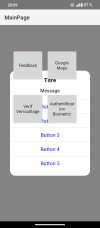
The overlay and dialog box are placed behind the views I added via the Designer. And `Overlay.BringToFront`, for example, didn't solve the problem. What should I do?
 

marcick

Well-Known Member
Licensed User
Longtime User
That’s strange, it shouldn’t happen.
Can you post a project that reproduces the issue?
 

TILogistic

Expert
Licensed User
Longtime User
Why not add the pop-up panel to the overlay panel?

and Overlay.BringToFront

or
B4X:
  #If B4a
   Overlay.As(Panel).Elevation = 8dip
#End If
 

marcick

Well-Known Member
Licensed User
Longtime User
Please use File-export as zip to export and share all the project.
Anyway, when you want to show some code, don't use pictures but "add code" button in the top bar so it is clearly formatted and easy to copy.
 

Sagenut

Expert
Licensed User
Longtime User
Why not add the pop-up panel to the overlay panel?

and Overlay.BringToFront

or
B4X:
  #If B4a
   Overlay.As(Panel).Elevation = 8dip
#End If
@TILogistic solution is the way to go.
Because Buttons natively have a higher elevation than other views.
So the beginning of the Show sub in the class should become something like this
B4X:
Overlay = xui.CreatePanel("")
Overlay.As(Panel).Elevation = 100dip      'ADD THIS. 100dip is an exageration but to avoid other panels with already higher Elevation
Overlay.Color = xui.Color_ARGB(120, 0, 0, 0)
mParent.AddView(Overlay, 0, 0, mParent.Width, mParent.Height)

' Main Popup
Popup = xui.CreatePanel("")
Popup.Color = Colors.White
Popup.SetColorAndBorder(Colors.White, 0, 0, 20dip)   ' angoli arrotondati
Dim dlgWidth As Float
If mParent.Width>mParent.Height Then
    dlgWidth = Min(mParent.Width * 0.4, 400dip)
Else
    dlgWidth = Min(mParent.Width * 0.8, 400dip)
End If
Overlay.AddView(Popup, 0, 0, dlgWidth, 1dip)    'HERE CHANGE mParent to Overlay
Dim TopPos As Float = 20dip
 

marcick

Well-Known Member
Licensed User
Longtime User
Because Buttons natively have a higher elevation than other views.
I learned something new. In my project I accidentally didn’t have any buttons, only labels, so I hadn’t noticed it.
This should resolve the issue Mohamed is experiencing.
Thanks.
 
Top