Running DropBox example

prokli

Active Member
Licensed User
Longtime User
Hi everybody

Need some :sign0085: concerning OAuth2 library / Dropbox.

I want to include the dropbox example to my app app.
After assigning to DropBox service I got a developer- and a security key. Fine!
When I run the example app I always receive the following message:

"You are using an older version of the dropbox API with a new API key. Please use latest version"

What I am doing wrong??

Thx
 

thedesolatesoul

Expert
Licensed User
Longtime User
Upvote 0

prokli

Active Member
Licensed User
Longtime User
Thanks for your reply!

I am not very familiar with changing the API level!
Actually I downloaded Erel's dropbox example then I included OAuth library (V. 1.00) to the b4a standard library folder (seems to work).
After inserting my developer- and security ID (which I got from Dropbox Homepage today) I started my app.
BTW: The link you have attached, seems to be broken!
 
Upvote 0

prokli

Active Member
Licensed User
Longtime User
Thanks, this link works perfectly!

But I am still confused.
I tried to change this code line

tokenLink = "https://api.dropbox.com/0/token?"
to
tokenLink = "https://api.dropbox.com/1/token?"

don't know if that changes the version of API, but now I don't receive the error which I mentioned before!!

Unfortunately I receive a new error:
"this app has no permission…."

I moved back to Dropbox page, created a new app and checked "Full Dropbox"
No way….it doesn't work
:BangHead:
 
Upvote 0

prokli

Active Member
Licensed User
Longtime User
Thanks! :sign0098:

Is there any example how to connect a dropbox app via a WebView?
Does "Dropbox app" mean, that I have to use the app which is provided by DropBox via PlayStore??

Actually I installed such an app from Dropbox.com and it works fine. Using a file browser (like ES File explorer) I can – of course – browse uploaded files, but this is not what I like to do.
 
Upvote 0

thedesolatesoul

Expert
Licensed User
Longtime User
Is there any example how to connect a dropbox app via a WebView?
Probably not an exact example but this example here shows you how to use OAuth 2.0 to connect to Google services. It is almost the same for Dropbox.
Here
Does "Dropbox app" mean, that I have to use the app which is provided by DropBox via PlayStore??
Yes. When your app is started, it requests permissions from the official dropbox app, where the user presses on 'Allow access' and then goes back to your app with the access token.
 
Upvote 0

vb1992

Well-Known Member
Licensed User
Longtime User
https://www.dropbox.com/developers/reference/api

Dropbox REST API Part 1: Authentication « Christophe Geers' Blog

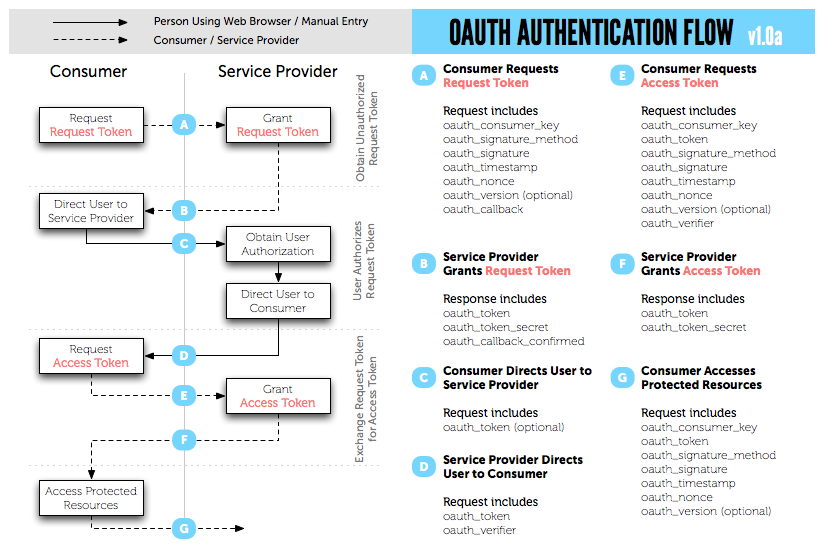
diagram.png
 
Upvote 0

vb1992

Well-Known Member
Licensed User
Longtime User
After playing around with it for a few minutes
you are going to have to start with making
a HttpUtils request:


https://api.dropbox.com/1/oauth/request_token?oauth_consumer_key=<YOUR DROPBOX DEVELOPER KEY HERE>&oauth_timestamp=1339769100

Time stamp needs a unix timestamp

Which will return to you a oauth_token_secret
and oauth_token

I believe the oauth_token token will be used next to have the USER authorize your app

I'll test a little more..
 
Last edited:
Upvote 0

thedesolatesoul

Expert
Licensed User
Longtime User
After playing around with it for a few minutes
you are going to have to start with making
a HttpUtils request:


https://api.dropbox.com/1/oauth/request_token?oauth_consumer_key=<YOUR DROPBOX DEVELOPER KEY HERE>&oauth_timestamp=1339769100

Time stamp needs a unix timestamp

Which will return to you a oauth_token_secret
and oauth_token

I believe the oauth_token token will be used next to have the USER authorize your app

I'll test a little more..

While this was the old way to do it in api0 and it is easy to simulate a webview request I think some user input is required to allow the app access.
 
Upvote 0
Top