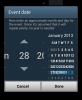
Why does my Date Picker look like this?

Andris

Active Member
Licensed User
Longtime User
I've used Date Dialogs before with no problem. However, I just added one to a new project and it shows up per the attachment. I have the Dialogs Library ver2.91 installed; however, 2.3 does the same thing. Any ideas anyone?
 

Attachments

  • Screenshot_2013-01-28-14-51-14.png
    Screenshot_2013-01-28-14-51-14.png
    96.7 KB · Views: 360

Mahares

Expert
Licensed User
Longtime User
While you are at the IDE, Click 'Project' then click 'Manifest Editor'
You will see a line that has this: android:targetSdkVersion="14"/>
Change the 14 or any other number to 10. Then save the manifest and rerun your app. You will get theold style.
 
Upvote 0

Andris

Active Member
Licensed User
Longtime User
While you are at the IDE, Click 'Project' then click 'Manifest Editor'
You will see a line that has this: android:targetSdkVersion="14"/>
Change the 14 or any other number to 10. Then save the manifest and rerun your app. You will get theold style.

Ahhh yes! Forgot about that. Thanks so much Mahares!
 
Upvote 0
Top