
Hi everyone!
I have an ABMaterial login dialog which works perfectly.
I also have a form for the user to reset their password.
I request that the old password is entered correctly and the new password is entered twice. As I've set the ABMInput controls with the ABM.INPUT_PASSWORD options they work as expected and do not show what's being typed into the input boxes.
From elsewhere I can force a user to change their password at next login, the system simply recognises a correct login but then displays the change password requirements.
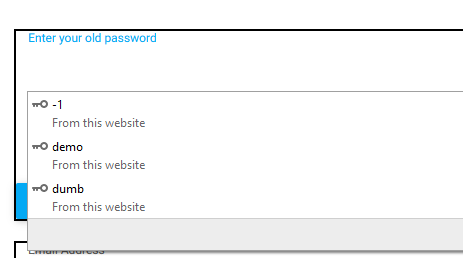
My problem is simply that my browser recognises a password editbox and insists on offering passwords that it has stored. As such it already knows the old password. I can't have that happen! If a device was accessed that has stored passwords on it an unscrupulous user could change the password without them actually knowing what the old one was.
Is there a way to make an ABMinput control set to ABM_TEXT mask out the typed characters (and act like a password edit box but without letting the browser know that's what it is being used for)?
Any advice greatly welcomed!
I have an ABMaterial login dialog which works perfectly.
I also have a form for the user to reset their password.
I request that the old password is entered correctly and the new password is entered twice. As I've set the ABMInput controls with the ABM.INPUT_PASSWORD options they work as expected and do not show what's being typed into the input boxes.
From elsewhere I can force a user to change their password at next login, the system simply recognises a correct login but then displays the change password requirements.
My problem is simply that my browser recognises a password editbox and insists on offering passwords that it has stored. As such it already knows the old password. I can't have that happen! If a device was accessed that has stored passwords on it an unscrupulous user could change the password without them actually knowing what the old one was.
Is there a way to make an ABMinput control set to ABM_TEXT mask out the typed characters (and act like a password edit box but without letting the browser know that's what it is being used for)?
Any advice greatly welcomed!


