Android Question BLE WriteData crash on Sony with Android 9

tfcroft4

Member
I have been developing a BLE app and testing it an a Fairphone 6 which now has Android 16
I also have an older Sony Xperia with Android 9
The app is designed to read from and writes to a BLE serial module KT6368A attached to a M0 MCU to send configuration messages.
On the Fairphone 6 all is well
On the Sony Xperia the application crashes when trying to write to BLE.


\i have tested with an initial test application which is an extension of the BLE Example with this sub added:

Sub TestData pbReadData.Show 'set up data notification 'manager.ReadData2("0000fff0-0000-1000-8000-00805f9b34fb","0000fff1-0000-1000-8000-00805f9b34fb") Log("SetMTU") manager.RequestMtu (64) Log("SetNotify") manager.SetNotify ("0000fff0-0000-1000-8000-00805f9b34fb","0000fff1-0000-1000-8000-00805f9b34fb", True) 'do initial write to get config data Dim TextToSend As String = "@" & Chr(13)& Chr(10) Dim DataToSend() As Byte = TextToSend.GetBytes("UTF8") Log("Write Data: " & TextToSend ) 'SONY crashes here manager.WriteData( "0000fff0-0000-1000-8000-00805f9b34fb","0000fff1-0000-1000-8000-00805f9b34fb",DataToSend) pbReadData.Hide End Sub

This works on the Fairphone 6
I have also tested the BLE connection on the Sony Xperia with 'LightBlue' and that works as expected testing the Serial UUID
I can connect to my device and can Write to and Subscribe to service UUID '0000fff1-0000-8000-00805f9b34fb'
Sending the test message gets the expected response from the MCU via serial module KT6368A

Is this behavior on the Sony with Android 9 as expected i.e. this is a limitation of the B4A BLE or have I missed something.
Thanks
Ted Finch
 

Attachments

  • BLEExample.zip
    182 KB · Views: 9

tfcroft4

Member
The Code for the relevant Sub as below.
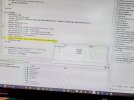
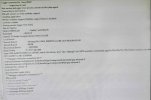
Three screen shots attached.

I am getting no output from Log statements.

Execution of the manager.WriteData line causes a crash with nothing logged.


B4X:
Sub TestData
pbReadData.Show '
set up data notification
'manager.ReadData2("0000fff0-0000-1000-8000-00805f9b34fb","0000fff1-0000-1000-8000-00805f9b34fb")
Log("SetMTU") manager.RequestMtu (64) Log("SetNotify")
manager.SetNotify ("0000fff0-0000-1000-8000-00805f9b34fb","0000fff1-0000-1000-8000-00805f9b34fb", True) 'do initial write to get config data
Dim TextToSend As String = "@" & Chr(13)& Chr(10)
Dim DataToSend() As Byte = TextToSend.GetBytes("UTF8")
Log("Write Data: " & TextToSend ) '
SONY crashes here
manager.WriteData( "0000fff0-0000-1000-8000-00805f9b34fb","0000fff1-0000-1000-8000-00805f9b34fb",DataToSend)
pbReadData.Hide
End Sub
 

Attachments

  • screenshot 3 bytes.jpg
    screenshot 3 bytes.jpg
    475 KB · Views: 10
  • logscreen.jpg
    logscreen.jpg
    453.8 KB · Views: 11
  • phone screen paused.jpeg
    phone screen paused.jpeg
    341.8 KB · Views: 12
Upvote 0

tfcroft4

Member
If I step to the next line the app crashes completely and the display just shows the B4ABridge screen
Nothing is showing on the log page not even Log statements.
Are there also log files I can locate?
Thanks
Ted
 
Upvote 0

tfcroft4

Member
Thanks for the suggestions.
I looked at Debug settings on the phone and confirmed USB debugging was on.

There may be some debugging settings on the phone that are not playing well with B4A
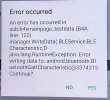
I changed to legacy debugger and got the attached message.
Still no Log statement outputs.
 

Attachments

  • Untitled.jpg
    Untitled.jpg
    166.3 KB · Views: 18
Upvote 0

Scantech

Well-Known Member
Licensed User
Longtime User
Im just curious if gemini is correct? Add that delay and retest it.

B4X:
Sub TestData
    pbReadData.Show
  
    ' 1. Request MTU
    Log("Requesting MTU...")
    manager.RequestMtu(64)
    Sleep(500) ' Give Sony time to handshake
  
    ' 2. Set Notification
    Log("Setting Notify...")
    manager.SetNotify("0000fff0-0000-1000-8000-00805f9b34fb", "0000fff1-0000-1000-8000-00805f9b34fb", True)
    Sleep(500) ' Wait for the CCCD descriptor write to finish
  
    ' 3. Prepare and Write Data
    Dim TextToSend As String = "@" & Chr(13) & Chr(10)
    Dim DataToSend() As Byte = TextToSend.GetBytes("UTF8")
  
    Log("Writing Data: " & TextToSend)
  
    ' Wrapping in a Try block prevents the "Continue?" popup if it fails
    Try
        manager.WriteData("0000fff0-0000-1000-8000-00805f9b34fb", "0000fff1-0000-1000-8000-00805f9b34fb", DataToSend)
    Catch
        Log("Error during WriteData: " & LastException.Message)
    End Try
  
    pbReadData.Hide
End Sub


That error confirms it: java.lang.RuntimeException: Error writing data to.... This specific crash on the WriteData line happens when the Android GATT service returns false or throws an exception because the Bluetooth stack is busy or in an invalid state.
Since this is happening on a Sony device, you are hitting the GATT Serial Queue limit. Android can only handle one GATT operation at a time. Because you are calling RequestMtu, SetNotify, and WriteData in a single block, the Sony stack is still trying to process the MTU/Notification when the Write command arrives, causing the crash.
How to fix this in B4A
You need to implement a small delay between commands to give the Sony Bluetooth hardware time to clear its internal buffer.

In Android 9, the BluetoothGatt object often returns false or throws a RuntimeException if a second operation is attempted before the onDescriptorWrite (from SetNotify) or onMtuChanged callback has returned from the system.
On your Fairphone 6, the modern stack likely abstracts this away. On the Sony, you are manually colliding with the hardware state machine.
 
Last edited:
Upvote 0

drgottjr

Expert
Licensed User
Longtime User
Im just curious if gemini is correct? Add that delay and retest it.

B4X:
Sub TestData
    pbReadData.Show
 
    ' 1. Request MTU
    Log("Requesting MTU...")
    manager.RequestMtu(64)
    Sleep(500) ' Give Sony time to handshake
 
    ' 2. Set Notification
    Log("Setting Notify...")
    manager.SetNotify("0000fff0-0000-1000-8000-00805f9b34fb", "0000fff1-0000-1000-8000-00805f9b34fb", True)
    Sleep(500) ' Wait for the CCCD descriptor write to finish
 
    ' 3. Prepare and Write Data
    Dim TextToSend As String = "@" & Chr(13) & Chr(10)
    Dim DataToSend() As Byte = TextToSend.GetBytes("UTF8")
 
    Log("Writing Data: " & TextToSend)
 
    ' Wrapping in a Try block prevents the "Continue?" popup if it fails
    Try
        manager.WriteData("0000fff0-0000-1000-8000-00805f9b34fb", "0000fff1-0000-1000-8000-00805f9b34fb", DataToSend)
    Catch
        Log("Error during WriteData: " & LastException.Message)
    End Try
 
    pbReadData.Hide
End Sub


That error confirms it: java.lang.RuntimeException: Error writing data to.... This specific crash on the WriteData line happens when the Android GATT service returns false or throws an exception because the Bluetooth stack is busy or in an invalid state.
Since this is happening on a Sony device, you are hitting the GATT Serial Queue limit. Android can only handle one GATT operation at a time. Because you are calling RequestMtu, SetNotify, and WriteData in a single block, the Sony stack is still trying to process the MTU/Notification when the Write command arrives, causing the crash.
How to fix this in B4A
You need to implement a small delay between commands to give the Sony Bluetooth hardware time to clear its internal buffer.

In Android 9, the BluetoothGatt object often returns false or throws a RuntimeException if a second operation is attempted before the onDescriptorWrite (from SetNotify) or onMtuChanged callback has returned from the system.
On your Fairphone 6, the modern stack likely abstracts this away. On the Sony, you are manually colliding with the hardware state machine.
this is correct in theory. what's required with android is a command queue. search for "command queue and gatt". there are several undocumented aspects of android's handling of gatt operations that would be helpful to understand. your ai assistant of choice may have details. there were no such assistants when i wrote my scanner. this is a very special case.
 
Upvote 0

Scantech

Well-Known Member
Licensed User
Longtime User
In B4A, a "Proper Queue" would look like this (moving away from one big Sub):
Call manager.RequestMtu(64) inside TestData.
Wait for Manager_MtuChanged event.
Inside this event, check if Success = True.
Then call manager.SetNotify(...).
Wait for Manager_WriteComplete or a Notification Event.
Inside that event, finally call your manager.WriteData(...).

Mr gemini recomendation?
B4X:
' Step 1: Start the process
Sub TestData
    Log("Step 1: Requesting MTU...")
    manager.RequestMtu(64)
End Sub

' Step 2: Triggered by the hardware
Sub Manager_MtuChanged (Success As Boolean, MTU As Int)
    If Success Then
        Log("MTU set to: " & MTU & ". Step 2: Setting Notify...")
        manager.SetNotify("0000fff0...", "0000fff1...", True)
        
        ' Note: B4A's SetNotify is often "Fire and Forget".
        ' To be 100% safe on Sony, still give it a tiny breath:
        Sleep(200)
        SendData
    Else
        Log("MTU Failed")
    End If
End Sub

' Step 3: Send the config
Sub SendData
    Log("Step 3: Writing Data...")
    Dim DataToSend() As Byte = "@" & Chr(13) & Chr(10).GetBytes("UTF8")
    manager.WriteData("0000fff0...", "0000fff1...", DataToSend)
End Sub
 
Upvote 0

Erel

B4X founder
Staff member
Licensed User
Longtime User
Thanks for the suggestions.
I looked at Debug settings on the phone and confirmed USB debugging was on.

There may be some debugging settings on the phone that are not playing well with B4A
I changed to legacy debugger and got the attached message.
Still no Log statement outputs.
It looks like you removed the starter service. Add it back. It will change the way errors are logged.
 
Upvote 0

tfcroft4

Member
Erel, ScanTech, drgottjr

Thank you for the information and suggestions.

I modified my test code to add a delay between the BLE actions. Trial and error suggests a delay of 150 is sufficient but may be worth increasing to be on the safe side.
Using BLE for Serial Communication one has to accept a slow throughput.
the manager.Writedata sub has no return value, it either succeeds ar not

B4X:
Sub TestBLE
    'test set up notification then send some date
    ' expect to get a response via Manager_DataAvailable
    pbReadData.Show
    Sleep(BLEDelay)
    RequestMTU(64)
    Sleep(BLEDelay)
    SetNotify (BLEService,BLECharacteristic, True)
    'On Sony DataWite can crash - try delaying a bit
    Sleep(BLEDelay) '150 seems to be OK
    TestDataWrite( BLEService,BLECharacteristic,"@" & Chr(13) & Chr(10))
    pbReadData.Hide
End Sub

Sub RequestMTU(MTU As Int)
    Log("SetMTU")
    If (manager.RequestMtu (MTU)) Then
        Log("MTU request sent OK")
    End If
End Sub

Sub SetNotify( BService As String , BCharacteristic As String, BNotify As Boolean)
    Log ("Set Notify " & BService & ", " & BCharacteristic)
    If (manager.SetNotify (BService,BCharacteristic, BNotify)) Then
        Log("SetNotify request sent OK. Look at DataAvailable event.")
    End If
End Sub

Sub TestDataWrite(BService As String , BCharacteristic As String, BString As String)
    Try
        Log("Writing Data: " & BString )
        Log("Delay set to: " & BLEDelay)
        Dim DataToSend() As Byte = BString .GetBytes("UTF8")
        'SONY with Android 9 crashes here without a delay
        manager.WriteData( BService,BCharacteristic,DataToSend)
    Catch
        Log( "Error: " & LastException.message)            
    End Try
End Sub

The log shows this:
B4X:
Discovering services.
android.system.ErrnoException: accept failed: EAGAIN (Try again)
Connected to B4A-Bridge (Wifi)
android.system.ErrnoException: accept failed: EAGAIN (Try again)
Connected
Service: 0000fff0-0000-1000-8000-00805f9b34fb
ID: 0000fff2-0000-1000-8000-00805f9b34fb, Data :KITST-03
ID: 0000fff1-0000-1000-8000-00805f9b34fb, Data :
ID: 0000fff3-0000-1000-8000-00805f9b34fb, Data :
SetMTU
MTU request sent OK
MTU Change request
OK64
Set Notify 0000fff0-0000-1000-8000-00805f9b34fb, 0000fff1-0000-1000-8000-00805f9b34fb
Setting descriptor. Success = true
writing descriptor: true
SetNotify request sent OK. Look at DataAvailable event.
Writing Data: @
Delay set to: 150
retries: 4
android.system.ErrnoException: accept failed: EAGAIN (Try again)
Connected to B4A-Bridge (Wifi)
Service: 0000fff0-0000-1000-8000-00805f9b34fb
ID: 0000fff1-0000-1000-8000-00805f9b34fb, Data :<T10:37:44B1D1P2C2>
<T10:37:44V0I30>

Thanks again
Ted
 
Upvote 0
Top