
Since the NotificationBuilder library is deprecated and NB6 doesn't support custom or extended notifications, I developed this example using AI, the JavaObject library, and native Android/AndroidX components.
Although the notification takes a few seconds to create the first time.

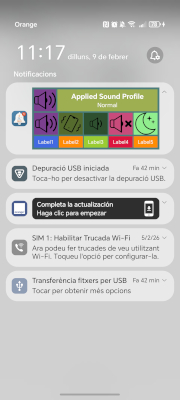

Creating the XML Layout
The unique XML layout in this example was created from a design created with the B4A visual designer:
Alternative: It can also be created and exported as XML from Android Studio, although this requires configuring a separate Android SDK (Do not share it with the Android SDK used by B4A to avoid conflicts)
File Configuration
Layout XML
ImageView Icons
Files in drawable (optional)
Implemented Features
Intent to open the application when clicking on the notification background
- The example allows you to enable or disable this feature. NB6 does not allow disabling it.
- Elements without a PendingIntent are also considered background elements.
Action Management:
ImageView or Label actions are sent via Intent to the B4A Receiver, which then forwards them to the service.
Optional Feature
Expanded and Collapsed Layouts
- Two different layouts could be used (not implemented in this example)
- The system automatically selects which one to use based on the state
Design Considerations:
- When designing the layout, verify which elements are hidden when collapsed.
- The background color could be set to almost transparent by default in the XML ("#10000000") to adapt to the system's Light and Dark modes.
Notification Interaction
- Actions of ImageViews or Labels when clicked
- Open the application when clicking on the notification background, or not (depending on the programming)
- Expand/collapse: Click on the upper right arrow (managed by the system)
Note:
Although the notification takes a few seconds to create the first time.
Creating the XML Layout
The unique XML layout in this example was created from a design created with the B4A visual designer:
- I designed the layout in B4A
- I took a screenshot
- I uploaded it to the AI to create the corresponding XML (after several corrective iterations)
Alternative: It can also be created and exported as XML from Android Studio, although this requires configuring a separate Android SDK (Do not share it with the Android SDK used by B4A to avoid conflicts)
File Configuration
Layout XML
- Path: JavaObjectNotification\B4A\Objects\res\layout
- Important: Set the file to Read-only to prevent it from being deleted during compilation.
ImageView Icons
- Path: JavaObjectNotification\B4A\Objects\res\
- Structure: Different folders inside depending on size of PNG files (drawable-mdpi, drawable-hdpi, etc.)
- Note: RemoteViews do NOT have access to the Assets folder, so they must be located in res.
Files in drawable (optional)
- Path: JavaObjectNotification\B4A\Objects\res\drawable
- Use: To modify the shapes of layout elements.
- Important: Also set to Read-only.
- Names: circle.xml, rounded.xml and rounded_background.xml
- Warning: These additional XML files are not included in the project and may require adjustments
Implemented Features
Intent to open the application when clicking on the notification background
- The example allows you to enable or disable this feature. NB6 does not allow disabling it.
- Elements without a PendingIntent are also considered background elements.
Action Management:
ImageView or Label actions are sent via Intent to the B4A Receiver, which then forwards them to the service.
Optional Feature
Expanded and Collapsed Layouts
- Two different layouts could be used (not implemented in this example)
- The system automatically selects which one to use based on the state
B4X:
Dim rvCustom As JavaObject = CreateRemoteViews("notif_custom_layout")
Dim rvCustomBig As JavaObject = CreateRemoteViews("notif_custom_big_layout")

builder.RunMethod("setCustomContentView", Array(rvCustom)) 'Max height = ~64dp
builder.RunMethod("setCustomBigContentView", Array(rvCustomBig)) 'Max height = ~256dp
Design Considerations:
- When designing the layout, verify which elements are hidden when collapsed.
- The background color could be set to almost transparent by default in the XML ("#10000000") to adapt to the system's Light and Dark modes.
Notification Interaction
- Actions of ImageViews or Labels when clicked
- Open the application when clicking on the notification background, or not (depending on the programming)
- Expand/collapse: Click on the upper right arrow (managed by the system)
Note:
- This is a basic, functional example that can be extended or modified according to specific needs
- I added the FOREGROUND_SERVICE_DATA_SYNC permission in the Manifest Editor to test it, but you can also add the FOREGROUND_SERVICE_SPECIAL_USE permission with its respective complementary lines.
- I had to remove the Objects folder to upload the project zip file. Compile once to recreate the Objects folder and replace the "res" folder inside with the contents of res.zip
Attachments
Last edited:


