Android Question Firebase Auth Issue

Rajesh Krishnan

Member
Licensed User
Hello,
Have the following issues, if someone could please help me
1) I am using Firebase auth for logging in using Erel's eg in the first blog of his ie
https://www.b4x.com/android/forum/threads/firebaseauth-authenticate-your-users.67875/
this works all fine, but the issue comes in where i am modifying this login
ie login from the main screen, and once authenticated loads the next activity and from that activity page i am suppose to do a logout when i do this logout from the next activity page throws an null pointer exception.
2)And also during the login, the username ie hello: username is displayed once authenticated, but i want the user name to be displayed when it navigates to the next page
Could anyone please help me.

Thanks
 

Rajesh Krishnan

Member
Licensed User
Can you post the code that logout code and the full error message from the logs?
This is another activity where i have the side menu and under which i have the logout
#Region Activity Attributes
#FullScreen: False
#IncludeTitle: False
#End Region

Sub Process_Globals
'These global variables will be declared once when the application starts.
'These variables can be accessed from all modules.
Public ion As Object
Public const tempImageFile As String = "tempimage.jpg"
Public imageFolder As String
Public lastPicture As Bitmap

Private auth As FirebaseAuth

End Sub

Sub Globals
'These global variables will be redeclared each time the activity is created.
'These variables can only be accessed from this module.

Private lblName2 As Label

Private sm As SlidingMenu
Private btnBooking As Button
Private btnconfirm As Button
Private Label1 As Label
Private Label2 As Label
Private Label3 As Label
Private Label4 As Label
Private Label5 As Label
Private lblName As Label
Private Panel1 As Panel
Private Panel2 As Panel
Private Panel3 As Panel
Private Panel4 As Panel
Private Panel5 As Panel
Private SlidingMenu As SlidingMenuStd
Private btnSlidingMenu As Button
' Private Image As ImageView


End Sub

Sub Activity_Create(FirstTime As Boolean)
'Do not forget to load the layout file created with the visual designer. For example:
'Activity.LoadLayout("Layout1")
Activity.LoadLayout("DoctorInfo")
sm.Initialize("sm")
Dim offset As Int = 100dip
sm.BehindOffset = offset
sm.Mode = sm.BOTH
Dim lv1 As ListView
lv1.Initialize("lv1")
For i = 1 To 10
lv1.AddSingleLine("Action " & i)
Next
sm.SecondaryMenu.AddView(lv1, 0, 0, 100%x - offset, 100%y)
Dim b1, b2, b3, btnSignOut As Button
Dim title As Button
' Dim Cam As Button

b1.Initialize("b1")
b2.Initialize("b2")
b3.Initialize("b3")
btnSignOut.Initialize("btnSignOut")
b1.Text = "Images"
b2.Text = "Project Videos"
b3.Text = "Student Videos"
btnSignOut.Text = "Logout"
sm.Menu.AddView(b1, 10dip, 220dip, 100%x - offset - 20dip, 50dip)
sm.Menu.AddView(b2, 10dip, 280dip, 100%x - offset - 20dip, 50dip)
sm.Menu.AddView(b3, 10dip, 340dip, 100%x - offset - 20dip, 50dip)
sm.Menu.AddView(btnSignOut, 10dip, 400dip, 100%x - offset - 20dip, 50dip)
sm.Menu.Color = Colors.White
b1.Color = Colors.RGB(255, 69, 0)
b2.Color = Colors.RGB(255, 69, 0)
b3.Color = Colors.RGB(255, 69, 0)
btnSignOut.Color = Colors.RGB(255, 69, 0)
b1.TextSize = 16.0
b2.TextSize = 16.0
b3.TextSize = 16.0
btnSignOut.TextSize = 16.0

title.Initialize("title")
title.Text = "Kiddypi!"
sm.Menu.AddView(title, 0dip, 490dip, 100%x - offset - 0dip, 80dip)
title.Color = Colors.RGB(255, 69, 0)
title.TextSize = 22.0
title.TextColor = Colors.White

' Image.Initialize("Image")
' sm.Menu.AddView(Image, 10dip, 20dip, 100%x - offset - 20dip, 150dip)
' Image.Bitmap = LoadBitmap(File.DirDefaultExternal, "logo.jpg")

'Image.Bitmap = LoadBitmapSample(File.DirAssets, "tempimage.jpg", Image.Width, Image.Height)
'Image.Bitmap = LoadBitmapSample(File.DirDefaultExternal, "tempimage.jpg", Image.Width, Image.Height)

' Cam.Initialize("Cam")
' Cam.Text = "EDIT PROFILE"
' Cam.TextSize = 14.0
' Cam.TextColor = Colors.RGB(119, 49, 209)
' sm.Menu.AddView(Cam, 10dip, 200dip, 100%x - offset - 20dip, 50dip)
' Cam.Color = Colors.White
End Sub

'Sub Auth_SignedIn (User As FirebaseUser)
' Log("SignedIn: " & User.DisplayName)
' lblName2.Text = "Hello: " & User.DisplayName
'End Sub


Sub Activity_Resume

End Sub

Sub Activity_Pause (UserClosed As Boolean)

End Sub

'Sub Activity_Create(FirstTime As Boolean)
' If FirstTime Then
' auth.Initialize("auth")
' End If
' Activity.LoadLayout("KP_firstpg")
' If auth.CurrentUser.IsInitialized Then Auth_SignedIn(auth.CurrentUser)
'End Sub


Sub r_CheckedChange(Checked As Boolean)

End Sub

Sub Cam_Click
Activity.Finish
StartActivity("Camera")
End Sub

'Sub btnconfirm_Click
' Msgbox("Appointment Confirmed","CONFIRMATION ")
' Activity.Finish
' StartActivity("Main")
'End Sub

Sub b_CheckedChange(Checked As Boolean)

End Sub

Sub a_CheckedChange(Checked As Boolean)

End Sub

'Sub btnBooking_Click
' StartActivity("Calendar")
'End Sub

Sub btnSlidingMenu_Click
sm.ShowMenu
End Sub

Sub lv1_ItemClick (Position As Int, Value As Object)
Log(Value)
sm.HideMenus
End Sub
Sub Activity_KeyPress (KeyCode As Int) As Boolean
If KeyCode = KeyCodes.KEYCODE_BACK And sm.Visible Then
sm.HideMenus
Return True
End If
Return False
End Sub
Sub B1_Click
Log("b1_click")
sm.HideMenus
End Sub
Sub B2_Click
Log("b2 click")
Activity.Finish
StartActivity("Main")
End Sub
Sub B3_Click
Log("b3 click")
Activity.Finish
StartActivity("Videos")
End Sub

Sub btnSignOut_Click
Log("b4 click")
' Activity.Finish
' StartActivity("Main")
auth.SignOutFromGoogle
lblName2.Text = "Goodbye!"
End Sub

 
Upvote 0

DonManfred

Expert
Licensed User
Longtime User
This is another activity where i have the side menu and under which i have the logout
I´m sure you got this told in the past....

Please use code tags when posting code!
 
Upvote 0

Rajesh Krishnan

Member
Licensed User
I am sorry sir, i was not told before on it, and i do not know how to do that would be really thankful if you could guide me on it, since i din know i have attached the part of the code below
Thanks
 

Attachments

  • DoctorInfo.bas
    4.9 KB · Views: 285
Upvote 0

DonManfred

Expert
Licensed User
Longtime User
Upvote 0

Rajesh Krishnan

Member
Licensed User
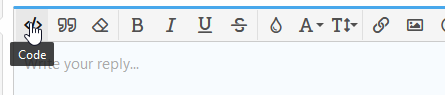
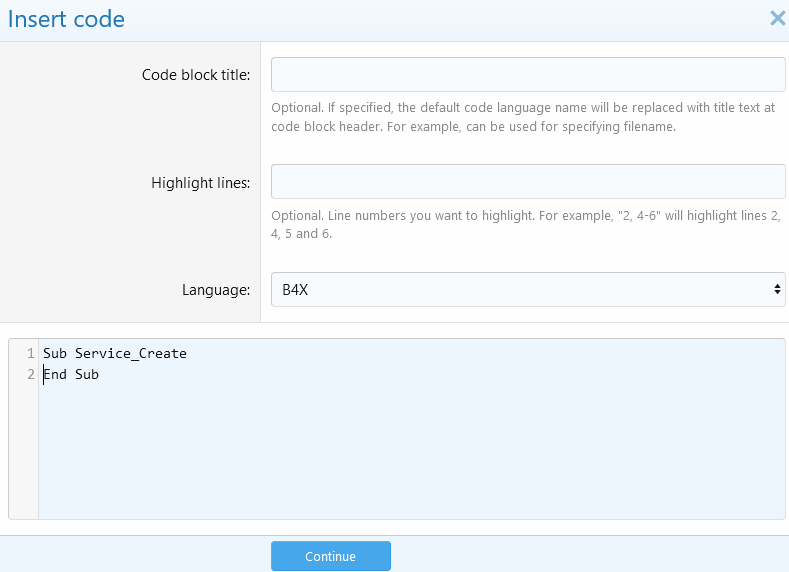
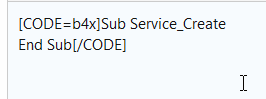
codetag001.png

codetag002.png

codetag003.png


But you did not answered Erels question:


Instead of code tag you need to use QUOTE tag when posting errorlog. From the ide copy all text from the log and post it inside a quote-tag.
Thanks Don
The following is the error


Error occurred on line: 194 (DoctorInfo)
java.lang.NullPointerException: Attempt to invoke virtual method 'void com.google.firebase.auth.FirebaseAuth.signOut()' on a null object reference
at anywheresoftware.b4a.objects.FirebaseAuthWrapper.SignOutFromGoogle(FirebaseAuthWrapper.java:103)
at b4a.Kiddypifirebase.doctorinfo._btnsignout_click(doctorinfo.java:656)
at java.lang.reflect.Method.invoke(Native Method)
at java.lang.reflect.Method.invoke(Method.java:372)
at anywheresoftware.b4a.shell.Shell.runMethod(Shell.java:708)
at anywheresoftware.b4a.shell.Shell.raiseEventImpl(Shell.java:337)
at anywheresoftware.b4a.shell.Shell.raiseEvent(Shell.java:247)
at java.lang.reflect.Method.invoke(Native Method)
at java.lang.reflect.Method.invoke(Method.java:372)
at anywheresoftware.b4a.ShellBA.raiseEvent2(ShellBA.java:134)
at anywheresoftware.b4a.BA.raiseEvent2(BA.java:157)
at anywheresoftware.b4a.BA.raiseEvent(BA.java:153)
at anywheresoftware.b4a.objects.ViewWrapper$1.onClick(ViewWrapper.java:78)
at android.view.View.performClick(View.java:4761)
at android.view.View$PerformClick.run(View.java:19767)
at android.os.Handler.handleCallback(Handler.java:739)
at android.os.Handler.dispatchMessage(Handler.java:95)
at android.os.Looper.loop(Looper.java:135)
at android.app.ActivityThread.main(ActivityThread.java:5312)
at java.lang.reflect.Method.invoke(Native Method)
at java.lang.reflect.Method.invoke(Method.java:372)
at com.android.internal.os.ZygoteInit$MethodAndArgsCaller.run(ZygoteInit.java:901)
at com.android.internal.os.ZygoteInit.main(ZygoteInit.java:696)
** Service (starter) Destroy **
** Activity (doctorinfo) Pause, UserClosed = true **
** Activity (main) Resume **
Connected to B4A-Bridge (Wifi)
** Activity (main) Pause, UserClosed = false **
 
Upvote 0

Rajesh Krishnan

Member
Licensed User
codetag001.png

codetag002.png

codetag003.png


But you did not answered Erels question:


Instead of code tag you need to use QUOTE tag when posting errorlog. From the ide copy all text from the log and post it inside a quote-tag.


B4X:
#Region  Activity Attributes
    #FullScreen: False
    #IncludeTitle: False
#End Region

Sub Process_Globals
    'These global variables will be declared once when the application starts.
    'These variables can be accessed from all modules.
    Public ion As Object
    Public const tempImageFile As String = "tempimage.jpg"
    Public imageFolder As String
    Public lastPicture As Bitmap
   
    Private auth As FirebaseAuth
   
End Sub

Sub Globals
    'These global variables will be redeclared each time the activity is created.
    'These variables can only be accessed from this module.
   
    Private lblName2 As Label
   
    Private sm As SlidingMenu
    Private btnBooking As Button
    Private btnconfirm As Button
    Private Label1 As Label
    Private Label2 As Label
    Private Label3 As Label
    Private Label4 As Label
    Private Label5 As Label
    Private lblName As Label
    Private Panel1 As Panel
    Private Panel2 As Panel
    Private Panel3 As Panel
    Private Panel4 As Panel
    Private Panel5 As Panel
    Private SlidingMenu As SlidingMenuStd
    Private btnSlidingMenu As Button
'    Private Image As ImageView
   

End Sub

Sub Activity_Create(FirstTime As Boolean)
    'Do not forget to load the layout file created with the visual designer. For example:
    'Activity.LoadLayout("Layout1")
    Activity.LoadLayout("DoctorInfo")
    sm.Initialize("sm")
    Dim offset As Int = 100dip
    sm.BehindOffset = offset
    sm.Mode = sm.BOTH
    Dim lv1 As ListView
    lv1.Initialize("lv1")
    For i = 1 To 10
        lv1.AddSingleLine("Action "  & i)
    Next
    sm.SecondaryMenu.AddView(lv1, 0, 0, 100%x - offset, 100%y)
    Dim b1, b2, b3, btnSignOut As Button
    Dim title As Button
'    Dim Cam As Button
   
    b1.Initialize("b1")
    b2.Initialize("b2")
    b3.Initialize("b3")
    btnSignOut.Initialize("btnSignOut")
    b1.Text = "Images"
    b2.Text = "Project Videos"
    b3.Text = "Student Videos"
    btnSignOut.Text = "Logout"
    sm.Menu.AddView(b1, 10dip, 220dip, 100%x - offset - 20dip, 50dip)
    sm.Menu.AddView(b2, 10dip, 280dip, 100%x - offset - 20dip, 50dip)
    sm.Menu.AddView(b3, 10dip, 340dip, 100%x - offset - 20dip, 50dip)
    sm.Menu.AddView(btnSignOut, 10dip, 400dip, 100%x - offset - 20dip, 50dip)
    sm.Menu.Color = Colors.White
    b1.Color = Colors.RGB(255, 69, 0)
    b2.Color = Colors.RGB(255, 69, 0)
    b3.Color = Colors.RGB(255, 69, 0)
    btnSignOut.Color = Colors.RGB(255, 69, 0)
    b1.TextSize = 16.0
    b2.TextSize = 16.0
    b3.TextSize = 16.0
    btnSignOut.TextSize = 16.0
   
    title.Initialize("title")
    title.Text = "Kiddypi!"
    sm.Menu.AddView(title, 0dip, 490dip, 100%x - offset - 0dip, 80dip)
    title.Color = Colors.RGB(255, 69, 0)
    title.TextSize = 22.0
    title.TextColor = Colors.White
   
'    Image.Initialize("Image")
'    sm.Menu.AddView(Image, 10dip, 20dip, 100%x - offset - 20dip, 150dip)
'    Image.Bitmap = LoadBitmap(File.DirDefaultExternal, "logo.jpg")

    'Image.Bitmap = LoadBitmapSample(File.DirAssets, "tempimage.jpg", Image.Width, Image.Height)
    'Image.Bitmap = LoadBitmapSample(File.DirDefaultExternal, "tempimage.jpg", Image.Width, Image.Height)

'    Cam.Initialize("Cam")
'    Cam.Text = "EDIT PROFILE"
'    Cam.TextSize = 14.0
'    Cam.TextColor = Colors.RGB(119, 49, 209)
'    sm.Menu.AddView(Cam, 10dip, 200dip, 100%x - offset - 20dip, 50dip)
    '    Cam.Color = Colors.White
End Sub

'Sub Auth_SignedIn (User As FirebaseUser)
'    Log("SignedIn: " & User.DisplayName)
'    lblName2.Text = "Hello: " & User.DisplayName
'End Sub


Sub Activity_Resume

End Sub

Sub Activity_Pause (UserClosed As Boolean)

End Sub

'Sub Activity_Create(FirstTime As Boolean)
'    If FirstTime Then
'        auth.Initialize("auth")
'    End If
'    Activity.LoadLayout("KP_firstpg")
'    If auth.CurrentUser.IsInitialized Then Auth_SignedIn(auth.CurrentUser)
'End Sub


Sub r_CheckedChange(Checked As Boolean)
   
End Sub

Sub Cam_Click
    Activity.Finish
    StartActivity("Camera")
End Sub

'Sub btnconfirm_Click
'        Msgbox("Appointment Confirmed","CONFIRMATION ")
'        Activity.Finish
'        StartActivity("Main")
'End Sub

Sub b_CheckedChange(Checked As Boolean)

End Sub

Sub a_CheckedChange(Checked As Boolean)
   
End Sub

'Sub btnBooking_Click
'    StartActivity("Calendar")
'End Sub

Sub btnSlidingMenu_Click
    sm.ShowMenu
End Sub

Sub lv1_ItemClick (Position As Int, Value As Object)
    Log(Value)
    sm.HideMenus
End Sub
Sub Activity_KeyPress (KeyCode As Int) As Boolean
    If KeyCode = KeyCodes.KEYCODE_BACK And sm.Visible Then
        sm.HideMenus
        Return True
    End If
    Return False
End Sub
Sub B1_Click
    Log("b1_click")
    sm.HideMenus
End Sub
Sub B2_Click
    Log("b2 click")
    Activity.Finish
    StartActivity("Main")
End Sub
Sub B3_Click
    Log("b3 click")
    Activity.Finish
    StartActivity("Videos")
End Sub
Sub btnSignIn_Click
    auth.SignInWithGoogle
End Sub
Sub btnSignOut_Click
    Log("b4 click")
'    Activity.Finish
'    StartActivity("Main")
    auth.SignOutFromGoogle
    lblName2.Text = "Goodbye!"
End Sub
 
Upvote 0

Rajesh Krishnan

Member
Licensed User
You are not initializing auth? Why not?
I am trying to get the hello with the user name on the next page but again throws an error telling label not initialized, though it works fine for the logout saying goodbye.
Error occurred on line: 126 (DoctorInfo)
java.lang.RuntimeException: Object should first be initialized (Label).
at anywheresoftware.b4a.AbsObjectWrapper.getObject(AbsObjectWrapper.java:50)
at anywheresoftware.b4a.objects.TextViewWrapper.setText(TextViewWrapper.java:43)
at b4a.Kiddypifirebase.doctorinfo._auth_signedin(doctorinfo.java:549)
at b4a.Kiddypifirebase.doctorinfo._activity_create(doctorinfo.java:408)
at java.lang.reflect.Method.invoke(Native Method)
at java.lang.reflect.Method.invoke(Method.java:372)
at anywheresoftware.b4a.shell.Shell.runMethod(Shell.java:708)
at anywheresoftware.b4a.shell.Shell.raiseEventImpl(Shell.java:340)
at anywheresoftware.b4a.shell.Shell.raiseEvent(Shell.java:247)
at java.lang.reflect.Method.invoke(Native Method)
at java.lang.reflect.Method.invoke(Method.java:372)
at anywheresoftware.b4a.ShellBA.raiseEvent2(ShellBA.java:134)
at b4a.Kiddypifirebase.doctorinfo.afterFirstLayout(doctorinfo.java:102)
at b4a.Kiddypifirebase.doctorinfo.access$000(doctorinfo.java:17)
at b4a.Kiddypifirebase.doctorinfo$WaitForLayout.run(doctorinfo.java:80)
at android.os.Handler.handleCallback(Handler.java:739)
at android.os.Handler.dispatchMessage(Handler.java:95)
at android.os.Looper.loop(Looper.java:135)
at android.app.ActivityThread.main(ActivityThread.java:5312)
at java.lang.reflect.Method.invoke(Native Method)
at java.lang.reflect.Method.invoke(Method.java:372)
at com.android.internal.os.ZygoteInit$MethodAndArgsCaller.run(ZygoteInit.java:901)
at com.android.internal.os.ZygoteInit.main(ZygoteInit.java:696)


B4X:
#Region  Activity Attributes
    #FullScreen: False
    #IncludeTitle: False
#End Region

Sub Process_Globals
    'These global variables will be declared once when the application starts.
    'These variables can be accessed from all modules.
    Public ion As Object
    Public const tempImageFile As String = "tempimage.jpg"
    Public imageFolder As String
    Public lastPicture As Bitmap
   
    Private auth As FirebaseAuth
   
End Sub

Sub Globals
    'These global variables will be redeclared each time the activity is created.
    'These variables can only be accessed from this module.
   
    Private lblName2 As Label
   
    Private sm As SlidingMenu
    Private btnBooking As Button
    Private btnconfirm As Button
    Private Label1 As Label
    Private Label2 As Label
    Private Label3 As Label
    Private Label4 As Label
    Private Label5 As Label
    Private lblName As Label
    Private Panel1 As Panel
    Private Panel2 As Panel
    Private Panel3 As Panel
    Private Panel4 As Panel
    Private Panel5 As Panel
    Private SlidingMenu As SlidingMenuStd
    Private btnSlidingMenu As Button
'    Private Image As ImageView
   

End Sub

Sub Activity_Create(FirstTime As Boolean)


    If FirstTime Then
        auth.Initialize("auth")
    End If
    If auth.CurrentUser.IsInitialized Then Auth_SignedIn(auth.CurrentUser)

    'Do not forget to load the layout file created with the visual designer. For example:
    'Activity.LoadLayout("Layout1")
    Activity.LoadLayout("DoctorInfo")
    sm.Initialize("sm")
    Dim offset As Int = 100dip
    sm.BehindOffset = offset
    sm.Mode = sm.BOTH
    Dim lv1 As ListView
    lv1.Initialize("lv1")
    For i = 1 To 10
        lv1.AddSingleLine("Action "  & i)
    Next
    sm.SecondaryMenu.AddView(lv1, 0, 0, 100%x - offset, 100%y)
    Dim b1, b2, b3, btnSignOut As Button
    Dim title As Button
'    Dim Cam As Button
   
    b1.Initialize("b1")
    b2.Initialize("b2")
    b3.Initialize("b3")
    btnSignOut.Initialize("btnSignOut")
    b1.Text = "Images"
    b2.Text = "Project Videos"
    b3.Text = "Student Videos"
    btnSignOut.Text = "Logout"
    sm.Menu.AddView(b1, 10dip, 220dip, 100%x - offset - 20dip, 50dip)
    sm.Menu.AddView(b2, 10dip, 280dip, 100%x - offset - 20dip, 50dip)
    sm.Menu.AddView(b3, 10dip, 340dip, 100%x - offset - 20dip, 50dip)
    sm.Menu.AddView(btnSignOut, 10dip, 400dip, 100%x - offset - 20dip, 50dip)
    sm.Menu.Color = Colors.White
    b1.Color = Colors.RGB(255, 69, 0)
    b2.Color = Colors.RGB(255, 69, 0)
    b3.Color = Colors.RGB(255, 69, 0)
    btnSignOut.Color = Colors.RGB(255, 69, 0)
    b1.TextSize = 16.0
    b2.TextSize = 16.0
    b3.TextSize = 16.0
    btnSignOut.TextSize = 16.0
   
    title.Initialize("title")
    title.Text = "Kiddypi!"
    sm.Menu.AddView(title, 0dip, 490dip, 100%x - offset - 0dip, 80dip)
    title.Color = Colors.RGB(255, 69, 0)
    title.TextSize = 22.0
    title.TextColor = Colors.White
   
'    Image.Initialize("Image")
'    sm.Menu.AddView(Image, 10dip, 20dip, 100%x - offset - 20dip, 150dip)
'    Image.Bitmap = LoadBitmap(File.DirDefaultExternal, "logo.jpg")

    'Image.Bitmap = LoadBitmapSample(File.DirAssets, "tempimage.jpg", Image.Width, Image.Height)
    'Image.Bitmap = LoadBitmapSample(File.DirDefaultExternal, "tempimage.jpg", Image.Width, Image.Height)

'    Cam.Initialize("Cam")
'    Cam.Text = "EDIT PROFILE"
'    Cam.TextSize = 14.0
'    Cam.TextColor = Colors.RGB(119, 49, 209)
'    sm.Menu.AddView(Cam, 10dip, 200dip, 100%x - offset - 20dip, 50dip)
    '    Cam.Color = Colors.White
End Sub

'Sub Auth_SignedIn (User As FirebaseUser)
'    Log("SignedIn: " & User.DisplayName)
'    lblName2.Text = "Hello: " & User.DisplayName
'End Sub


Sub Activity_Resume

End Sub

Sub Auth_SignedIn (User As FirebaseUser)
    Log("SignedIn: " & User.DisplayName)
    lblName2.Text = "Hello: " & User.DisplayName
End Sub

Sub Activity_Pause (UserClosed As Boolean)

End Sub

'Sub Activity_Create(FirstTime As Boolean)
'    If FirstTime Then
'        auth.Initialize("auth")
'    End If
'    Activity.LoadLayout("KP_firstpg")
'    If auth.CurrentUser.IsInitialized Then Auth_SignedIn(auth.CurrentUser)
'End Sub


Sub r_CheckedChange(Checked As Boolean)
   
End Sub

Sub Cam_Click
    Activity.Finish
    StartActivity("Camera")
End Sub

'Sub btnconfirm_Click
'        Msgbox("Appointment Confirmed","CONFIRMATION ")
'        Activity.Finish
'        StartActivity("Main")
'End Sub

Sub b_CheckedChange(Checked As Boolean)

End Sub

Sub a_CheckedChange(Checked As Boolean)
   
End Sub

'Sub btnBooking_Click
'    StartActivity("Calendar")
'End Sub

Sub btnSlidingMenu_Click
    sm.ShowMenu
End Sub

Sub lv1_ItemClick (Position As Int, Value As Object)
    Log(Value)
    sm.HideMenus
End Sub
Sub Activity_KeyPress (KeyCode As Int) As Boolean
    If KeyCode = KeyCodes.KEYCODE_BACK And sm.Visible Then
        sm.HideMenus
        Return True
    End If
    Return False
End Sub
Sub B1_Click
    Log("b1_click")
    sm.HideMenus
End Sub
Sub B2_Click
    Log("b2 click")
    Activity.Finish
    StartActivity("Main")
End Sub
Sub B3_Click
    Log("b3 click")
    Activity.Finish
    StartActivity("Videos")
End Sub
Sub btnSignIn_Click
    auth.SignInWithGoogle
End Sub
Sub btnSignOut_Click
    Log("b4 click")
'    Activity.Finish
'    StartActivity("Main")
    auth.SignOutFromGoogle
    lblName2.Text = "Goodbye!"
    StartActivity(Main)
   
End Sub
 
Upvote 0
Top