

Basic4android includes two special numeric units which are helpful when you create graphics or dynamic layouts and you want to support devices with different scales and dimensions.
dip
DIP - Density Independent Pixel.
Dip values are written related to the default scale, which is 160 DPI (not DIP ) - Dots Per Inch.
At runtime these values are scaled based on the device scale.
For example:
This button "physical" size will be the same whether the user device screen is a high resolution device or a low resolution device.
Writing 'dip' value is almost always preferred over writing absolute position values.
%x, %y
Percentage of the activity's width and height respectively (Activity is similar to Form).
For example:
This button width will always be half the width of the activity and the height is quarter of the activity height.
The percentage units are useful for tabular layouts and to make sure that your layout or graphics always fit (especially with orientation changes).
And some code:
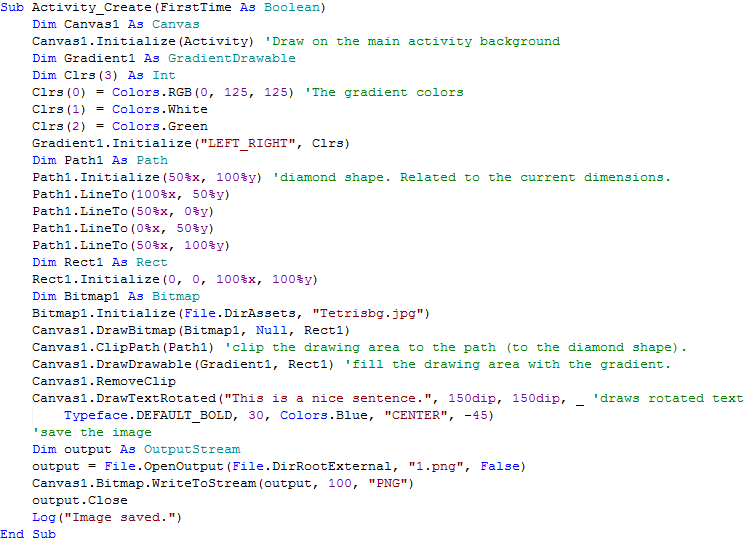
The saved image:

dip
DIP - Density Independent Pixel.
Dip values are written related to the default scale, which is 160 DPI (not DIP
) - Dots Per Inch.At runtime these values are scaled based on the device scale.
For example:
B4X:
Button1.Width = 100dipWriting 'dip' value is almost always preferred over writing absolute position values.
%x, %y
Percentage of the activity's width and height respectively (Activity is similar to Form).
For example:
B4X:
Button1.Width = 50%x
Button1.Height = 25%yThe percentage units are useful for tabular layouts and to make sure that your layout or graphics always fit (especially with orientation changes).
And some code:
The saved image:


