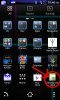
Need help with application icon and application manager name.

Omegarex

Member
Licensed User
Longtime User
I would appreciate any help all of you can give me. On the application launcher screen below I can not get my icon to show up. I only get the default green android. I have created the correct folders in the /objects/res folder. All my icons are named icon.png and are read only. I have tried to add the icon from the IDE and that didn't work. I ran [Clean Project]. I uninstalled and re-installed the wallpaper and still no luck.

Also, on the apps manager screen I can not get the icon to show up and the package name is showing up instead of the application name.

Any help you can give would really be appreciated
 

Attachments
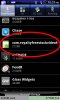
  • app manager.jpg
    app manager.jpg
    59.2 KB · Views: 1,134
  • app screen.jpg
    app screen.jpg
    75.1 KB · Views: 1,023
Last edited:

Omegarex

Member
Licensed User
Longtime User
Thank you for your prompt response. I deleted all instances of the icon and added it through the IDE but it didn't work. Any other assistance you can give would be greatly appreciated. Also do you have any recommendations on how to fix the issue I am having with the package name showing up in the application manager instead of the label name. Thank you again for all your help.
 
Upvote 0

Omegarex

Member
Licensed User
Longtime User
Erel,

I was able to fix my problem with the application icon not displaying correctly in the application launcher menu and fixing the application name as well as the application icon displaying correctly in the apps manager menu.

I had to update the following line in the Objects/AndroidManifest.xml file.

From this:
<application>

To this:
<application android:icon="@drawable/icon" android:label="application_name">

Then I had to make the AndroidManifest.xml file read only to compile correctly. If I did not make it read only my changes would get overwritten.

I hope this helps anyone else that had the same problem.
 
Upvote 0

Omegarex

Member
Licensed User
Longtime User
Erel,

Thank you very much for the configuration changes. I guess I must have screwed the manifest up. This was my first time using Basic4Android to develop an app.

I added the text you provided back into the manifest editor and everything is working fine now.

That last bit of help got me to the end of my project and I just posted my first live wallpaper to the Google play store. Thank you very much for all your help.
 
Upvote 0

JeffreyC

Member
Licensed User
Longtime User
I'm having a similar problem.
I compile using "Release" mode.
I copy the result.apk to my Samsung Galaxy Note 4 running Android 4.4.4
In the Application Manager, the default Android icon is shown, not my application's icon.
For the app and the preview it * does * show my app's icon.
Back in the virtual / emulator world, the 4.2.2 virtual phone * does * show the right icon in Application Manager.
I have deleted the manifest file and let B4A recreate it. This is what is shows:

B4X:
'This code will be applied to the manifest file during compilation.
'You do not need to modify it in most cases.
'See this link for for more information: http://www.b4x.com/forum/showthread.php?p=78136
AddManifestText(
<uses-sdk android:minSdkVersion="5" android:targetSdkVersion="14"/>
<supports-screens android:largeScreens="true"
    android:normalScreens="true"
    android:smallScreens="true"
    android:anyDensity="true"/>)
SetApplicationAttribute(android:icon, "@drawable/icon")
SetApplicationAttribute(android:label, "$LABEL$")
SetApplicationAttribute(android:theme, "@android:style/Theme.Holo")
'End of default text.

Any thoughts?
 
Upvote 0
Top