June 1 2012
10:45 Hours
I like colors in my apps. So I usually have a 'control' activity to create difference color combinations.
I used these colors for panels, labels and label text.
I find that the color dialog is good most of the time but not for 'fine-tuning' the rgb values.
So, I created this activity for that purpose.
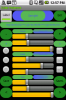
The sample panel and label with text is located at the top.
The toggle view switches between label color and label text color.
The radio buttons select the panel, label or label color.
The check buttons select the red, green and blue values.
The seekbars are for 'gross' selection of the red, green or blue values.
The plus and minus buttons are for 'fine' selection of the red, green or blue values.
You can also tap on the panel, label or text for a 'random' combination to be used.
I have attached a zipped file of the project for your perusal.
I would entertain any suggestions, comments etc.
Regards,
Ray Tesluk :sign0104:
10:45 Hours
I like colors in my apps. So I usually have a 'control' activity to create difference color combinations.
I used these colors for panels, labels and label text.
I find that the color dialog is good most of the time but not for 'fine-tuning' the rgb values.
So, I created this activity for that purpose.
The sample panel and label with text is located at the top.
The toggle view switches between label color and label text color.
The radio buttons select the panel, label or label color.
The check buttons select the red, green and blue values.
The seekbars are for 'gross' selection of the red, green or blue values.
The plus and minus buttons are for 'fine' selection of the red, green or blue values.
You can also tap on the panel, label or text for a 'random' combination to be used.
I have attached a zipped file of the project for your perusal.
I would entertain any suggestions, comments etc.
Regards,
Ray Tesluk :sign0104: