
There are a lot of threads that seem to relate to my query, and I have tried to study them, but cannot find an answer to this specific case. I want to be able to send users a specialised data file by email or whatever, and for them to be able to open the file using my app. I hope to distribute the app (for free) using Google Play once I have sorted out this problem. The data files relate to tower bell-ringing.
I have achieved this for Android 5. Using the app I can read/write custom data files from/to folders in File.DirDefaultExternal. I can use a File Manager to check everything and it all makes sense.
For my Moto G9 running Android 11, when I try to read the folder I can see/navigate folders, but cannot see any of the files, although a File Manager confirms the files are there, with the right extensions. If I write a file using the app I can then see it (and open it) using the app and I can also see it using a File Manager. The same goes for my Pixel 6A running on Android 16.
If I try to write a file with the same name as one already in the relevant folder, but invisible to my app's read function, first of all I get a warning about overwriting the file (code in my app does this) but then, if I try to go ahead and overwrite I get the EACCES message.
I have added
to the Manifest.
Using the List Permissions facility in B4A I get
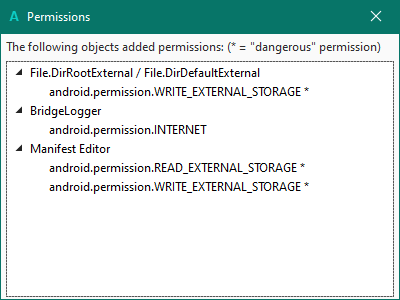
Do I need to use RuntimePermissions? If so how?
Many thanks.
I have achieved this for Android 5. Using the app I can read/write custom data files from/to folders in File.DirDefaultExternal. I can use a File Manager to check everything and it all makes sense.
For my Moto G9 running Android 11, when I try to read the folder I can see/navigate folders, but cannot see any of the files, although a File Manager confirms the files are there, with the right extensions. If I write a file using the app I can then see it (and open it) using the app and I can also see it using a File Manager. The same goes for my Pixel 6A running on Android 16.
If I try to write a file with the same name as one already in the relevant folder, but invisible to my app's read function, first of all I get a warning about overwriting the file (code in my app does this) but then, if I try to go ahead and overwrite I get the EACCES message.
I have added
B4X:
SetApplicationAttribute(android:requestLegacyExternalStorage, "true")
AddPermission(android.permission.READ_EXTERNAL_STORAGE)
AddPermission(android.permission.WRITE_EXTERNAL_STORAGE)Using the List Permissions facility in B4A I get
Do I need to use RuntimePermissions? If so how?
Many thanks.


