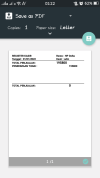
I have use this method, and this is the example of my code :
Sub Cetak_RegiterKasir
Dim pdf As PdfDocument
Dim y As Int
Dim out As OutputStream
Dim Rect1 As Rect, Rect2 As Rect
pdf.Initialize
Rect1.Initialize(25,80,595,80)
Rect2.Initialize(25,260,595,260)
If File.Exists(File.DirInternal,nmFileRpt) Then
File.Delete(File.DirInternal,nmFileRpt)
End If
'-- Buat Headers
'DateTime.DateFormat="dd-MM-yyyy"
out = File.OpenOutput(File.DirInternal, nmFileRpt, False)
pdf.StartPage(595, 842) 'A4 size
pdf.Canvas.DrawText(cJobNama, 25, 50, Typeface.DEFAULT_BOLD, 20 / GetDeviceLayoutValues.Scale , Colors.Black,"LEFT")
pdf.Canvas.DrawText(lblnamastore.text, 375, 50, Typeface.DEFAULT_BOLD, 20 / GetDeviceLayoutValues.Scale , Colors.Black,"LEFT")
pdf.Canvas.drawrect(Rect1,Colors.Gray,False,4)
y = y + 25
'-- Ambil Data Register
If Main.kd_store="" Then
koneksiDB.rset1 = koneksiDB.handlerDB1.Query("Select * from v_register_kasir where tanggal='" & DateTime.Date(KalenderActivity.DaySelected) & "' Order by tanggal")
Else
koneksiDB.rset1 = koneksiDB.handlerDB1.Query("Select * from v_register_kasir where kd_store='" & Main.kd_store & "' and tanggal='" & DateTime.Date(KalenderActivity.DaySelected) & "' Order by tanggal")
End If
If koneksiDB.rset1.RowCount > 0 Then
For i=0 To koneksiDB.rset1.RowCount -1
koneksiDB.rset1.Position=i
If koneksiDB.rset1.GetString2("tipe_byr") = "TUNAI" Then
pdf.Canvas.DrawText("PENERIMAAN TUNAI : " ,25,130,Typeface.DEFAULT_BOLD, 20 / GetDeviceLayoutValues.Scale , Colors.Black,"LEFT")
pdf.Canvas.DrawText(koneksiDB.rset1.GetString2("jml_bayar"),475,130,Typeface.DEFAULT_BOLD, 20 / GetDeviceLayoutValues.Scale , Colors.Black,"LEFT")
Else If koneksiDB.rset1.GetString2("tipe_byr") = "CC/DC" Then
.......
End If
y = y + 25
If i <> 0 And (i Mod 35) = 0 Then
pdf.FinishPage
pdf.StartPage(595, 842)
y = 75
End If
Next
pdf.Canvas.DrawText("TOTAL PENJUALAN : ",25,105,Typeface.DEFAULT_BOLD, 20 / GetDeviceLayoutValues.Scale , Colors.Black,"LEFT")
pdf.Canvas.DrawText(TotalPenj,375,105,Typeface.DEFAULT_BOLD, 25 / GetDeviceLayoutValues.Scale , Colors.Black,"LEFT")
End If
koneksiDB.handlerDB1.Close
pdf.Canvas.drawrect(Rect2,Colors.Gray,False,4)
pdf.Canvas.DrawText("SELISIH PENJUALAN : ",25,285,Typeface.DEFAULT_BOLD, 20 / GetDeviceLayoutValues.Scale , Colors.Black,"LEFT")
pdf.Canvas.DrawText(TotalPenj-TotPembayaran,475,285,Typeface.DEFAULT_BOLD, 25 / GetDeviceLayoutValues.Scale , Colors.Black,"LEFT")
pdf.FinishPage
pdf.WriteToStream(out)
out.Close
pdf.Close
'-- Cetak Pdf
Dim printer As Printer
printer.Initialize("")
Try
printer.PrintPdf(cJobNama,File.DirInternal,nmFileRpt)
Catch
ToastMessageShow("Terjadi Kesalahan saat cetak",False)
End Try
End Sub
-------------
it work and create a pdf preview, but the printer option is only "Save to PDF" and when I click icon Save pdf nothing happen.
please correct me if my code is wrong, or should I installs bluetooth printer first on my phone?