B4J Question Adding libraries

LukaszK

Member
Hello Experts!
Iam starting jurney with B4J. I download project with serial communication , but it looks like i need to add jserial library. How to do that?
 

Attachments

  • screen.jpg
    screen.jpg
    498.9 KB · Views: 14
Solution
Hi @LukaszK
1. Download the library here: jSerial library
2. Create a folder to put all your "Additional libraries" e.g C:\B4X\AdditionalLibraries
3. Create a B4J folder inside it
4. Unzip jSerial.zip into the B4J folder C:\B4X\AdditionalLibraries\B4J. The folder should contains jSerial.jar and jSerial.xml now.
5. Click on the menu Tools->Configure Paths in B4J and edit the path then click Ok
6. Restart B4J IDE or right-click the Libraries Manager tab and click Refresh
7. Now try to check the library is available
8. You can also check the B4X Getting Started guide

1766833829183.png

aeric

Expert
Licensed User
Longtime User
Hi @LukaszK
1. Download the library here: jSerial library
2. Create a folder to put all your "Additional libraries" e.g C:\B4X\AdditionalLibraries
3. Create a B4J folder inside it
4. Unzip jSerial.zip into the B4J folder C:\B4X\AdditionalLibraries\B4J. The folder should contains jSerial.jar and jSerial.xml now.
5. Click on the menu Tools->Configure Paths in B4J and edit the path then click Ok
6. Restart B4J IDE or right-click the Libraries Manager tab and click Refresh
7. Now try to check the library is available
8. You can also check the B4X Getting Started guide
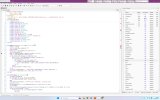
1766833829183.png
 
Last edited:
Upvote 1
Solution

aeric

Expert
Licensed User
Longtime User
Next time please post your question in B4J Question sub forum

You are posting on this sub forum which is for members sharing libraries they have created

Edit: Thanks Erel for moving this thread to question forum.
 
Last edited:
Upvote 0
Top