Hi,
I just finished writing an app and using the Designer Script.
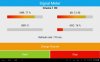
Layout is perfect except that the Text in the labels, buttons, etc are not scaling.
I dont know if this make a difference --I used %x and %y through out the Designer Script.
I tried using AutoScale(Button1) and AutoScaleAll but no difference. How can I make the text scale?
Thanks
I just finished writing an app and using the Designer Script.
Layout is perfect except that the Text in the labels, buttons, etc are not scaling.
I dont know if this make a difference --I used %x and %y through out the Designer Script.
I tried using AutoScale(Button1) and AutoScaleAll but no difference. How can I make the text scale?
Thanks