Android Question B4A Edit a code module

jccraig

Member
Licensed User
Longtime User
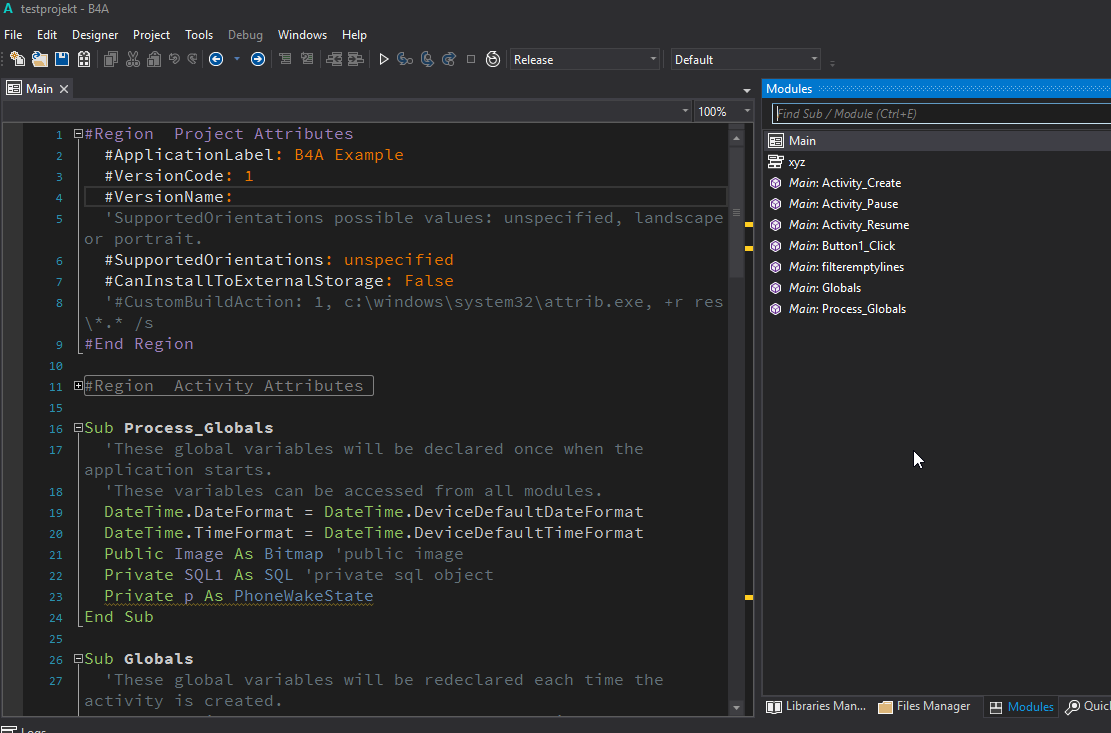
Just getting started here, but I must be doing something really silly. I used Project>Add New Module>Code Module, gave it a name of xyz, and it showed up in the IDE ready to edit. But when I close the tab by clicking on its "X", I can't find any way to reopen that module for editing. It shows in the Files Manager window, after I copy it into the Files folder, but how do I select it and open it again? I'm using B4A Vs. 5.20 in a Windows 10 environment.
 
Last edited:

jccraig

Member
Licensed User
Longtime User
Also, on a related note, shouldn't the new code and class modules be created in the Files folder in the project, so they'll show in the Files Manager list? I must be missing something really basic here. Thanks for your help.
 
Upvote 0

DonManfred

Expert
Licensed User
Longtime User
Also, on a related note, shouldn't the new code and class modules be created in the Files folder in the project, so they'll show in the Files Manager list?
No. New Modules (Code-, Service-, Activity-Modules) will be placed in the same folder as the Projectfile is (b4a). They should NOT be placed in the files folder.

And for the missing xyz module you should look at the MODULES tab inside the IDE.

modulexyz0022.png


Here you can click on the xyz module to open it. You also can use CTRL-E to find the module. [CTRL-E]xyz[return] and the module will open

PS: Welcome in our community!
 
Upvote 0

udg

Expert
Licensed User
Longtime User
Hi jccraig,

since Manfred already replied optimally to your request, I modestly break in to anticipate your obvious next question "What's used for the File manager then?".
Files tab is the place where you add files to be coupled with your app. Examples are images, icons, sound tracks..; whatever helps to make your app unique.
Oh, in FM you can even add a sqlite db file, but in that case recall to move it to a real, not readonly folder before operating on it.

Welcome in our fantastic B4xers community!

udg
 
Upvote 0

jccraig

Member
Licensed User
Longtime User
Thank you for both replies! Now it makes more sense. I have a strong VB background (wrote books for Microsoft and O'Reilly) so I find myself sometimes trying to force fit new things with the old ways of doing things. So far, as I start to grasp the B4A way, I'm finding I like it a lot. Great programming concept and environment!
 
Upvote 0

udg

Expert
Licensed User
Longtime User
Don't forget to have a good look at B4J too! I simply love it.
 
Upvote 0
Top