
Currently, you can do cross-platform layout conversion, for example xyz.bjl to xyz.bal, by:
1. open a new B4J project
2. copy xyz.bjl to its Files folder
3. open the projects .b4j in the B4J IDE
4. use the Files tab to add xyz.bjl
5. go to the internal designer, open the xyz layout file
6. select all views and copy them to the clipboard
7. close the B4J IDE and open the target B4A IDE
8. go to internal designer and open a new empty layout
9. paste the clipboard content to the layout and save as xyz.bal
You need to do steps 2, 4, 5, 8 and 9 for every layout and every variant you want to convert.
If you forget to check the XUI views and BCEngine libraries in the B4A IDE Library panel
you'll find you have to do things over again.
The Internal Designer does its conversion magic in a black box, so we can't see what changes it made.
This process is cumbersome and invites errors that can remain hidden until some expected event happens.
There are ways to convert layout files (.bjl, .bal, .bil) to .json files and back.
 www.b4x.com
But these different platform-specific .json files are not compatible with each other.
www.b4x.com
But these different platform-specific .json files are not compatible with each other.
The .json files contain all the layout information but they are overly bulky and difficult to review.
Moreover, the layout and .json files have many elements that are unrelated to the salient features of layout design.
So here is my solution.
1. Extract the salient information from the .json files and use that to make a generic layout .txt file
2. Generate any of the three platform layouts from the generic layout .txt file
This way any of (.bjl, .bal, .bil) can be converted to any of (.bjl, .bal, .bil)
Consider a layout file named 'complex' as displayed in the following screenshot:
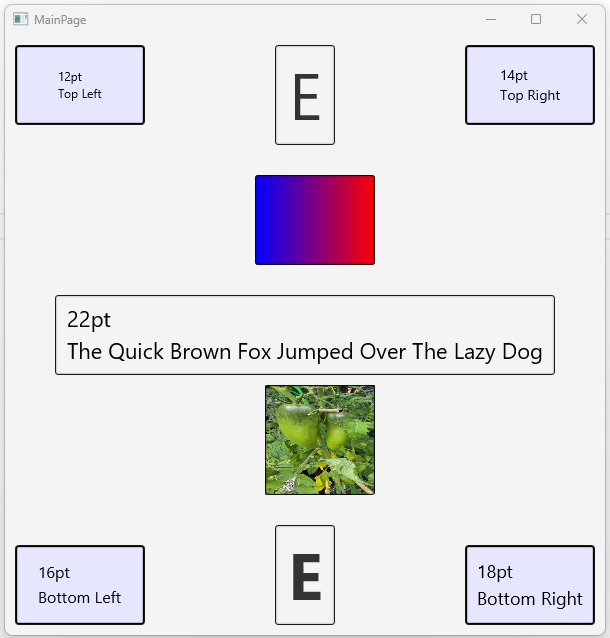
If we can achieve this:
complex_bjl.json → complex_bjl.txt=complex_bal.txt=complex_bil.txt → complex_bjl.json
complex_bal.json → complex_bjl.txt=complex_bal.txt=complex_bil.txt → complex_bal.json
complex_bil.json → complex_bjl.txt=complex_bal.txt=complex_bil.txt → complex_bil.json
Then we will have reached our final goal if and only if for each of the three lines above:
the first json equals the last json and the middle layer files are all the same.
I have attached the WiLXLayouts.b4xlib and an example app that uses it.
Don't forget to copy WiLXLayouts.b4xlib to your Additional folder
In the next few posts I will describe in more detail how to use it.
1. open a new B4J project
2. copy xyz.bjl to its Files folder
3. open the projects .b4j in the B4J IDE
4. use the Files tab to add xyz.bjl
5. go to the internal designer, open the xyz layout file
6. select all views and copy them to the clipboard
7. close the B4J IDE and open the target B4A IDE
8. go to internal designer and open a new empty layout
9. paste the clipboard content to the layout and save as xyz.bal
You need to do steps 2, 4, 5, 8 and 9 for every layout and every variant you want to convert.
If you forget to check the XUI views and BCEngine libraries in the B4A IDE Library panel
you'll find you have to do things over again.
The Internal Designer does its conversion magic in a black box, so we can't see what changes it made.
This process is cumbersome and invites errors that can remain hidden until some expected event happens.
There are ways to convert layout files (.bjl, .bal, .bil) to .json files and back.
[B4X] BalConverter - Convert the layouts files to JSON (and vice versa)
Automation tool: https://www.b4x.com/android/forum/threads/b4x-jsonlayouts-synchronize-json-and-binary-layouts.167398/#content BalConverter is a B4J app (desktop app) that converts between the designer layout files and JSON format. This allows you to edit the layout with a text editor. Note...
www.b4x.com
The .json files contain all the layout information but they are overly bulky and difficult to review.
Moreover, the layout and .json files have many elements that are unrelated to the salient features of layout design.
So here is my solution.
1. Extract the salient information from the .json files and use that to make a generic layout .txt file
2. Generate any of the three platform layouts from the generic layout .txt file
This way any of (.bjl, .bal, .bil) can be converted to any of (.bjl, .bal, .bil)
Consider a layout file named 'complex' as displayed in the following screenshot:
If we can achieve this:
complex_bjl.json → complex_bjl.txt=complex_bal.txt=complex_bil.txt → complex_bjl.json
complex_bal.json → complex_bjl.txt=complex_bal.txt=complex_bil.txt → complex_bal.json
complex_bil.json → complex_bjl.txt=complex_bal.txt=complex_bil.txt → complex_bil.json
Then we will have reached our final goal if and only if for each of the three lines above:
the first json equals the last json and the middle layer files are all the same.
I have attached the WiLXLayouts.b4xlib and an example app that uses it.
Don't forget to copy WiLXLayouts.b4xlib to your Additional folder
In the next few posts I will describe in more detail how to use it.
Attachments
Last edited:


