
B4J Library [B4X] MinimaListUtils

Version : 3.00

A utility class to manipulate a simple List of Map to do basic CRUD.
Treat it as some kind of a NoSQL for key-value pairs.
It is suitable for small demo if you don't want to use SQL database.

Depends on:
  • RandomAccessFile
Note: You can use File.ReadBytes and File.WriteBytes to read/write to a file.

This b4xlib replaces the class from MinimaList formerly published in B4J code snippet.

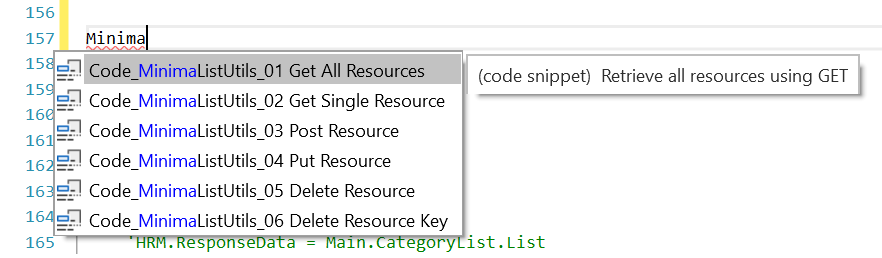
Code snippets also included for creating RESTful API subs for MinimaList Controller when developing with Web API Template 2.04+.
1697614452588.png


Properties
  • First As Map (read)
  • Last As Map (read)
  • List As List (read/write)
  • CaseSensitive As Boolean (read/write)
Methods
  • Add (M As Map)
  • Clone As MinimaList
  • ContainsKey (key As String) As Boolean
  • CopyList As Object
  • CopyObject (O As Object) As Object
  • CountById (key As String, id As Long) As Int
  • CreateFromList (L As List) As MinimaList
  • CreateType (id As Int, value As Object) As mType
  • Exclude (id As Long) As List
  • ExcludeAll (keys As List, values As List) As List
  • ExcludeAny (keys As List, values As List) As List
  • Find (id As Long) As Map
  • FindAll (keys As List, values As List) As List
  • FindAnyLike (keys As List, values As List) As List
  • FindByKey (key As String, value As Object)
  • FindFirst (keys As List, values As List) As Map
  • IndexFromId (id As Long) As Long
  • IndexFromMap (M As Map) As Long
  • Limit (Number As Int) As MinimaList
  • Merge (ML As MinimaList, key1 As String, key2 As String) As MinimaList
  • Remove (index As Long)
  • Remove2 (M As Map)
  • RemoveKey (key As String, index As Long)
  • RemoveKey2 (key As String, M As Map)
  • ResetFirstAndLast
  • Reverse As MinimaList
  • SortByKey (key As String, ascending As Boolean)
  • SortByKey2 (key As String, ascending As Boolean, default As Object)
What's New
  • Version 3.00
    • Added Merge sub
    • Added CaseSensitive property
    • Added CreateFromList sub (Private)
    • Added ResetFirstAndLast sub (Private)
    • First property is now read only
    • Last property is now read only
    • Updated List property (write)
    • Updated Add sub
    • Updated Clone sub
    • Replaced Count with CountById and updated
    • Updated Remove sub
    • Updated Remove2 sub
    • Updated RemoveKey sub
    • Updated IndexFromMap sub
    • Updated IndexFromId sub
    • Updated Find sub
    • Updated FindByKey sub
    • Updated FindFirst sub
    • Updated FindAll sub
    • Updated FindAnyLike sub
    • Updated Exclude sub
    • Updated ExcludeAll sub
    • Updated ExcludeAny sub
    • Updated Reverse sub
    • Updated Limit sub
    • Updated ContainsKey sub
    • Updated SortByKey sub
    • Updated SortByKey2 sub
    • Updated CreateType sub
    • Added Macros for building B4X library
    • Added CustomBuildAction
  • Version 2.00
    • Update Clone method
    • Add #Macro tags
  • Version 1.80
    • Added ContainsKey
    • Renamed CreatemType to CreateType
  • Version 1.07
    • Added Limit
    • Replace dependency of KeyValueStore to RandomAccessFile
  • Version 1.06
    • Added Clone
    • Update Reverse return the resulted object
    • Update SortByKey
    • Added SortByKey2
    • First and Last properties are now writable
  • Version 1.05
    • Fix bug in SortByKey
    • Added CopyObject
    • Update CopyList
  • Version 1.04
    • Added Reverse, FindByKey, SortByKey
    • Updated Snippet 08
  • Version 1.03
    • Update Snippets, removed #plural tag
  • Version 1.02
    • Added CopyList sub
  • Version 1.01
    • Add KeyValueStore dependency to manifest file

GitHub: https://github.com/pyhoon/MinimaListUtils-B4X
 

Attachments

  • MinimaListUtils.b4xlib
    6.5 KB · Views: 232
Last edited:

aeric

Expert
Licensed User
Longtime User
  • Version 1.05
    • Fix bug in SortByKey
    • Added CopyObject
    • Update CopyList
 

aeric

Expert
Licensed User
Longtime User
Base on the example using Type Variable in this post: https://www.b4x.com/android/forum/threads/need-help-with-structures.163479/#post-1002764

B4X:
Sub Example
    Dim Persons As MinimaList
    Persons.Initialize
    Dim missing As Int = -1
    Dim names() As String = Array As String("John", "Alice", "Anne", "Michael", "Gordon", "William")
    For Each name As String In names
        Dim age As Int = Rnd(18, 90)
        If age Mod 2 = 0 Then age = missing
        Dim person As Map = CreatePerson(1, name, "", "", age)
        Persons.Add(person)
    Next
    
    Log($"id${TAB}Name${TAB}Age${TAB}Group"$)
    For Each p As Map In Persons.List
        Log(p.Get("id") & TAB & p.Get("Name") & TAB & IIf(missing = p.Get("Age"), "-", p.Get("Age")) & TAB & p.Get("Group"))
    Next
    
    ' Update value
    Persons.FindByKey("Name", "Anne").Put("Age", 22)
    
    ' Sort by key
    Persons.SortByKey("Age", True)
    
    Log(TAB)
    Log($"id${TAB}Name${TAB}Age${TAB}Group"$)
    For Each p As Map In Persons.List
        Log(p.Get("id") & TAB & p.Get("Name") & TAB & IIf(missing = p.Get("Age"), "-", p.Get("Age")) & TAB & p.Get("Group"))
    Next
End Sub

Sub CreatePerson (Group As Int, Name As String, Address As String, City As String, Age As Int) As Map
    Return CreateMap("Group": Group, "Name": Name, "Address": Address, "City": City, "Age": Age)
End Sub

B4X:
id   Name     Age    Group
1    John     77     1
2    Alice    -      1
3    Anne     33     1
4    Michael  -      1
5    Gordon   -      1
6    William  57     1
    
id   Name     Age    Group
2    Alice    -      1
4    Michael  -      1
5    Gordon   -      1
3    Anne     22     1
6    William  57     1
1    John     77     1
 

aeric

Expert
Licensed User
Longtime User
  • Version 1.06
    • Added Clone
    • Update Reverse return the resulted object
    • Update SortByKey
    • Added SortByKey2
    • First and Last properties are now writable
Based on example on post #8 above
B4X:
' Sort by key
Persons.SortByKey("Age", True)

' Put default value if key does not exist
Persons.SortByKey2("Age", True, -1)

B4X:
Log(Persons.Reverse.List)

B4X:
Log(Persons.Last)
Dim Clone1 As MinimaList = Persons.Clone
Log(Clone1.Last)

Log(Clone1.Reverse)
Log(Clone1.Last)

Log(Persons.Last) ' original MinimaList has not affected
 

aeric

Expert
Licensed User
Longtime User
It depends on KeyValueStore library.
Note: You can remove this dependency and use File.WriteBytes and File.ReadBytes.
I think it is possible. I haven't tested it.
I added the dependency so it is automatically available to use in MinimaList/Web Api template.

Basically there are 2 methods in the library that depends on jRandomAccessFile or equivalent in other platforms.
Edit: Methods SortByKey, SortByKey2 and Clone also depends on these 2 methods.

B4X:
' Make a copy of the List
Public Sub CopyList As List
    Dim ser As B4XSerializator
    Return ser.ConvertBytesToObject(ser.ConvertObjectToBytes(mList))
End Sub

' Make a copy of an Object/Map
Public Sub CopyObject (xo As Object) As Object
    Dim ser As B4XSerializator
    Return ser.ConvertBytesToObject(ser.ConvertObjectToBytes(xo))
End Sub

Why we want to avoid using KeyValueStore library?
Because this library is dependent on SQL library.
If you want to make a smaller project then you may want to consider this question.
 
Last edited:

aeric

Expert
Licensed User
Longtime User
I think it is possible. I haven't tested it.
I added the dependency so it is automatically available to use in MinimaList/Web Api template.

Basically there are 2 methods in the library that depends on jRandomAccessFile or equivalent in other platforms.
Edit: Methods SortByKey, SortByKey2 and Clone also depends on these 2 methods.

B4X:
' Make a copy of the List
Public Sub CopyList As List
    Dim ser As B4XSerializator
    Return ser.ConvertBytesToObject(ser.ConvertObjectToBytes(mList))
End Sub

' Make a copy of an Object/Map
Public Sub CopyObject (xo As Object) As Object
    Dim ser As B4XSerializator
    Return ser.ConvertBytesToObject(ser.ConvertObjectToBytes(xo))
End Sub

Why we want to avoid using KeyValueStore library?
Because this library is dependent on SQL library.
If you want to make a smaller project then you may want to consider this question.

I have tested.
Just replace KeyValueStore library with RandomAccessFile library.

A simple app compiled with the following:
KeyValueStore: 3250 KB
RandomAccessFile: 140 KB (reduced 95% of size or 3110 KB)

B4X:
Dim Clone1 As MinimaList = Persons.Clone
Dim data As Map = CreateMap("persons": Clone1.List)
Dim ser As B4XSerializator
File.WriteBytes(File.DirApp, "data", ser.ConvertObjectToBytes(data))

Dim data As Map = ser.ConvertBytesToObject(File.ReadBytes(File.DirApp, "data"))
Dim persons As MinimaList
persons.Initialize
persons.List = data.Get("persons")
Log(persons.FindByKey("name", "aeric"))
 
Last edited:

aeric

Expert
Licensed User
Longtime User
Version 1.07
  • Added Limit
  • Replace dependency of KeyValueStore to RandomAccessFile
 

aeric

Expert
Licensed User
Longtime User
Version 3.00
  • Added Merge sub
  • Added Macros for building B4X library
  • Added CustomBuildAction
  • Added CaseSensitive property
  • Added CreateFromList sub (Private)
  • Added ResetFirstAndLast sub (Private)
  • First property is now read only
  • Last property is now read only
  • Updated List property (write)
  • Updated almost all subs
 

RIlestia

New Member
Version : 3.00

A utility class to manipulate a simple List of Map to do basic CRUD.
Treat it as some kind of a NoSQL for key-value pairs.
It is suitable for small demo if you don't want to use SQL database.

Depends on:
  • RandomAccessFile
Note: You can use File.ReadBytes and File.WriteBytes to read/write to a file.

This b4xlib replaces the class from MinimaList formerly published in B4J code snippet.

Code snippets also included for creating RESTful API subs for MinimaList Controller when developing with Web API Template 2.04+.

View attachment 146981

Properties
  • First As Map (read)
  • Last As Map (read)
  • List As List (read/write)
  • CaseSensitive As Boolean (read/write)
Methods
  • Add (M As Map)
  • Clone As MinimaList
  • ContainsKey (key As String) As Boolean
  • CopyList As Object
  • CopyObject (O As Object) As Object
  • CountById (key As String, id As Long) As Int
  • CreateFromList (L As List) As MinimaList
  • CreateType (id As Int, value As Object) As mType
  • Exclude (id As Long) As List
  • ExcludeAll (keys As List, values As List) As List
  • ExcludeAny (keys As List, values As List) As List
  • Find (id As Long) As Map
  • FindAll (keys As List, values As List) As List
  • FindAnyLike (keys As List, values As List) As List
  • FindByKey (key As String, value As Object)
  • FindFirst (keys As List, values As List) As Map
  • IndexFromId (id As Long) As Long
  • IndexFromMap (M As Map) As Long
  • Limit (Number As Int) As MinimaList
  • Merge (ML As MinimaList, key1 As String, key2 As String) As MinimaList
  • Remove (index As Long)
  • Remove2 (M As Map)
  • RemoveKey (key As String, index As Long)
  • RemoveKey2 (key As String, M As Map)
  • ResetFirstAndLast
  • Reverse As MinimaList
  • SortByKey (key As String, ascending As Boolean)
  • SortByKey2 (key As String, ascending As Boolean, default As Object)
What's New
  • Version 3.00
    • Added Merge sub
    • Added CaseSensitive property
    • Added CreateFromList sub (Private)
    • Added ResetFirstAndLast sub (Private)
    • First property is now read only
    • Last property is now read only
    • Updated List property (write)
    • Updated Add sub
    • Updated Clone sub
    • Replaced Count with CountById and updated
    • Updated Remove sub
    • Updated Remove2 sub
    • Updated RemoveKey sub
    • Updated IndexFromMap sub
    • Updated IndexFromId sub
    • Updated Find sub
    • Updated FindByKey sub
    • Updated FindFirst sub
    • Updated FindAll sub
    • Updated FindAnyLike sub
    • Updated Exclude sub
    • Updated ExcludeAll sub
    • Updated ExcludeAny sub
    • Updated Reverse sub
    • Updated Limit sub
    • Updated ContainsKey sub
    • Updated SortByKey sub
    • Updated SortByKey2 sub
    • Updated CreateType sub
    • Added Macros for building B4X library
    • Added CustomBuildAction
  • Version 2.00
    • Update Clone method
    • Add #Macro tags
  • Version 1.80
    • Added ContainsKey
    • Renamed CreatemType to CreateType
  • Version 1.07
    • Added Limit
    • Replace dependency of KeyValueStore to RandomAccessFile
  • Version 1.06
    • Added Clone
    • Update Reverse return the resulted object
    • Update SortByKey
    • Added SortByKey2
    • First and Last properties are now writable
  • Version 1.05
    • Fix bug in SortByKey
    • Added CopyObject
    • Update CopyList
  • Version 1.04
    • Added Reverse, FindByKey, SortByKey
    • Updated Snippet 08
  • Version 1.03
    • Update Snippets, removed #plural tag
  • Version 1.02
    • Added CopyList sub
  • Version 1.01
    • Add KeyValueStore dependency to manifest file

GitHub: https://github.com/pyhoon/MinimaListUtils-B4X bowl games
Could you share a simple example showing how to create a MinimaList, add some maps, save/load the data, and find an item? Also, are there any limitations on the list size or concurrent access?
 

aeric

Expert
Licensed User
Longtime User
a simple example
I suggest you post question in new thread in the future.

Here is an answer taken from Google:

1. Initialization and Create (C)​

B4X:
' Declare the utility class (usually in Class_Globals or Process_Globals)
Private ml As MinimaList

' Initialize it
ml.Initialize

' Create and add some mock data (Map structures)
Dim User1 As Map = CreateMap("id": 1, "name": "Alice", "role": "Admin", "age": 28)
Dim User2 As Map = CreateMap("id": 2, "name": "Bob", "role": "User", "age": 34)
Dim User3 As Map = CreateMap("id": 3, "name": "Charlie", "role": "User", "age": 22)

ml.Add(User1)
ml.Add(User2)
ml.Add(User3)

Log("Total users added: " & ml.List.Size) ' Prints 3

2. Read and Query (R)​

B4X:
' Find a specific record using its ID
Dim FoundUser As Map = ml.Find(2)
If FoundUser.IsInitialized Then
    Log("Found User ID 2: " & FoundUser.Get("name")) ' Prints "Bob"
End If

' Filter data: Find all records matching specific criteria
' Example: Find all users whose "role" is "User"
Dim MatchingUsers As List = ml.FindAll(Array As String("role"), Array As Object("User"))
For Each User As Map In MatchingUsers
    Log("Matched User: " & User.Get("name")) ' Prints "Bob" and "Charlie"
Next

' Check if a specific property key exists inside the dataset
If ml.ContainsKey("role") Then
    Log("The dataset contains a 'role' definition.")
End If

3. Update (U)​

B4X:
' Grab the reference to the user profile
Dim UserToUpdate As Map = ml.Find(1)
If UserToUpdate.IsInitialized Then
    ' Modify the value directly within the collection
    UserToUpdate.Put("age", 29)
    Log("Alice's updated age: " & ml.Find(1).Get("age")) ' Prints 29
End If

4. Delete (D)​

B4X:
' Option A: Remove a record using its explicit Map profile
Dim TargetUser As Map = ml.Find(3)
If TargetUser.IsInitialized Then
    ml.Remove2(TargetUser) ' Charlie is removed
End If

' Option B: Remove an item using its position index
' Let's find index position of Alice (ID: 1)
Dim ItemIndex As Long = ml.IndexFromId(1)
If ItemIndex > -1 Then
    ml.Remove(ItemIndex) ' Alice is removed
End If

5. Bonus Utilities (Sorting & Limiting)​

B4X:
' Sort users by their "age" key in ascending order
ml.SortByKey("age", True)

' Limit the list to only return the top 2 elements
Dim LimitedList As MinimaList = ml.Limit(2)

' Quickly peak at the extreme boundary values
Dim TopPerson As Map = ml.First
Dim BottomPerson As Map = ml.Last

Other examples:
https://www.b4x.com/android/forum/threads/b4x-b4xtable-sample-working-with-minimalist.168717/
https://www.b4x.com/android/forum/threads/minimalist-player-scoreboard.164122/
 

aeric

Expert
Licensed User
Longtime User
are there any limitations on the list size or concurrent access?
The limitation is same as B4X list and maps.
As far as I know, it has great performance.
As I suggested, use it for small apps, not for concurrent access. Do not use it to replace SQLite.
 
Top