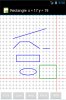
Android Question Create Grid on which to draw upon

lock255

Well-Known Member
Licensed User
Longtime User
I would like to create a grid where I can get the coordinates of each point (kind of a sheet of squared paper), so that I could connect to the lines and then create a design.
Anyone have any suggestions that can help me to solve the problem?
 

klaus

Expert
Licensed User
Longtime User
You can draw the grid onto the activity or a panel.
Use another panel for the drawing and with the Touch event of this panel you get the current position of the touch point and calculate the the equivalent grid coordinate and draw with these coordinates.
 
Upvote 0

lock255

Well-Known Member
Licensed User
Longtime User
What I would, but I need to know:
  1. How do I draw the grid on the panel?
  2. If a device with a smaller screen or larger, the grid is resized, but I need the coordinates to the points of intersection in the grid remain the same.
 
Upvote 0

klaus

Expert
Licensed User
Longtime User
Attached you find a small drawing program with a grid.
It's not exactly what you are looking for but you can see the principle.
 

Attachments

  • DrawGrid.jpg
    DrawGrid.jpg
    64.7 KB · Views: 303
  • DrawGrid.zip
    7.7 KB · Views: 238
Upvote 0

lock255

Well-Known Member
Licensed User
Longtime User
You can explain a few things the example you gave me attached:
  1. How can I remove the function of the oblique line?
  2. If I wanted to find the coordinates of a point as I do?
 
Upvote 0

klaus

Expert
Licensed User
Longtime User
How can I remove the function of the oblique line?
I suppose you mean having a 'cursor' function.
If you mean deleting a drawn object, this will first need:
- Defining drawing objects and memorizing them with their properties in a list.
And then to delete an object:
- Remove the object from the list and redraw the whole drawing.

Attached you find a new version.
- Added a cursor function showing a cursor and its coordinates.
- Added a delete function which deletes the whole drawing.
 

Attachments

  • DrawGrid1.jpg
    DrawGrid1.jpg
    70.4 KB · Views: 247
  • DrawGrid1.zip
    8.1 KB · Views: 234
Last edited:
Upvote 0

lock255

Well-Known Member
Licensed User
Longtime User
  1. Wow the cursor works fine, you're a magician!
  2. I did not mean to delete the entire design but two buttons, which allow you to go back and forth with the modiriche (like in a browser or CAD editing)
  3. I would like to put a button that draws only straight horizontal and veticali (no oblique lines). What I wish is that possible?
 
Upvote 0

klaus

Expert
Licensed User
Longtime User
You should do the next steps of the program yourself, with the example programs have the basic principles.
3. This is relatively easy, based on the oblic line drawing you can adapt it for horizontal and vertical lines.
2. This a bit more complicated.
You must define what exactly you want, because the principle may be different according to what you need.
- Memorizing only the bitmap or memorizing also the object type and its properties.
 
Upvote 0
Top