
Android Question Different behaviour Android 14 and 15 with Action Bar Height

josejad

Expert
Licensed User
Longtime User
Hi all:

Probably I've lost some update, but I can't find the reason why the panel under the action bar is different on android 14 and 15.
See attached a project test

The first image is on my Samsung A13 with Android 14, the second one a Samsung A14 with Android 15. Probably something just in front my eyes
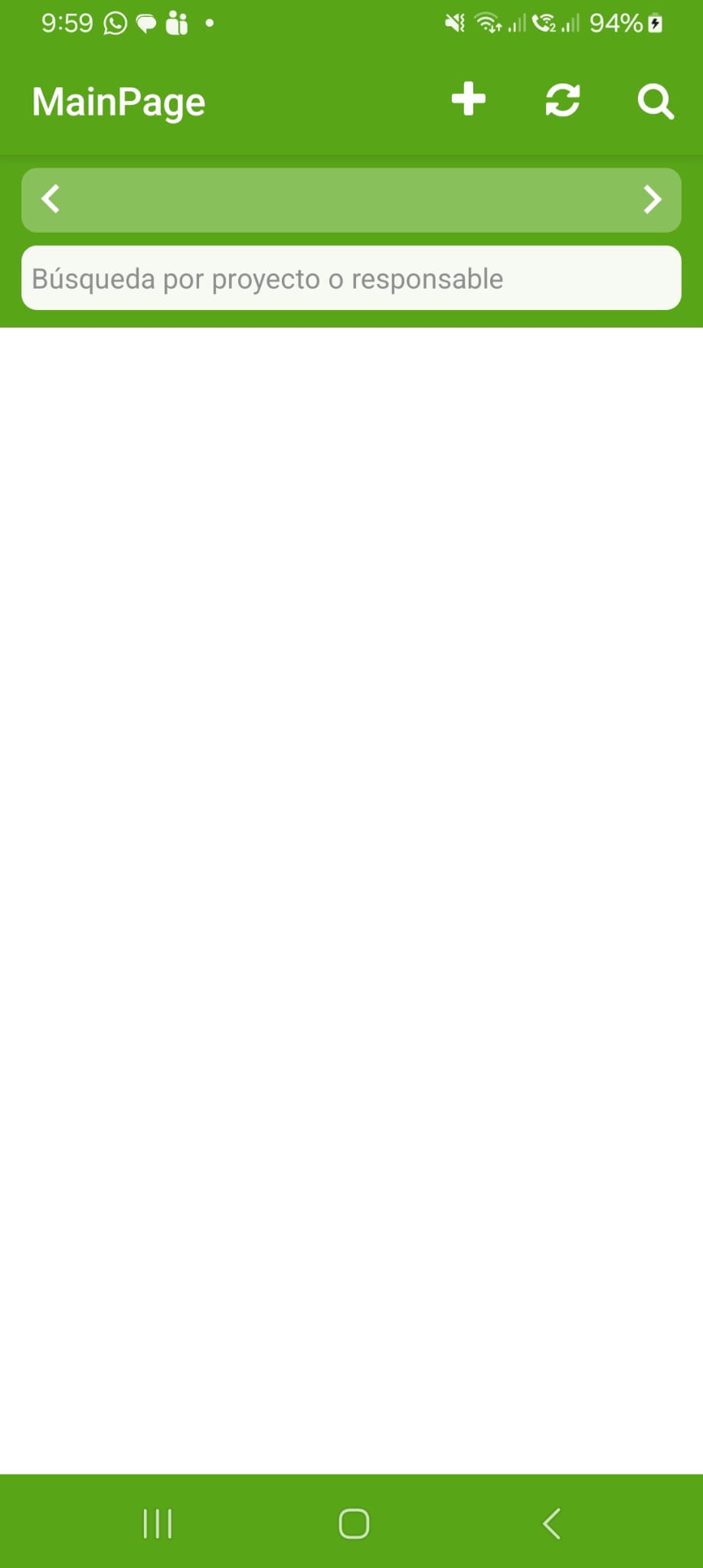
A13.jpeg
A14.jpg


Thanks in advance
 

Attachments

  • TestMenu.zip
    19 KB · Views: 9

josejad

Expert
Licensed User
Longtime User
Hi aeric, thanks for your answer

You're right. I'd read that post about edge-to-edge, but I saw this line: "Starting from B4A v13.4, the default themes (Themes.LightTheme / Themes.DarkTheme) already include the snippet that opts out of edge-edge. You only need this if you use a customize theme." so I thought my manifest was right as it was created using the version 13.5
But re-reading now, the key is the "You only need this if you use a customize theme"

So, the problem is in the theme customization, I will search how to customize them with the targetSdkVersion = 35. If I remove this part, it works

B4X:
'Theme colors
'https://www.b4x.com/android/forum/threads/theme-colors.87716/#content
SetApplicationAttribute(android:theme, "@style/LightTheme")
CreateResource(values, colors.xml,
<resources>
    <color name="actionbar">#58A618</color>
   <color name="statusbar">#58A618</color>
   <color name="textColorPrimary">#ffffffff</color>
   <color name="navigationBar">#58A618</color>
   <color name="bkgMenu">#58A618</color>
   <color name="window">#ffffffff</color>
</resources>
)
CreateResource(values-v20, theme.xml,
<resources>
    <style name="LightTheme" parent="@android:style/Theme.Material.Light">
        <item name="android:colorPrimary">@color/actionbar</item>
        <item name="android:colorPrimaryDark">@color/statusbar</item>
        <item name="android:textColorPrimary">@color/textColorPrimary</item>
        <item name="android:navigationBarColor">@color/navigationBar</item>
        <item name="android:itemBackground">@color/bkgMenu</item>
         <item name="android:windowBackground">@color/window</item>
    </style>
</resources>
)
CreateResource(values-v14, theme.xml,
<resources>
    <style name="LightTheme" parent="@android:style/Theme.Holo.Light">
       <item name="android:actionBarStyle">@style/CustomActionBarStyle</item>
    </style>
   <style name="CustomActionBarStyle" parent="@android:style/Widget.Holo.Light.ActionBar.Solid.Inverse">
       <item name="android:background">@color/actionbar</item>
   </style>
        <style
        name="DarkTheme" parent="@android:style/Theme.Material.Light.NoActionBar.Fullscreen">
          <item name="android:windowBackground">@color/window</item>
    </style>
</resources>
)
 
Last edited:
Upvote 0

aeric

Expert
Licensed User
Longtime User
Latest news:

maybe the opt-out will not work soon.
 
Upvote 0

josejad

Expert
Licensed User
Longtime User
Found!!

I've just added this line

B4X:
<item name="android:windowOptOutEdgeToEdgeEnforcement">true</item>

and now it works

B4X:
SetApplicationAttribute(android:theme, "@style/LightTheme")
CreateResource(values, colors.xml,
<resources>
    <color name="actionbar">#58A618</color>
   <color name="statusbar">#58A618</color>
   <color name="textColorPrimary">#ffffffff</color>
   <color name="navigationBar">#58A618</color>
   <color name="bkgMenu">#58A618</color>
   <color name="window">#ffffffff</color>
</resources>
)
CreateResource(values-v20, theme.xml,
<resources>
    <style name="LightTheme" parent="@android:style/Theme.Material.Light">
        <item name="android:colorPrimary">@color/actionbar</item>
        <item name="android:colorPrimaryDark">@color/statusbar</item>
        <item name="android:textColorPrimary">@color/textColorPrimary</item>
        <item name="android:navigationBarColor">@color/navigationBar</item>
        <item name="android:itemBackground">@color/bkgMenu</item>
         <item name="android:windowBackground">@color/window</item>
         <item name="android:windowOptOutEdgeToEdgeEnforcement">true</item>
    </style>
</resources>
)
 
Upvote 0

aeric

Expert
Licensed User
Longtime User
Google:
Starting August 31, 2026, Google Play requires all new apps and app updates to target Android 16 (API level 36). Under this target SDK, the windowOptOutEdgeToEdgeEnforcement attribute is completely deprecated, disabled, and ignored.
While Android 15 (API level 35) allowed a temporary layout fallback by setting android:windowOptOutEdgeToEdgeEnforcement="true", targeting API level 36 means edge-to-edge rendering is strictly mandatory. Your app will automatically be forced to draw behind the system status and navigation bars. If you do not adapt your layouts, your content will overlap with system bars, creating a broken user experience.
 
Upvote 0
Top