
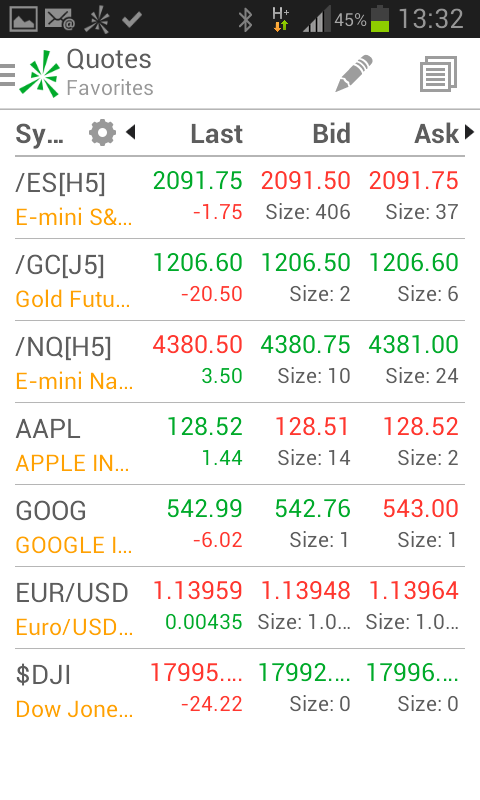
Alberto Michelis Well-Known Member Licensed User Longtime User Feb 18, 2015 #1 Hi, I own a licence of B4A and I need to program an app with as creen like the atached image. Also there are more columns that the user can see using the header arrows. Any example of how to do it? Thanks
Hi, I own a licence of B4A and I need to program an app with as creen like the atached image. Also there are more columns that the user can see using the header arrows. Any example of how to do it? Thanks
Erel B4X founder Staff member Licensed User Longtime User Feb 18, 2015 #2 You can use CustomListView class to create a list with any layout you like: https://www.b4x.com/android/forum/threads/19567/#content Upvote 0
You can use CustomListView class to create a list with any layout you like: https://www.b4x.com/android/forum/threads/19567/#content
KMatle Expert Licensed User Longtime User Feb 18, 2015 #3 Welcome to the forum You can do it on your own (to learn how to handle views) Take a scrollview and add it to the Activity (or to another panel you add) In a loop add 4 labels per row (or as many as you like) to the sv's panel (sv.panel.addview...) add as many rows you need adjust the sv.panel's height fill the labels as you like and play with the colors add some imageviews for the icons all views can be mixed like you want Happy scrolling and don't forget to initialize the views before using Getting access to the views you've created at runtime is done by getting them from the parent (= where you've added them). A better way is to store them in a list. Here is a sample: https://www.b4x.com/android/forum/threads/for-beginners-playing-with-views-dynamic.44621/ This example uses absolute coordinates for the views and does not take care of different screen resolutions. Upvote 0
Welcome to the forum You can do it on your own (to learn how to handle views) Take a scrollview and add it to the Activity (or to another panel you add) In a loop add 4 labels per row (or as many as you like) to the sv's panel (sv.panel.addview...) add as many rows you need adjust the sv.panel's height fill the labels as you like and play with the colors add some imageviews for the icons all views can be mixed like you want Happy scrolling and don't forget to initialize the views before using Getting access to the views you've created at runtime is done by getting them from the parent (= where you've added them). A better way is to store them in a list. Here is a sample: https://www.b4x.com/android/forum/threads/for-beginners-playing-with-views-dynamic.44621/ This example uses absolute coordinates for the views and does not take care of different screen resolutions.
Erel B4X founder Staff member Licensed User Longtime User Feb 19, 2015 #4 I recommend you to use CustomListView class which already implements the above points. Upvote 0