Android Question Match view length to text length

chuck3e

Active Member
Licensed User
Longtime User
I have text in 2 labels and the text length equals their label's width and the texts display butted together. This works fine when the phone itself is set to large font size, but when someone uses small font size the view width doesn't change enough to match the small text length and I get a large gap between text1 and text2. How can I make the view width match the text length?
 

chuck3e

Active Member
Licensed User
Longtime User
Correct me if I'm wrong, but I don't think this is what I'm looking for. I have five short words I want to join to make one longer word. I need to shrink short word's label width to match their word length, otherwise I get a large gap or an overlap between words when phones use different font sizes. Designer does a good job of automatically getting the text size correct but not the width of the views containing the text.

The problem: When the user's phone doesn't use the font size I used on the design, the text automatically changes size fit, but the view length doesn't change to match the text length.

I design with my phone set to Large Font. I tried using labels then buttons, but get the same result. See photos (These views were designed with my phone set to Large Font).

I think I have to make separate views for each short word this way because the short words must be different font types and ER must be in red. I can't do that in just one view.

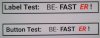
As shown, in the "Phone set to Large Font" photo, the short words are joined to spell one word as BE-FASTER! as they should. This is what I want.
But, if a users phone is not set to Large Font, the "Phone set to Small Font" photo shows what happens. The short words do not join but end up as BE- FAST ER ! The same happens with Medium Font. It is spread out also.

If I then design with my phone set to Small Font instead of Large Font, the views of the smaller words overlap when the phone used is set to Large Font, cutting off some of the letters. If I design with phone set to Medium font, then setting to Large Font causes overlap and setting to Small Font makes the gaps.

This is critical because BE-FASTER! is a copyrighted word, so I must get it right.

I might have to end up using an image file instead.

 

Attachments

  • Phone set to Large Font.JPG
    Phone set to Large Font.JPG
    351.3 KB · Views: 267
  • Phone set to Small Font.JPG
    Phone set to Small Font.JPG
    266.8 KB · Views: 266
Upvote 0

Mahares

Expert
Licensed User
Longtime User
I think I have to make separate views for each short word this way because the short words must be different font types and ER must be in red. I can't do that in just one view.
Have you thought about using CSBuilder , where you can change portion of text size, color, typeface and keep all your text in one label. Here is an example code using CSBuilder with the matching screenshot: For colors, you can use xui colors if you want.
B4X:
Dim tf As Typeface
tf = tf.CreateNew(Typeface.DEFAULT_BOLD, Typeface.STYLE_ITALIC)
Dim cs As CSBuilder
lbl.Text = cs.Initialize.Bold.Color(Colors.Black).Append("Label Test: ").Pop.Pop. _
Append("BE-").Bold.Color(Colors.Black).Append("FAST"). _
color(Colors.red).Typeface(tf).Append("ER").Pop.Bold.Color(Colors.Black).Append("!").PopAll
You could probably do it with BBLabel of BCTextEngine also.
 

Attachments

  • BeFaster.png
    BeFaster.png
    7.1 KB · Views: 254
Upvote 0

chuck3e

Active Member
Licensed User
Longtime User
Have you thought about using CSBuilder , where you can change portion of text size, color, typeface and keep all your text in one label. Here is an example code using CSBuilder with the matching screenshot: For colors, you can use xui colors if you want.
B4X:
Dim tf As Typeface
tf = tf.CreateNew(Typeface.DEFAULT_BOLD, Typeface.STYLE_ITALIC)
Dim cs As CSBuilder
lbl.Text = cs.Initialize.Bold.Color(Colors.Black).Append("Label Test: ").Pop.Pop. _
Append("BE-").Bold.Color(Colors.Black).Append("FAST"). _
color(Colors.red).Typeface(tf).Append("ER").Pop.Bold.Color(Colors.Black).Append("!").PopAll
You could probably do it with BBLabel of BCTextEngine also.

Mahares, I thought I had replied to your response but I don't see it so I'll reply again.

Thank you very much for your above code solution. I knew there had to be a way. I have tested it and it works great so far. However, I haven't tested it on the other 15,000 phones out there yet ?.

Erel, I will try your BCTextEngine suggestion. Thank you. I assume it's a B4x command. I've been a B4a coder, so I needed a B4a answer. I'm now just getting into B4x.
 
Upvote 0

Cableguy

Expert
Licensed User
Longtime User
My ignorance is on display. ?
There is no such thing as a "stupid question" and no one should feel lesser just because he doesn't know "everything "... even Einstein was a noob at some point
 
Upvote 0
Top