B4J Question MacSigner - Package

Arnaud

Active Member
Licensed User
Longtime User
Hello,

I use MacSigner v2.01 but I have an error log in Package for signing


When I click on the button "Package", I receive this log :


package:
Package completed successfully.
Signing package...
Error - 1:
error: The specified item could not be found in the keychain.

Sign completed unsuccessfully.

What is the code "Error : -1" ? The package seems ok just before, but not the Signing package

Thanks for your help
 

Attachments

  • WhatsApp Image 2026-03-18 at 13.19.48.jpeg
    WhatsApp Image 2026-03-18 at 13.19.48.jpeg
    129.6 KB · Views: 49
  • WhatsApp Image 2026-03-18 at 13.17.40.jpeg
    WhatsApp Image 2026-03-18 at 13.17.40.jpeg
    126.9 KB · Views: 49

Arnaud

Active Member
Licensed User
Longtime User
Yes, I have an Apple Developer account and it is the first time that I create a Mac Package.

I have try several times , to be sure to follow the institution of the have the right Developer ID application, that's why there are lots of certificats.
Unfortunately, we cannot revoke then the olds Developer ID application.

I have also certificat for iOS APP Smarphone, these work fine.

I am not sure for the process that Apple asks to me for the first time :

"If you're generating your first Developer ID certificate, the software that you sign it with must be notarized by Apple in order to run on macOS 10.14.5 or later. Learn how to submit your software for notarization"

Maybe this could be the problem?
 

Attachments

  • Apple account.png
    Apple account.png
    92.2 KB · Views: 49
  • First time.png
    First time.png
    106.5 KB · Views: 47
Upvote 0

Arnaud

Active Member
Licensed User
Longtime User
Here the log via B4J bridge for the fisrt steps (create key, link and package) in debug mode:

macsigner:
'Create KEY


keytool: (ArrayList) [-genkey, -dname, CN=Arnaud Chardenal,O=ALFAN0 S.A.,C=BE, -keystore, sign.keystore, -keypass, 888888, -alias, b4j, -validity, 14000, -keysize, 2048, -keyalg, RSA, -storepass, 888888]
keytool: (ArrayList) [-importkeystore, -srckeystore, sign.keystore, -destkeystore, sign.p12, -deststoretype, PKCS12, -srcstorepass, 888888, -deststorepass, 888888]
openssl: (ArrayList) [pkcs12, -in, sign.p12, -out, sign.p12.pem, -nodes, -passin, pass:888888]
openssl: (ArrayList) [req, -new, -key, sign.p12.pem, -out, certSigningRequest.csr, -subj, /CN=UNKNOWN,C=UNKNOWN]
Create key completed successfully.


'Link

B4JPackager11 Version 1.50
Exe name: run.exe
Only Java 11 and Java 19 are supported (Tools - Configure Paths).
build folder: /Users/arnaud/Downloads/temp/build
InputJar: /Users/arnaud/Downloads/ADA_PRO.jar
Running: /Users/arnaud/java/jdk-19.0.1.jdk/Contents/Home/bin/jar
Package name: b4j.ADA_WINDOWS_PRO
Running: /Users/arnaud/java/jdk-19.0.1.jdk/Contents/Home/bin/jdeps
.
.
.
.
.
Explicitly excluded modules: [javafx.web]
Included modules: [jdk.charsets, javafx.web, javafx.controls, javafx.graphics, javafx.base, javafx.media, javafx.swing, jdk.crypto.ec, java.base, java.desktop, java.logging, java.security.jgss, java.xml, java.xml.crypto, javafx.fxml, jdk.jsobject]
Running: /Users/arnaud/java/jdk-19.0.1.jdk/Contents/Home/bin/javac
Running: /Users/arnaud/java/jdk-19.0.1.jdk/Contents/Home/bin/jar
.
.
Running: /Users/arnaud/java/jdk-19.0.1.jdk/Contents/Home/bin/jlink
.
.
.
.
.
.
.
.
Done!
Link completed successfully.
You can check the linked package: /Users/arnaud/Downloads/temp/build/run.command


'Package

jpackage: (ArrayList) [-n, ADA PRO, --type, app-image, -m, b4j/b4j.ADA_WINDOWS_PRO.main, --java-options, -Dfile.encoding=UTF-8 -Dsun.stdout.encoding=UTF-8 -Dsun.stderr.encoding=UTF-8 -Dprism.order=sw --add-exports=javafx.graphics/com.sun.glass.ui=ALL-UNNAMED --add-exports=javafx.base/com.sun.javafx.collections=ALL-UNNAMED, --mac-package-identifier, b4j.ADA_WINDOWS_PRO, --java-options, --add-opens java.desktop/sun.awt=b4j --add-opens javafx.controls/com.sun.javafx.scene.control.inputmap=b4j --add-opens javafx.graphics/com.sun.javafx.scene=b4j --add-opens javafx.controls/com.sun.javafx.scene.control.behavior=b4j --add-opens javafx.graphics/com.sun.javafx.scene.traversal=b4j --add-opens javafx.graphics/javafx.scene=b4j --add-opens javafx.base/com.sun.javafx.collections=b4j --add-opens javafx.controls/com.sun.javafx.scene.control=b4j --add-opens javafx.base/com.sun.javafx.event=b4j --add-opens javafx.graphics/com.sun.javafx.css=b4j --add-opens javafx.base/com.sun.javafx.runtime=b4j --add-opens javafx.
controls/com.sun.javafx.scene.control.skin=b4j --add-opens javafx.graphics/com.sun.javafx.geom=b4j --add-opens javafx.graphics/javafx.scene.canvas=b4j --add-opens javafx.graphics/com.sun.javafx.geom.transform=b4j  --add-modules=b4j,jdk.charsets,javafx.web,javafx.controls,javafx.graphics,javafx.base,javafx.media,javafx.swing,jdk.crypto.ec,java.base,java.desktop,java.logging,java.security.jgss,java.xml,java.xml.crypto,javafx.fxml,jdk.jsobject, --runtime-image, temp/build, --dest, package]
Package completed successfully.
Signing package...
security: (ArrayList) [delete-keychain, b4j2]
security: (ArrayList) [-v, create-keychain, -p, 888888, b4j2]
security: (ArrayList) [-v, import, developerID_application.cer, -k, b4j2, -A]
security: (ArrayList) [-v, import, AppleWWDRCA.cer, -k, b4j2, -A]
security: (ArrayList) [-v, import, AppleWWDRCAG2.cer, -k, b4j2, -A]
security: (ArrayList) [-v, import, AppleIncRootCertificate.cer, -k, b4j2, -A]
security: (ArrayList) [-v, import, AppleRootCA-G2.cer, -k, b4j2, -A]
security: (ArrayList) [-v, import, AppleRootCA-G3.cer, -k, b4j2, -A]
security: (ArrayList) [-v, unlock-keychain, -p, 888888, b4j2]
openssl: (ArrayList) [pkcs12, -in, sign.p12, -info, -nokeys, -passin, pass:888888, -legacy]
Error - 1:
unknown option '-legacy'
usage: pkcs12 [-aes128 | -aes192 | -aes256 | -camellia128 |
    -camellia192 | -camellia256 | -des | -des3 | -idea]
    [-cacerts] [-CAfile file] [-caname name]
    [-CApath directory] [-certfile file] [-certpbe alg]
    [-chain] [-clcerts] [-CSP name] [-descert] [-export]
    [-in file] [-info] [-inkey file] [-keyex] [-keypbe alg]
    [-keysig] [-LMK] [-macalg alg] [-maciter] [-name name]
    [-nocerts] [-nodes] [-noiter] [-nokeys] [-nomac]
    [-nomaciter] [-nomacver] [-noout] [-out file]
    [-passin arg] [-passout arg] [-password arg] [-twopass]
 -aes128            Encrypt PEM output with CBC AES
 -aes192            Encrypt PEM output with CBC AES
 -aes256            Encrypt PEM output with CBC AES
 -camellia128       Encrypt PEM output with CBC Camellia
 -camellia192
       Encrypt PEM output with CBC Camellia
 -camellia256       Encrypt PEM output with CBC Camellia
 -des               Encrypt private keys with DES
 -des3              Encrypt private keys with triple DES (default)
 -cacerts           Only output CA certificates
 -CAfile file       PEM format file of CA certificates
 -caname name       Use name as CA friendly name (can be used more than once)
 -CApath directory  PEM format directory of CA certificates
 -certfile file     Add all certs in file
 -certpbe alg       Specify certificate PBE algorithm (default RC2-40)
 -chain             Add certificate chain
 -clcerts           Only output client certificates
 -CSP name          Microsoft CSP name
 -descert           Encrypt PKCS#12 certificates with triple DES (default RC2-40)
 -export            Output PKCS#12 file
 -in file       
   Input filename
 -info              Give info about PKCS#12 structure
 -inkey file        Private key if not infile
 -keyex             Set MS key exchange type
 -keypbe alg        Specify private key PBE algorithm (default 3DES)
 -keysig            Set MS key signature type
 -LMK               Add local machine keyset attribute to private key
 -macalg alg        Digest algorithm used in MAC (default SHA1)
 -maciter           Use MAC iteration
 -name name         Use name as friendly name
 -nocerts           Don't output certificates
 -nodes             Don't encrypt private keys
 -noiter            Don't use encryption iteration
 -nokeys            Don't output private keys
 -nomac             Don't generate MAC
 -nomaciter         Don't use MAC iteration
 -nomacver          Don't verify MAC
 -noout       
      Don't output anything, just verify
 -out file          Output filename
 -passin arg        Input file passphrase source
 -passout arg       Output file passphrase source
 -password arg      Set import/export password source
 -twopass           Separate MAC, encryption passwords
removing legacy option
openssl: (ArrayList) [pkcs12, -in, sign.p12, -info, -nokeys, -passin, pass:888888]
converting to legacy key
openssl: (ArrayList) [pkcs12, -in, sign.p12, -out, keypair.pem, -passin, pass:888888, -passout, pass:888888]
openssl: (ArrayList) [pkcs12, -export, -in, keypair.pem, -out, sign.p12, -passin, pass:888888, -passout, pass:888888]
security: (ArrayList) [import, sign.p12, -k, b4j2, -P, 888888, -A]
security: (ArrayList) [set-keychain-settings, -t, 9900000, b4j2]
security: (ArrayList) [set-key-partition-list, -S, apple-tool:,apple:, -s, -k, 888888, b4j2]
security: (ArrayList) [list-keychains, -s, b4j2]
codesign: (ArrayList) [--entitlements, /Users/arnaud/SignerKeys/entitlements.plist, --timestamp, -o, runtime, -f, -s, Developer ID Application: ALFANO (6QM64TV4AV), --keychain, b4j2, /Users/arnaud/Downloads/package/ADA PRO.app/Contents/runtime/Contents/Home/bin/jrunscript]
Error - 1:
error: The specified item could not be found in the keychain.
Sign completed unsuccessfully.

 
Upvote 0

Erel

B4X founder
Staff member
Licensed User
Longtime User
The message about the legacy flag is not a real error.

It fails here:
codesign: (ArrayList) [--entitlements, /Users/arnaud/SignerKeys/entitlements.plist, --timestamp, -o, runtime, -f, -s, Developer ID Application: ALFANO (6QM64TV4AV), --keychain, b4j2, /Users/arnaud/Downloads/package/ADA PRO.app/Contents/runtime/Contents/Home/bin/jrunscript]

First thing to try is to change the name and remove the space. Use underscore instead.
 
Upvote 0

Arnaud

Active Member
Licensed User
Longtime User
here the log with underscore instead space:

log:
jpackage: (ArrayList) [-n, ADA_PRO, --type, app-image, -m, b4j/b4j.ADA_WINDOWS_PRO.main, --java-options, -Dfile.encoding=UTF-8 -Dsun.stdout.encoding=UTF-8 -Dsun.stderr.encoding=UTF-8 -Dprism.order=sw --add-exports=javafx.graphics/com.sun.glass.ui=ALL-UNNAMED --add-exports=javafx.base/com.sun.javafx.collections=ALL-UNNAMED, --mac-package-identifier, b4j.ADA_WINDOWS_PRO, --java-options, --add-opens java.desktop/sun.awt=b4j --add-opens javafx.controls/com.sun.javafx.scene.control.inputmap=b4j --add-opens javafx.graphics/com.sun.javafx.scene=b4j --add-opens javafx.controls/com.sun.javafx.scene.control.behavior=b4j --add-opens javafx.graphics/com.sun.javafx.scene.traversal=b4j --add-opens javafx.graphics/javafx.scene=b4j --add-opens javafx.base/com.sun.javafx.collections=b4j --add-opens javafx.controls/com.sun.javafx.scene.control=b4j --add-opens javafx.base/com.sun.javafx.event=b4j --add-opens javafx.graphics/com.sun.javafx.css=b4j --add-opens javafx.base/com.sun.javafx.runtime=b4j --add-opens javafx.
controls/com.sun.javafx.scene.control.skin=b4j --add-opens javafx.graphics/com.sun.javafx.geom=b4j --add-opens javafx.graphics/javafx.scene.canvas=b4j --add-opens javafx.graphics/com.sun.javafx.geom.transform=b4j  --add-modules=b4j,jdk.charsets,javafx.web,javafx.controls,javafx.graphics,javafx.base,javafx.media,javafx.swing,jdk.crypto.ec,java.base,java.desktop,java.logging,java.security.jgss,java.xml,java.xml.crypto,javafx.fxml,jdk.jsobject, --runtime-image, temp/build, --dest, package]
Package completed successfully.
Signing package...
security: (ArrayList) [delete-keychain, b4j2]
security: (ArrayList) [-v, create-keychain, -p, 888888, b4j2]
security: (ArrayList) [-v, import, developerID_application.cer, -k, b4j2, -A]
security: (ArrayList) [-v, import, AppleWWDRCA.cer, -k, b4j2, -A]
security: (ArrayList) [-v, import, AppleWWDRCAG2.cer, -k, b4j2, -A]
security: (ArrayList) [-v, import, AppleIncRootCertificate.cer, -k, b4j2, -A]
security: (ArrayList) [-v, import, AppleRootCA-G2.cer, -k, b4j2, -A]
security: (ArrayList) [-v, import, AppleRootCA-G3.cer, -k, b4j2, -A]
security: (ArrayList) [-v, unlock-keychain, -p, 888888, b4j2]
openssl: (ArrayList) [pkcs12, -in, sign.p12, -info, -nokeys, -passin, pass:888888]
security: (ArrayList) [import, sign.p12, -k, b4j2, -P, 888888, -A]
security: (ArrayList) [set-keychain-settings, -t, 9900000, b4j2]
security: (ArrayList) [set-key-partition-list, -S, apple-tool:,apple:, -s, -k, 888888, b4j2]
security: (ArrayList) [list-keychains, -s, b4j2]
codesign: (ArrayList) [--entitlements, /Users/arnaud/SignerKeys/entitlements.plist, --timestamp, -o, runtime, -f, -s, Developer ID Application: ALFANO (6QM64TV4AV), --keychain, b4j2, /Users/arnaud/Downloads/package/ADA_PRO.app/Contents/runtime/Contents/Home/bin/jrunscript]
Error - 1:
error: The specified item could not be found in the keychain.
Sign completed unsuccessfully.


I can see in FINDER of Macbook the path /Users/arnaud/Downloads/package/ADA_PRO.app

I have also replace the name of app by the the name "TEST", and I have the same error type.
 
Upvote 0

Arnaud

Active Member
Licensed User
Longtime User
it returns :

mac:
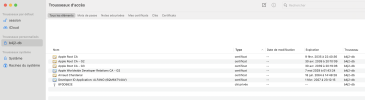
0 valid identities found

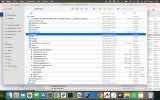
this seems to be the problem. I add in attachment what I see in the KeyAccess of the macbook, I don't know if this can help to you or if I need to check in the Apple certificate.
 

Attachments

  • Capture d’écran 2026-03-24 à 09.07.22.png
    Capture d’écran 2026-03-24 à 09.07.22.png
    341.6 KB · Views: 24
Upvote 0

Arnaud

Active Member
Licensed User
Longtime User
Hello,

Ok, thanks. Unfortunately, for the Developer ID Application, we cannot revoke the certificates; Apple forbids this, and if I try to create a new one, I get a message saying that the certificate already exists. I will have to wait one year for all current certificates to expire and then I will try again.

Thanks for your help
 
Upvote 0

Arnaud

Active Member
Licensed User
Longtime User
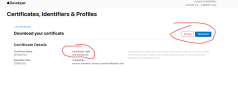
Please find 2 screenshots on the certifcate Apple page, one certificate for smartphone tabell, certificate that we can revoke, and the other certificate for Macbook (Developer ID application) and no button to "REVOKE".

I have call the Apple assistance for the, please find his response, this is in freanh but you can translae esay with a trdcutor, Apple said to me that we can not revoke Macbook (Developer ID application) :

assistance:
Bonjour Monsieur Chardenal,

Nous vous remercions d’avoir contacté l’assistance au développement. Je m’appelle Seraphinet je vais faire de mon mieux pour répondre à votre demande.
Suite à la lecture de votre message, il apparaît que vous avez rencontré plusieurs erreurs lorsde la création de certificats d’application de type « Developer ID application ».

Vous souhaitez par conséquent savoir s’il est envisageable de procéder à leur suppression, étant donné que le bouton « Révoquer » n’est pas accessible.

Les certificats d’application de type « Developer ID application » ou pour macOS ne peuventpas être révoqués. Nous ne pouvons pas révoquer mais nous rappelons aux développeursque il est important de sauvegarder les clés privées.

Les certificats vous permettent de signernumériquement vos apps iOS et vos paquets du programme d’installation Mac. Vous créez desidentités, stockées dans votre trousseau, et des certificats, stockés dans votre comptedéveloppeur, pour signer et approvisionner votre app. 

La signature de code de votre apppermet au système d’exploitation d’identifier le signataire de l’app et de vérifier que cettedernière n’a pas été modifiée depuis que vous l’avez signée.

Les identités de signature permettent de signer votre app ou votre paquet du programmed’installation. Un certificat de développement vous identifie, en tant que membre de l’équipe,dans un profil d’approvisionnement de développement qui permet aux apps que vous avezsignées de s’ouvrir sur les appareils. Un certificat de distribution identifie votre équipe ou votreorganisation dans un profil d’approvisionnement de distribution, et vous permet de soumettrevotre app dans l’App Store. Seul le titulaire du compte ou un administrateur peut créer uncertificat de distribution.
Les certificats arrivent à expiration après une période définie et ne peuvent pas êtrerenouvelés.
Si votre certificat a été utilisé pour soumettre une app dans l’App Store et expireprochainement, aucune action n’est requise. Votre identité de signature est uniquement utiliséepour soumettre l’app à Apple. Elle est remplacée par l’identité de signature d’Apple lorsqu’elleest distribuée aux clients via l’App Store. Vous pouvez créer un certificat lorsque vous êtes prêtà mettre l’app à jour ou à en soumettre une nouvelle.
Arnaud Chardenal <[email protected]>
Re: [102847808811] Apple Developer Support - Développement et informationstechniques
Apple Support
<[email protected]>
26 mars 2026 à 20:15
Répondre à : [email protected]
.
 

Attachments

  • MacBook.png
    MacBook.png
    83.5 KB · Views: 16
  • smartphone tablette.png
    smartphone tablette.png
    67.1 KB · Views: 13
Upvote 0

Arnaud

Active Member
Licensed User
Longtime User
Yes the same but now if I try to create a new one, I get a message saying that the certificate already exists. I must have made a mistake somewhere. I think the best way is to wait until all disappear in a year and then redo everything properly.
 
Upvote 0
Top