Hello,
I am using a label to display the current value of a seekbar.
I have add the label in the designer to a layout.
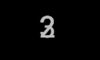
My problem it that after changing ".text" the display of "myLabel.text" is not correct.
It's a bit difficult to explain...but it looks as if 2 values are mixed in the display:
There is always a "3" visible in the background of myLabel.text and "over" this I see other numbers.
I have tried to use "invalidate" to force a redraw of the label but it didnt solve the problem
Here is what I do:
I see the same problem when I use an editfield
Heinz
I am using a label to display the current value of a seekbar.
I have add the label in the designer to a layout.
My problem it that after changing ".text" the display of "myLabel.text" is not correct.
It's a bit difficult to explain...but it looks as if 2 values are mixed in the display:
There is always a "3" visible in the background of myLabel.text and "over" this I see other numbers.
I have tried to use "invalidate" to force a redraw of the label but it didnt solve the problem
Here is what I do:
B4X:
in  Globals :
dim myLabel as label

in Activity_Create :
myLabel.text = "3"  ' set a default start value. This  is always displayed in the background

in mySeekbar__ValueChanged (value As Int, UserChanged As Boolean)

'myLabel.Text =""
'myLabel.Invalidate
myLabel.Text = value+5  'Values are updated in .text - but I see always a "3" in the background
'myLabel.Invalidate
I see the same problem when I use an editfield
Heinz
Last edited: