

I bit the bullet. I have been using Claude Code to develop microcontroller firmware for about 2-3 months with great satisfaction.
Many moons ago I wrote a piece of code to download waveforms from a Tektronix oscilloscope to a PC under VB 6.0.
That worked well enough until VB 6.0 stopped working under Windows 10/11.
So yesterday after work I fed the old VB code into Claude and asked it to make it into a B4J application.
I did prune the less useful features. It was more of an exercise than something I really needed but in about 2 hours time, it was working.
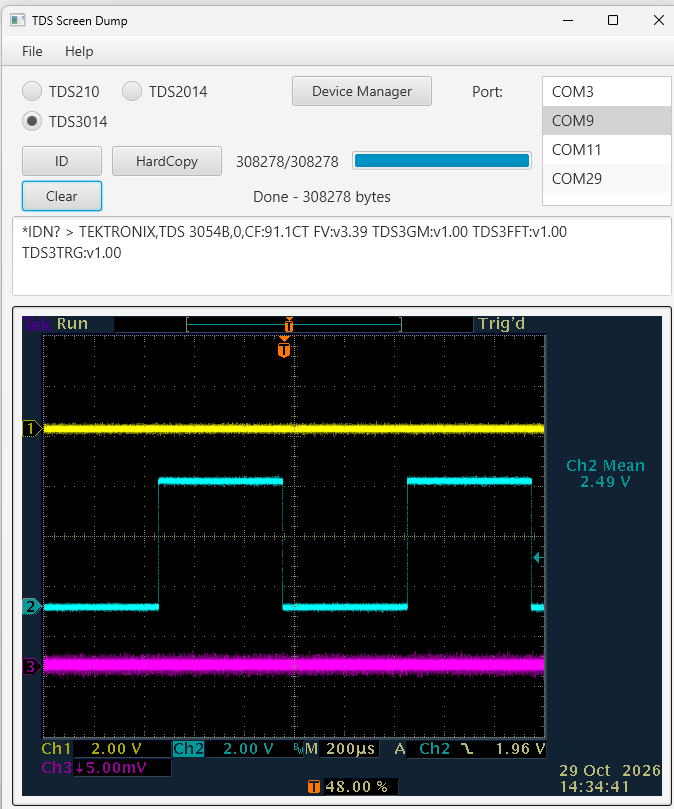
I had to create the layout file, but Claude told me exactly the elements I needed, I just had to put them on the screen where I wanted them.
There were a handful of syntax errors, not unexpected considering the relatively small code base for B4J, but surprisingly few and I did not fix them, I just told Claude what was wrong.
The original application did not support the TDS3000 Series, so I had to find out the few differences.
Overall I am quite impressed.
The code and comments below are pretty much 100% Claude. I wrote very little code myself, I mostly told Claude what I needed.
Many moons ago I wrote a piece of code to download waveforms from a Tektronix oscilloscope to a PC under VB 6.0.
That worked well enough until VB 6.0 stopped working under Windows 10/11.
So yesterday after work I fed the old VB code into Claude and asked it to make it into a B4J application.
I did prune the less useful features. It was more of an exercise than something I really needed but in about 2 hours time, it was working.
I had to create the layout file, but Claude told me exactly the elements I needed, I just had to put them on the screen where I wanted them.
There were a handful of syntax errors, not unexpected considering the relatively small code base for B4J, but surprisingly few and I did not fix them, I just told Claude what was wrong.
The original application did not support the TDS3000 Series, so I had to find out the few differences.
Overall I am quite impressed.
The code and comments below are pretty much 100% Claude. I wrote very little code myself, I mostly told Claude what I needed.
B4X:
#Region  Project Attributes

    #MainFormWidth: 680
    #MainFormHeight: 780

#End Region

' ============================================================================
' TDS2xxDump - B4J conversion (bitmap screen-dump path only; waveform plotting
' dropped per requirements). Converted from the original VB6 project.
'
' ASSUMPTIONS / THINGS TO VERIFY (flagged, not silently guessed):
' 1. UI layout: this code assumes a Designer layout file "Main" containing the
'    nodes listed in the "REQUIRED DESIGNER LAYOUT" comment block below, with
'    those EXACT names. You'll need to build that layout yourself in the B4J
'    Designer (I can't reliably hand you a working .fxml sight-unseen).
' 2. Save/Open dialogs use B4J's built-in FileChooser type (confirmed against
'    the official jfx.html docs: Initialize/SetExtensionFilter/ShowOpen/ShowSave).
' 3. Baud rate / model selection: mapped VB6's mnTDS2xx/mnTDS2xxx menu choice
'    to two RadioButtons (rbTDS210, rbTDS2014) in the same ToggleGroup, per
'    your own jSerial example's UI pattern (label+listview) adapted to radio
'    buttons since there are only two choices here. A third, rbTDS3014, was
'    added later for the TDS3014 (not supported by the original VB6 code).
' 4. Expected BMP sizes: 38464 (TDS210/220) and 27250 (TDS2014) bytes are
'    carried over verbatim from your VB6 comments, unverified independently.
'    308278 bytes for the TDS3014 (color hardcopy) came from your own
'    measurement against real hardware.
' ============================================================================

Sub Process_Globals
    Private fx As JFX
    Private MainForm As Form
    Private MsgBox As Msgboxes
    Private bc As ByteConverter

    ' -- Serial port --
    Private sp As Serial
    Private AStream As AsyncStreams
    Private COMPortName As String
    Private cmdTimeoutTimer As Timer
    Private msRemaining As Int

    ' -- Comm state machine --
    Private Const MODE_IDLE As Int = 0
    Private Const MODE_COMMAND As Int = 1   ' waiting for an LF-terminated text reply
    Private Const MODE_BITMAP As Int = 2    ' waiting for raw binary BMP bytes
    Private commMode As Int = MODE_IDLE
    Private respText As String              ' accumulator for MODE_COMMAND
    Private bmpBytes As List                ' accumulator for MODE_BITMAP (List of Byte)
    Private pendingCmdLabel As String        ' which command we're waiting on, for the log
    Private expectedBMPSize As Int

    ' -- UI nodes (must exist in the "Main" Designer layout with these names) --
    Private lblPort As Label
    Private lvPorts As ListView
    Private rbTDS210 As RadioButton          ' 9600 baud, TDS210/220
    Private rbTDS2014 As RadioButton         ' 19200 baud, TDS2014
    Private rbTDS3014 As RadioButton         ' 19200 baud (assumed, see OpenComPort), color hardcopy
    Private btnID As Button
    Private btnClear As Button
    Private btnHardCopy As Button
    Private btnDeviceManager As Button
    Private pbProgress As ProgressBar
    Private lblStatus As Label               ' Label1 equivalent
    Private lblByteCount As Label             ' Label3/Label4 equivalent
    Private taLog As TextArea                ' Text1 equivalent
    Private ivBitmap As ImageView             ' Picture1 equivalent
    Private mnuBar As MenuBar
    Private fc As FileChooser

    Private savedBMPData() As Byte           ' last captured bitmap, for Save
    Private ScopeType As String = ""
End Sub

' ============================================================================
' REQUIRED DESIGNER LAYOUT ("Main")
' Add these nodes via the B4J Designer and set their Name property to match:
'   lblPort (Label), lvPorts (ListView, initially Visible=False)
'   rbTDS210, rbTDS2014, rbTDS3014 (RadioButton, all same ToggleGroup)
'   btnID  (Button)
'   btnHardCopy (Button), btnDeviceManager (Button)
'   pbProgress (ProgressBar)
'   lblStatus, lblByteCount (Label)
'   taLog (TextArea)
'   mnuBar (MenuBar) - leave it empty in the Designer; the File/Help menus and
'                      their items are built in code (see CreateMenu, called
'                      from AppStart)
' ============================================================================

Sub AppStart(Form1 As Form, Args() As String)
    MainForm = Form1
    MainForm.RootPane.LoadLayout("Main")
    MainForm.Show
    MainForm.Title = "TDS Screen Dump"

    sp.Initialize("sp")
    cmdTimeoutTimer.Initialize("cmdTimeoutTimer", 100) ' 100ms tick, mirrors VB6 Timer1 (was 50ms)
    bmpBytes.Initialize

    'lvPorts.Visible = False
    rbTDS3014.Selected = True

    CreateMenu
    RefreshPortList
End Sub

' Builds the File/Help menus in code and attaches them to the mnuBar node
' that already exists in the "Main" Designer layout. EventName ("mnuOpen" etc)
' matches the existing mnuOpen_Action/mnuSave_Action/... subs below, so each
' item routes straight to its own handler with no Select Case needed.
Sub CreateMenu
    Dim mFile As Menu
    mFile.Initialize("File", "")

    Dim miOpen As MenuItem
    miOpen.Initialize("Open", "mnuOpen")
    mFile.MenuItems.Add(miOpen)

    Dim miSave As MenuItem
    miSave.Initialize("Save", "mnuSave")
    mFile.MenuItems.Add(miSave)

    Dim miExit As MenuItem
    miExit.Initialize("Exit", "mnuExit")
    mFile.MenuItems.Add(miExit)

    mnuBar.Menus.Add(mFile)

    Dim mHelp As Menu
    mHelp.Initialize("Help", "")

    Dim miAbout As MenuItem
    miAbout.Initialize("About", "mnuAbout")
    mHelp.MenuItems.Add(miAbout)

    mnuBar.Menus.Add(mHelp)
End Sub

Sub RefreshPortList
    lvPorts.Items.Clear
    For Each s As String In sp.ListPorts
        lvPorts.Items.Add(s)
    Next
End Sub

Sub lblPort_MouseClicked(EventData As MouseEvent)
    lvPorts.Visible = Not(lvPorts.Visible)
End Sub

Sub lvPorts_SelectedIndexChanged(Index As Int)
    If Index > -1 Then
        COMPortName = lvPorts.SelectedItem
        'lblPort.Text = COMPortName
        'lvPorts.Visible = False
    End If
End Sub

' -- Opens the port with the settings for the currently selected scope model.
' Returns True on success. Mirrors VB6's OpenComPort().
Sub OpenComPort As Boolean
    If COMPortName = "" Then
        MsgBox.Show("Select a COM port first", "TDS2xx")
        Return False
    End If
    Try
        sp.Close
    Catch
        Log( LastException )
    End Try
    Try
        sp.Open(COMPortName)
    Catch
        MsgBox.Show("Error opening port " & COMPortName, "TDS2xx")
        Return False
    End Try

    If rbTDS210.Selected Then
        sp.SetParams(9600, 8, 1, 0)  ' N,8,1
    Else If rbTDS2014.Selected Then
        sp.SetParams(19200, 8, 1, 0)
    Else If rbTDS3014.Selected Then
        sp.SetParams(38400, 8, 1, 0)
    End If
    AStream.Initialize(sp.GetInputStream, sp.GetOutputStream, "AStream")
    Return True
End Sub

Sub CloseComPort
    Try
        AStream.Close
    Catch
        Log( LastException )
    End Try
    Try
        sp.Close
    Catch
        Log( LastException )
    End Try
End Sub

' ============================================================================
' Diagnostic SCPI command buttons - all follow the same pattern as VB6's
' cmdCMD_Click / cmdESR_Click / etc: send text + LF, wait (with timeout) for
' an LF-terminated text reply, log it.
' ============================================================================

Sub SendTextCommand(label As String, cmd As String)
    Try
        AStream.Close
    Catch
        Log( LastException )
    End Try
    Try
        sp.Close
    Catch
        Log( LastException )
    End Try
    If Not(OpenComPort) Then Return
    commMode = MODE_COMMAND
    respText = ""
    pendingCmdLabel = label
    AStream.Write((cmd & Chr(10)).GetBytes("UTF8"))
    msRemaining = 750 ' matches VB6's 750ms timeout
    cmdTimeoutTimer.Enabled = True
End Sub

Sub btnID_Action
    SendTextCommand("*IDN?", "*IDN?")
End Sub

Sub btnClear_Action
    taLog.Text = ""
End Sub

Sub btnDeviceManager_Action
    ' Equivalent of VB6's ShellExecute call to launch Device Manager
    Dim proc As Shell
    proc.Initialize("proc", "cmd", Array As String("/c", "devmgmt.msc"))
    proc.Run(-1)
End Sub

' ============================================================================
' HardCopy / bitmap capture - mirrors VB6's BitMapTDS2xx() / BitMapTDS2xxx()
' ============================================================================

Sub btnHardCopy_Action
    Try
        AStream.Close
    Catch
        Log( LastException )
    End Try
    Try
        sp.Close
    Catch
        Log( LastException )
    End Try
    If Not(OpenComPort) Then Return
    bmpBytes.Initialize
    lblStatus.Text = "Setting up hardcopy"
    pbProgress.Progress = 0
    lblByteCount.Text = "0"
    btnHardCopy.Text = "Capturing..."
    btnHardCopy.Enabled = False

    Dim fmtCmd As String
    If rbTDS210.Selected Then
        expectedBMPSize = 38464
        fmtCmd = "HARDC:FORMAT BMP"
    Else If rbTDS2014.Selected Then
        expectedBMPSize = 27250
        fmtCmd = "HARDC:FORMAT BMP"
    Else ' rbTDS3014
        expectedBMPSize = 308278
        fmtCmd = "HARDC:FORMAT BMPColor"
    End If

    AStream.Write(("HARDC:PORT RS232" & Chr(10)).GetBytes("UTF8"))
    AStream.Write((fmtCmd & Chr(10)).GetBytes("UTF8"))
    AStream.Write(("HARDC:LAYOUT PORTRAIT" & Chr(10)).GetBytes("UTF8"))
    AStream.Write(("HARDC START" & Chr(10)).GetBytes("UTF8"))

    commMode = MODE_BITMAP
    lblStatus.Text = "Waiting for scope"
    msRemaining = 5000 ' VB6 used up to 5000ms initial timeout for the TDS2014 path
    cmdTimeoutTimer.Enabled = True
End Sub

Sub FinishBitmapCapture(success As Boolean)
    cmdTimeoutTimer.Enabled = False
    btnHardCopy.Text = "HardCopy"
    btnHardCopy.Enabled = True
    commMode = MODE_IDLE

    If Not(success) Or bmpBytes.Size = 0 Then
        lblStatus.Text = "Received nothing"
        MsgBox.Show("Received nothing", "TDS2xx")
        Return
    End If

    savedBMPData = ArrayFromList(bmpBytes)
    lblStatus.Text = "Done - " & bmpBytes.Size & " bytes"

    Try
        Dim jo As JavaObject
        jo.InitializeNewInstance("java.io.ByteArrayInputStream", Array(savedBMPData))
        Dim bmpStream As InputStream = jo
        Dim img As Image
        img.Initialize2(bmpStream)
        ivBitmap.SetImage(img)
        bmpStream.Close
    Catch
        MsgBox.Show("Received data does not appear to be a valid BMP", "TDS2xx")
    End Try
End Sub

' Helper: B4J's List doesn't give you a byte array directly - convert.
Sub ArrayFromList(lst As List) As Byte()
    Dim arr(lst.Size) As Byte
    For i = 0 To lst.Size - 1
        arr(i) = lst.Get(i)
    Next
    Return arr
End Sub

' ============================================================================
' AsyncStreams event handlers - this replaces VB6's polling
' (Do / DoEvents / InBufferCount) loops with an event-driven model.
' ============================================================================

Sub AStream_NewData(Buffer() As Byte)
    Select commMode
        Case MODE_COMMAND
            respText = respText & bc.StringFromBytes(Buffer, "UTF8")
            If respText.EndsWith(Chr(13)) Then
                cmdTimeoutTimer.Enabled = False
                commMode = MODE_IDLE
                AddLog(pendingCmdLabel & " > " & respText)
                respText = ""
            Else
                msRemaining = 750 ' data is still arriving in fragments - keep the watchdog alive
            End If

        Case MODE_BITMAP
            For i = 0 To Buffer.Length - 1
                bmpBytes.Add(Buffer(i))
            Next
            lblByteCount.Text = bmpBytes.Size & "/" & expectedBMPSize
            If expectedBMPSize > 0 Then
                pbProgress.Progress = bmpBytes.Size / expectedBMPSize
            End If
            If Left3(lblStatus.Text) <> "Rec" Then lblStatus.Text = "Receiving"
            msRemaining = 500 ' safety net only now - normal completion is by byte count below
            If bmpBytes.Size >= expectedBMPSize Then
                FinishBitmapCapture(True)
            End If
    End Select
End Sub

Sub Left3(s As String) As String
    If s.Length >= 3 Then
        Return s.SubString2(0, 3)
    Else
        Return s
    End If
End Sub

Sub AStream_Error
    Log("Serial error: " & LastException)
    cmdTimeoutTimer.Enabled = False
    If commMode = MODE_BITMAP Then
        FinishBitmapCapture(False)
    Else
        commMode = MODE_IDLE
    End If
End Sub

Sub AddLog(s As String)
    If taLog.Text.Length > 20000 Then
        taLog.Text = taLog.Text.SubString(taLog.Text.Length - 15000)
    End If
    If taLog.Text.Length > 0 Then
        taLog.Text = taLog.Text & CRLF & s
    Else
        taLog.Text = s
    End If
End Sub

' -- Timeout watchdog: replaces VB6's TimeOut countdown that ran off Timer1 --
Sub cmdTimeoutTimer_Tick
    msRemaining = msRemaining - 100
    If msRemaining <= 0 Then
        cmdTimeoutTimer.Enabled = False
        If commMode = MODE_BITMAP Then
            AddLog("Timed out waiting for bitmap data")
            FinishBitmapCapture(bmpBytes.Size > 0)
        Else If commMode = MODE_COMMAND Then
            AddLog(pendingCmdLabel & " > (no response / timeout)")
            commMode = MODE_IDLE
        End If
    End If
End Sub

' ============================================================================
' Menu handlers
' ============================================================================

Sub mnuOpen_Action
    fc.Initialize
    fc.Title = "Open BMP"
    fc.SetExtensionFilter("BMP Files", Array As String("*.bmp"))
    Dim path As String = fc.ShowOpen(MainForm)
    If path <> "" And File.Exists(File.GetFileParent(path), File.GetName(path)) Then
        Dim img As Image
        img.Initialize(File.GetFileParent(path), File.GetName(path))
        ivBitmap.SetImage(img)
    End If
End Sub

Sub mnuSave_Action
    If savedBMPData.Length = 0 Then
        MsgBox.Show("Nothing captured yet to save", "TDS2xx")
        Return
    End If
    fc.Initialize
    fc.Title = "Save BMP"
    fc.InitialFileName = ScopeType & ".bmp"
    fc.SetExtensionFilter("BMP Files", Array As String("*.bmp"))
    Dim path As String = fc.ShowSave(MainForm)
    If path <> "" Then
        If path.ToLowerCase.EndsWith(".bmp") = False Then path = path & ".bmp"
        File.WriteBytes(File.GetFileParent(path), File.GetName(path), savedBMPData)
    End If
End Sub

Sub mnuExit_Action
    MainForm.Close
End Sub

Sub mnuAbout_Action
    MsgBox.Show( _
        "Tek TDS2xx, TDS2xxx and TDS30xx Series Screen Dump Utility" & CRLF & _
        "Works with TDS200/TDS2000/TPS2000/TDS3000 Series Scopes with" & CRLF & _
        "TDS2CM/TDS2CMA/TDS2CMAX/TDS2MM/TDS2MEM options" & CRLF & _
        "TDS3000 Series: 38400 bauds," & CRLF & _
        "TDS2000 Series: 19200 bauds," & CRLF & _
        "TDS200 Series: 9600 bauds" & CRLF & _
        "Flow Control: None   EOL: LF   Parity: None", _
        "TDS Screen Dump")
End Sub

Sub MainForm_Closed
    CloseComPort
End Sub
Last edited:


