
B4J Library [B4X] [B4XLib] SD SwitchAdv (3 states)

Switch with 2 or 3 states. Horizontal or vertical. You can choose the style. All selectable from Design

Note: Even if it is a B4XLib library, it is not allowed to decompress it, read and / or modify the sources. It is also not allowed to rename the library. Unless you are explicitly authorized by the author.

SD_SwitchAdv

Author:
Star-Dust
Version: 0.03
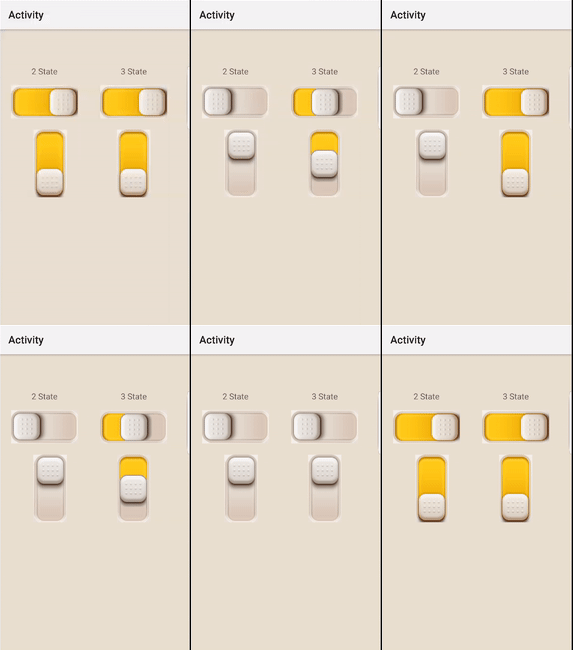
  • SD_SwitchAdv
    • Events:
      • ChangeNumericValue (Value As Int, UsersChange As Boolean) ' 3 State - 0-off; 1-middle; 2-on
      • ChangeValue (Value As Boolean, UsersChange As Boolean) ' Only 2 state - False-off; True-on
    • Fields:
      • mBase As B4XView
      • Tag As Object
    • Functions:
      • DesignerCreateView (Base As Object, Lbl As Label, Props As Map)
        Base type must be Object
      • GetBase As B4XView
      • Initialize (Callback As Object, EventName As String)
    • Properties:
      • intValue As Int
        0-off; 1-middle; 2-on
      • ThirdstateValue As Boolean
      • Value As Boolean


V1.gif
2.gif
 

Attachments

  • aSample.zip
    8.7 KB · Views: 637
  • iSample.zip
    2.7 KB · Views: 559
  • jSample.zip
    2.3 KB · Views: 601
  • SD_SwitchAdv.b4xlib
    52.3 KB · Views: 21
Last edited:

Unobtainius

Active Member
Licensed User
Longtime User
just out of interest, I thought I would ask instead of downloading and finding out. (I am very lazy yes)
is it a fixed size, eg no matter what size I drag its container in the designer, it will always have the same dimensions?
Or does it resize proportionally to the container size? (keeping its aspect ratio of course)
 

Star-Dust

Expert
Licensed User
Longtime User
just out of interest, I thought I would ask instead of downloading and finding out. (I am very lazy yes)
is it a fixed size, eg no matter what size I drag its container in the designer, it will always have the same dimensions?
Or does it resize proportionally to the container size? (keeping its aspect ratio of course)
Yes
 

Unobtainius

Active Member
Licensed User
Longtime User
Beautiful as always. I love the three states. Really good for database fields that are either; initially null, then true, or false. Thanks
 

Enrico Fuoti

Active Member
Licensed User
Longtime User
Hello SD,
this view is really useful and beautiful. As far as i know is the only one that can handle 3 states,
but i have 2 issues.
1. i'm not able to trap the values within a customlistview it throws an error either using
getitemfromview(switch) or getitemfromview(switch.mbase) can you help on this ?
2. "UsersChange" parameter seems to always return true.
 

Star-Dust

Expert
Licensed User
Longtime User
Hi Enrico, please attach a small example that I can examine.
 

Enrico Fuoti

Active Member
Licensed User
Longtime User
Thank you SD,
I prepared the small attached example.
to get the error you have to unremark the "SD_SwitchAdv1_ChangeNumericValue" sub.
 

Attachments

  • SWitchAdv.zip
    12.8 KB · Views: 9

Star-Dust

Expert
Licensed User
Longtime User
There was a bug in the library and an error in your code. Download version 0.03 and see the example code I attached
 

Attachments

  • SWitchAdv.zip
    12 KB · Views: 16
Top