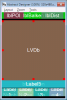
Strange problem! I have a layout with two rows of buttons at the bottom. The last row (4 buttons) works without problems but the large button "btnLatLon" with the label "Label5" on top works only after tapping x times on the screen, especially at the bottom of the button there is a chance, so that I hit the buttons below also. I hope this was understandable. Enclosed the layout and the layout definitions. Of course the button btnLatLon is defined and there is a "Sub btnLatLon_Click" in the code. (The buttons are imageviews with a label on top). When i remove all the layout code the two rows of buttons are in the middle and not button works.
B4X:
'All variants script
'AutoScaleAll 'uncomment to scale all views based on the device physical size.
AutoScaleRate(0.5)

LVDb.Width = 100%x
LVDb.SetTopAndBottom(lblBalken.Bottom, btnLatLon.Top - 10dip)

lblBalken.Width = 100%x
lblPOI.Left = 5%x
lblDist.Right = 95%x

btnByNumber.Width = 23%x
btnByNumber.Left = 0%x
btnByNumber.Bottom = 99%y
Label1.Bottom = 99%y

btnByName.Width = 23%x
btnByName.Left = btnByNumber.Right + 10dip
btnByName.Bottom = 99%y
Label2.Left = btnByNumber.Right + 10dip
Label2.Bottom = 99%y

btnByMls.Width = 23%x
btnByMls.Left = btnByName.Right + 10dip
btnByMls.Bottom = 99%y
Label3.Left = btnByName.Right + 10dip
Label3.Bottom = 99%y

btnSearch.Width = 23%x
btnSearch.Left = btnByMls.Right + 10dip
btnSearch.Bottom = 99%y
Label4.Left = btnByMls.Right + 10dip
Label4.Bottom = 99%y

btnLatLon.Left = 0%x
btnLatLon.Width = 100%x
btnLatLon.Bottom = btnByName.Top - 10dip
Label5.Left = 0%x
Label5.Width = 100%x
Label5.Bottom = btnByName.Top - 10dip