
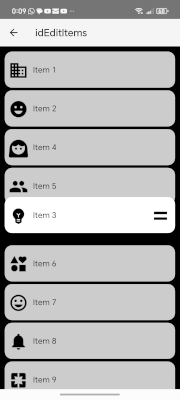
What it is: A vertical column of draggable panels backed by SQLite. The user long-presses a panel and drags it to reorder the list. Changes persist across sessions


— the reservation book — — the physical tables —
[ { id:1, text:"Item 1", [ Panel (real view on screen),
icon:"ic_domain", sort:0 }, Panel (real view on screen),
{ id:2, text:"Item 2", Panel (real view on screen) ]
icon:"ic_mood", sort:1 } ]
Source of truth for data Source of truth for visual order
Persists in SQLite Rebuilt on every RenderPanels
During drag only the tables move. The reservation book (panelList) is not touched until the finger lifts
- The overlay — the glass pane analogy

Instead of attaching a listener to every panel (fragile), a single transparent panel covers the entire screen and calculates which item is under the finger using Y position math.
- SHIFT (chain displacement) Not swap
Each intermediate panel shifts one slot in the opposite direction of the drag, creating a natural cascading effect. The dragged panel itself is not animated here — it follows the finger at 0 ms until finger lift
- Animation — three distinct behaviors
Dragged panel → SetLayoutAnimated(0ms) instant, follows finger
Shifted panels → SetLayoutAnimated(150ms) smooth slide, makes room
Final snap (all) → SetLayoutAnimated(200ms) gentle settle on drop
- smoothScrollTo — smooth scrolling is native to Android
The dragged panel isn't animated—it moves to the exact pixel of the finger. What's smoothed is the ScrollView moving underneath, creating the illusion of a fluid scroll to the edge
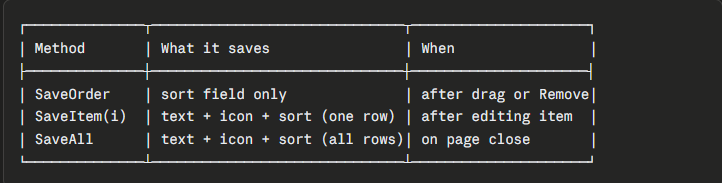
- Three save modes in SQLite
├── active: Log("Clicked: ...") placeholder
└── ? commented: RemoveItem(index) functional but disabled
Return (safety: abort after list change)
Public API — implemented but no buttons in UI yet:
├── AddItem(text, icon)
├── InsertItem(text, icon, index)
├── RemoveItem(index)
├── RemoveItemByText(text)
├── UpdateItem(index, text, icon)
├── UpdateItemText(index, text)
└── UpdateItemIcon(index, icon)
The API is ready — the interface is not
- Icons in the AddResources folder
- The necessary code needs to be moved to a class with touch calling the class methods, if reused on other pages.
The overlay would need a container panel as an anchor — it must be passed in the Initialize of the class as a parameter
- Aided by AI
- Notes:
- Two data structures — the restaurant analogy
panelList (List of Maps) panels() (Array of Panel)— the reservation book — — the physical tables —
[ { id:1, text:"Item 1", [ Panel (real view on screen),
icon:"ic_domain", sort:0 }, Panel (real view on screen),
{ id:2, text:"Item 2", Panel (real view on screen) ]
icon:"ic_mood", sort:1 } ]
Source of truth for data Source of truth for visual order
Persists in SQLite Rebuilt on every RenderPanels
During drag only the tables move. The reservation book (panelList) is not touched until the finger lifts
- The overlay — the glass pane analogy
Instead of attaching a listener to every panel (fragile), a single transparent panel covers the entire screen and calculates which item is under the finger using Y position math.
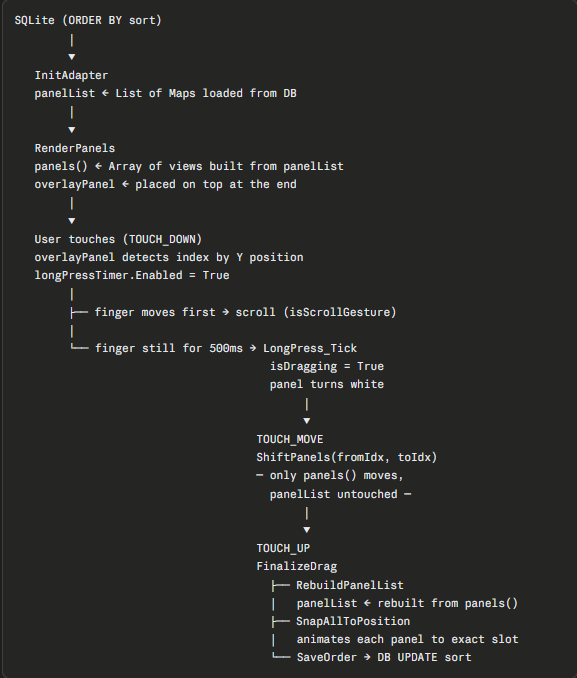
- Full drag flow
- SHIFT (chain displacement) Not swap
Each intermediate panel shifts one slot in the opposite direction of the drag, creating a natural cascading effect. The dragged panel itself is not animated here — it follows the finger at 0 ms until finger lift
- Animation — three distinct behaviors
Dragged panel → SetLayoutAnimated(0ms) instant, follows finger
Shifted panels → SetLayoutAnimated(150ms) smooth slide, makes room
Final snap (all) → SetLayoutAnimated(200ms) gentle settle on drop
- smoothScrollTo — smooth scrolling is native to Android
The dragged panel isn't animated—it moves to the exact pixel of the finger. What's smoothed is the ScrollView moving underneath, creating the illusion of a fluid scroll to the edge
- Three save modes in SQLite
- What is commented out / not yet wired to UI
HandlePanelClick├──
active: Log("Clicked: ...") placeholder└── ? commented: RemoveItem(index) functional but disabled
Return (safety: abort after list change)
Public API — implemented but no buttons in UI yet:
├── AddItem(text, icon)
├── InsertItem(text, icon, index)
├── RemoveItem(index)
├── RemoveItemByText(text)
├── UpdateItem(index, text, icon)
├── UpdateItemText(index, text)
└── UpdateItemIcon(index, icon)
The API is ready — the interface is not
- Icons in the AddResources folder
- The necessary code needs to be moved to a class with touch calling the class methods, if reused on other pages.
The overlay would need a container panel as an anchor — it must be passed in the Initialize of the class as a parameter
- Aided by AI
- Notes:
- This is an alternative to CustomListView for changing the order of its items using the wes58 class called [B4X][class] CLVDragger - drag to reorder elements -> https://www.b4x.com/android/forum/threads/b4x-class-clvdragger-drag-to-reorder-items.120437/#content
- CLVDragger Class with Remove Item for xCustomListView (Two versions)) ->
https://www.b4x.com/android/forum/t...-item-for-xcustomlistview-two-versions.145945
Attachments
Last edited:


