Android Tutorial [Linux] [B4X] Wine Installer

📦 Install B4A+B4J on Linux Mint using Wine with a single silent script​


GitHub: https://github.com/pyhoon/b4x-wine-installer


Files:
  1. install_b4x_wine.sh
  2. uninstall_b4x_wine.sh
  3. configure_b4x_settings.sh
  4. README.md
Archived:
  1. install_b4a_wine.sh
  2. install_b4j_wine.sh
  3. uninstall_b4a_wine.sh
  4. uninstall_b4j_wine.sh
  5. configure_b4a_settings.sh
  6. configure_b4j_settings.sh
  7. repair_b4a_launcher.sh
  8. repair_b4j_launcher.sh
The script is modified from the combination of B4A Wine Installer and B4J Wine Installer script generated by AI (Qwen3.6-Plus chat)
Using a single wine prefix saved you 3GB+ of diskspace.

Disclaimer: I haven't really fully tested it. Use it at your own risk.

🚀 How to use​

Just 3 lines of commands (You can copy and paste in one go).
Bash:
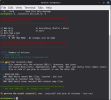
wget https://raw.githubusercontent.com/pyhoon/b4x-wine-installer/main/install_b4x_wine.sh
chmod +x install_b4x_wine.sh
./install_b4x_wine.sh

⚠️ Note / Reminder​

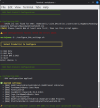
  1. When you double-click on a launcher (desktop icon), Linux Mint will prompt you to choose "Launch Anyway" or "Mark Executable". Choose the latter so it won't ask you again.
  2. Remember to comment the #CustomBuildAction: folders ready for RoboCopy.exe or Shared Files
  3. Even if you have run "configure_b4x_settings.sh", B4A still pops up asking you to set the Paths, just click "Ok" to save the settings.
  4. Make sure you have deleted old scripts and you are not downloaded the new script which renamed to .sh1 extension. Otherwise you are not executing the new script.
  5. Tips: To run winetricks, run winetricks prefix=.wine_b4x

🤝 Contributing​

Found an issue or have an improvement?
  1. Fork the repository
  2. Create a feature branch
  3. Submit a Pull Request

🙏 Credits​

Special thanks to B4X members who have contributed tutorial/guides in the past so that AI could use them as references to assist me to generate this script.
@Mihai Rainer Jr. @walt61 @Raboebie

📄 License​

MIT License - See LICENSE file for details.
 

Attachments

  • Screenshot3.png
    Screenshot3.png
    87.8 KB · Views: 736
  • Screenshot4.png
    Screenshot4.png
    94.7 KB · Views: 433
Last edited:

aeric

Expert
Licensed User
Longtime User
You can always search how to resolve the problem by googling the error by Google AI.

To fix Wine 11 stable installation issues on Ubuntu 24.04 (Noble Numbat), you need to ensure the correct WineHQ repository and GPG keys are configured and update your multiarch architecture settings.

Fix Broken Installation Steps
Run the following commands in your terminal in order to set up and install Wine 11 stable properly:
    • Enable 32-bit architecture (required for Windows applications):
      bash
      sudo dpkg --add-architecture i386
      Use code with caution.
    • Create the keyring directory and download the official WineHQ signing key:
      bash
      sudo mkdir -pm755 /etc/apt/keyrings
      sudo wget -O /etc/apt/keyrings/winehq-archive.key https://dl.winehq.org/wine-builds/winehq.key

      Use code with caution.
    • Update your package lists and install Wine stable:
      bash
      sudo apt update
      sudo apt install --install-recommends winehq-stable
      Use code with caution.

Troubleshooting Common Problems
    • "Unable to locate package winehq-stable": Ensure you added the .sources repository file correctly for noble as shown in step 3, and ran sudo apt update right after. [1, 2]
    • Unmet Dependencies: If apt complains about broken packages, it is usually because older repository lists conflict. Remove old lists (such as winehq-jammy.sources) from /etc/apt/sources.list.d/ before running sudo apt update again.
 

johnaaronrose

Active Member
Licensed User
Longtime User
Followed above procedure but still had same problem. So I deleted /etc/apt/sources.list.d/winehq.sources and did "sudo apt update" which went Ok followed by "sudo apt install --install-recommends winehq-stable" which gave:

john@Desktop:~$ sudo apt install --install-recommends winehq-stable
Reading package lists... Done
Building dependency tree... Done
Reading state information... Done
Some packages could not be installed. This may mean that you have
requested an impossible situation or if you are using the unstable
distribution that some required packages have not yet been created
or been moved out of Incoming.
The following information may help to resolve the situation:

The following packages have unmet dependencies.
winehq-stable : Depends: wine-stable (= 11.0.0.0~noble-1)
E: Unable to correct problems, you have held broken packages.

PS Interestingly Synaptic says that no packages are broken and "sudo apt autoremove" says
"0 to upgrade, 0 to newly install, 0 to remove and 0 not to upgrade."
 
Last edited:

aeric

Expert
Licensed User
Longtime User
Followed above procedure but still had same problem. So I deleted /etc/apt/sources.list.d/winehq.sources and did "sudo apt update" which went Ok followed by "sudo apt install --install-recommends winehq-stable" which gave:

john@Desktop:~$ sudo apt install --install-recommends winehq-stable
Reading package lists... Done
Building dependency tree... Done
Reading state information... Done
Some packages could not be installed. This may mean that you have
requested an impossible situation or if you are using the unstable
distribution that some required packages have not yet been created
or been moved out of Incoming.
The following information may help to resolve the situation:

The following packages have unmet dependencies.
winehq-stable : Depends: wine-stable (= 11.0.0.0~noble-1)
E: Unable to correct problems, you have held broken packages.

PS Interestingly Synaptic says that no packages are broken and "sudo apt autoremove" says
"0 to upgrade, 0 to newly install, 0 to remove and 0 not to upgrade."
I think Ubuntu 24.04 is pointing to Wine version 9 which causes conflict with the Wine-stable version from WineHQ.
I suggest to remove all wine-stable installation for Ubuntu 24.04 and run the script.
I think sudo apt autoremove will not clean up the old version.
To make it easier, better to use Linux Mint.
 

johnaaronrose

Active Member
Licensed User
Longtime User
I found https://linuxcapable.com/how-to-install-wine-on-ubuntu-linux/ on an internet search.

Doing:
B4X:
wget -O "$tmp_sources" "$source_url" && sed 's#/etc/apt/keyrings/winehq-archive.key#/etc/apt/keyrings/winehq-archive.gpg#' "$tmp_sources" | sudo tee /etc/apt/sources.list.d/winehq.sources > /dev/null
rm -f "$tmp_sources"
wget -qO- https://dl.winehq.org/wine-builds/winehq.key | sudo gpg --dearmor --yes -o /etc/apt/keyrings/winehq-archive.gpg
has lead to:
B4X:
john@Desktop:~$ sudo apt update
E: Conflicting values set for option Signed-By regarding source https://dl.winehq.org/wine-builds/ubuntu/ noble: /etc/apt/keyrings/winehq-archive.key != /etc/apt/keyrings/winehq-archive.gpg
E: The list of sources could not be read.

I've even tried deleting /etc/apt/keyrings/winehq-archive.gpg but still same result.
I' m very confused!
 

aeric

Expert
Licensed User
Longtime User
I found https://linuxcapable.com/how-to-install-wine-on-ubuntu-linux/ on an internet search.

Doing:
B4X:
wget -O "$tmp_sources" "$source_url" && sed 's#/etc/apt/keyrings/winehq-archive.key#/etc/apt/keyrings/winehq-archive.gpg#' "$tmp_sources" | sudo tee /etc/apt/sources.list.d/winehq.sources > /dev/null
rm -f "$tmp_sources"
wget -qO- https://dl.winehq.org/wine-builds/winehq.key | sudo gpg --dearmor --yes -o /etc/apt/keyrings/winehq-archive.gpg
has lead to:
B4X:
john@Desktop:~$ sudo apt update
E: Conflicting values set for option Signed-By regarding source https://dl.winehq.org/wine-builds/ubuntu/ noble: /etc/apt/keyrings/winehq-archive.key != /etc/apt/keyrings/winehq-archive.gpg
E: The list of sources could not be read.

I've even tried deleting /etc/apt/keyrings/winehq-archive.gpg but still same result.
I' m very confused!
Try:
Bash:
# Remove all Wine repository list and source configurations
sudo rm -f /etc/apt/sources.list.d/winehq*.list
sudo rm -f /etc/apt/sources.list.d/winehq*.sources

# Remove all Wine GPG keys and keyrings
sudo rm -f /usr/share/keyrings/winehq*
sudo rm -f /etc/apt/keyrings/winehq*

# Refresh your package manager cache
sudo apt update
 

johnaaronrose

Active Member
Licensed User
Longtime User
Try:
Bash:
# Remove all Wine repository list and source configurations
sudo rm -f /etc/apt/sources.list.d/winehq*.list
sudo rm -f /etc/apt/sources.list.d/winehq*.sources

# Remove all Wine GPG keys and keyrings
sudo rm -f /usr/share/keyrings/winehq*
sudo rm -f /etc/apt/keyrings/winehq*

# Refresh your package manager cache
sudo apt update
Did above. All went well. Then followed steps in post #21 and again got the "broken" message on:
sudo apt install --install-recommends winehq-stable
...
winehq-stable : Depends: wine-stable (= 11.0.0.0~noble-1)
E: Unable to correct problems, you have held broken packages.
 

aeric

Expert
Licensed User
Longtime User
sudo apt install --install-recommends winehq-stable
I tried in a fresh Ubuntu 24.04.4 install.
Bash:
./install_b4x_wine.sh
I got error: line 206: curl: command not found
gpg: no valid OpenPGP data found.
Install curl:
Bash:
sudo apt install curl
Then run the script again.

Make sure to login to Xorg session.
Edit: I have tested no issue of black menu on Wayland.
 
Last edited:

johnaaronrose

Active Member
Licensed User
Longtime User
I noticed that you said to login to Xorg session. I always use Wayland session. Could this be the cause?
PS I don't even to know how to login to an Xorg session nowadays. On no other software do I have to use an Xorg session.
 

aeric

Expert
Licensed User
Longtime User
I noticed that you said to login to Xorg session. I always use Wayland session. Could this be the cause?
PS I don't even to know how to login to an Xorg session nowadays. On no other software do I have to use an Xorg session.
I don't think it causes problem during installation. Xorg session only solve the black menu on B4A IDE.

To login to Xorg, in the login screen, click the gear button at bottom right corner before typing your password.
 

aeric

Expert
Licensed User
Longtime User
I reinstall Ubuntu a few times to test the script.
I found that Ubuntu 24.04 (with X11 + Wayland) has no issue with black menu even on Wayland session.
While Ubuntu 26.04 (Wayland only) has issue with black menu.
The only thing I need to install in Ubuntu 24.04 after a fresh install is curl before running the script.


johnaaronrose

Active Member
Licensed User
Longtime User
Is there a way to find out more detail about the error?

Unmet Dependencies:
The following packages have unmet dependencies.
winehq-stable : Depends: wine-stable (= 11.0.0.0~noble-1)
E: Unable to correct problems, you have held broken packages.
 

aeric

Expert
Licensed User
Longtime User
Is there a way to find out more detail about the error?

Unmet Dependencies:
The following packages have unmet dependencies.
winehq-stable : Depends: wine-stable (= 11.0.0.0~noble-1)
E: Unable to correct problems, you have held broken packages.

Gemini answer:

The error winehq-stable : Depends: wine-stable (= ...) combined with E: Unable to correct problems, you have held broken packages occurs when APT cannot resolve 32-bit (i386) dependencies, has conflicting repository keys/sources, or encounters held/stale packages.
Run the following steps in your terminal to fix the issue:

Step 1: Clear Conflicting Wine Repositories & Keys​

Remove any existing or duplicate Wine source lists and keys to ensure a clean slate:
Bash:
sudo rm -f /etc/apt/sources.list.d/winehq*.list
sudo rm -f /etc/apt/sources.list.d/winehq*.sources
sudo rm -f /etc/apt/keyrings/winehq*
sudo rm -f /usr/share/keyrings/winehq*


Step 2: Unhold Any Locked Packages & Purge Stale Installations​

Ensure no packages are stuck on hold or partially installed:
Bash:
# Check and release any held APT packages
sudo apt-mark unhold winehq-stable wine-stable wine-stable-i386

# Clean out any partial/broken Wine installs
sudo apt purge "wine*" "wine*:i386"
sudo apt autoremove --purge


Step 3: Re-enable 32-bit Architecture & Re-add Repository​

Wine relies heavily on 32-bit libraries (i386). Re-add the architecture and download the official signing key:
Bash:
# Enable 32-bit architecture
sudo dpkg --add-architecture i386

# Add Keyring
sudo mkdir -pm755 /etc/apt/keyrings
sudo wget -O /etc/apt/keyrings/winehq-archive.key https://dl.winehq.org/wine-builds/winehq.key

# Add Official Repository (replace 'noble' with your Ubuntu codename if different, e.g., 'jammy')
sudo wget -NP /etc/apt/sources.list.d/ https://dl.winehq.org/wine-builds/ubuntu/dists/noble/winehq-noble.sources

# Update package cache
sudo apt update


Step 4: Resolve Unmet Dependencies During Installation​

If standard apt install still throws broken package errors, use aptitude, which automatically searches for dependency resolution paths:
  1. Install aptitude:
    Bash:
    sudo apt install aptitude

  2. Run the Wine installation via aptitude:
    Bash:
    sudo aptitude install winehq-stable

  3. Important: When aptitude presents options:
    • Type n (No) to the first proposal if it suggests "keep packages at their current version / do nothing".
    • Type y (Yes) to the second proposal, which usually involves downgrading or upgrading conflicting underlying 32-bit libraries (like libc6:i386 or libavahi) to match the expected versions.
 

johnaaronrose

Active Member
Licensed User
Longtime User
Gemini answer:

The error winehq-stable : Depends: wine-stable (= ...) combined with E: Unable to correct problems, you have held broken packages occurs when APT cannot resolve 32-bit (i386) dependencies, has conflicting repository keys/sources, or encounters held/stale packages.
Run the following steps in your terminal to fix the issue:

Step 1: Clear Conflicting Wine Repositories & Keys​

Remove any existing or duplicate Wine source lists and keys to ensure a clean slate:
Bash:
sudo rm -f /etc/apt/sources.list.d/winehq*.list
sudo rm -f /etc/apt/sources.list.d/winehq*.sources
sudo rm -f /etc/apt/keyrings/winehq*
sudo rm -f /usr/share/keyrings/winehq*


Step 2: Unhold Any Locked Packages & Purge Stale Installations​

Ensure no packages are stuck on hold or partially installed:
Bash:
# Check and release any held APT packages
sudo apt-mark unhold winehq-stable wine-stable wine-stable-i386

# Clean out any partial/broken Wine installs
sudo apt purge "wine*" "wine*:i386"
sudo apt autoremove --purge


Step 3: Re-enable 32-bit Architecture & Re-add Repository​

Wine relies heavily on 32-bit libraries (i386). Re-add the architecture and download the official signing key:
Bash:
# Enable 32-bit architecture
sudo dpkg --add-architecture i386

# Add Keyring
sudo mkdir -pm755 /etc/apt/keyrings
sudo wget -O /etc/apt/keyrings/winehq-archive.key https://dl.winehq.org/wine-builds/winehq.key

# Add Official Repository (replace 'noble' with your Ubuntu codename if different, e.g., 'jammy')
sudo wget -NP /etc/apt/sources.list.d/ https://dl.winehq.org/wine-builds/ubuntu/dists/noble/winehq-noble.sources

# Update package cache
sudo apt update


Step 4: Resolve Unmet Dependencies During Installation​

If standard apt install still throws broken package errors, use aptitude, which automatically searches for dependency resolution paths:
  1. Install aptitude:
    Bash:
    sudo apt install aptitude

  2. Run the Wine installation via aptitude:
    Bash:
    sudo aptitude install winehq-stable

  3. Important:When aptitude presents options:
    • Type n (No) to the first proposal if it suggests "keep packages at their current version / do nothing".
    • Type y (Yes) to the second proposal, which usually involves downgrading or upgrading conflicting underlying 32-bit libraries (like libc6:i386 or libavahi) to match the expected versions.
Still got 'broken' error with apt so did aptitude method. It seems like its trying harder may never end - please see attached file.
 

Attachments

  • john Desktop sudo aptitude.txt
    2 KB · Views: 15

aeric

Expert
Licensed User
Longtime User
Maybe try to paste the content of files for /etc/apt/sources.list.d/winehq-noble.list
/etc/apt/sources.list.d/winehq-noble.sources
for AI to analyze the packages

Or manually open the directory to check and delete any files with winehq

Or maybe change the source archive mirror to other region.

Try restart after cleaning the files.

I can't help further.
 

johnaaronrose

Active Member
Licensed User
Longtime User
A quick question below.

My OS (Ubuntu 24.04 Noble desktop) according to https://gitlab.winehq.org/wine/wine/-/wikis/Debian-Ubuntu is not WoW64:
"The WineHQ packages for Ubuntu 25.10 and later and Debian Testing (wine versions 10.18 and up) are WoW64. Therefore, the 32-bit packages are no longer necessary. The new WoW64 can run 32-bit programs from a 64-bit wineprefix, but it cannot use 32-bit wineprefixes. If you have any 32-bit wineprefixes from a previous installation, you will need to reinstall your 32-bit applications to a 64-bit wineprefix. Older versions of Ubuntu and Debian require the 32-bit architecture to be enabled.".

If I understood your script correctly, it has a wineprefix of 64-bit. Is it possible that Ubuntu Noble requires a 32-bit wineprefix?

PS Of course, when Ubuntu Resolute is suggested by Software Updater to be upgraded to, then the wineprefix is to be 64-bit.
 

aeric

Expert
Licensed User
Longtime User
A quick question below.

My OS (Ubuntu 24.04 Noble desktop) according to https://gitlab.winehq.org/wine/wine/-/wikis/Debian-Ubuntu is not WoW64:
"The WineHQ packages for Ubuntu 25.10 and later and Debian Testing (wine versions 10.18 and up) are WoW64. Therefore, the 32-bit packages are no longer necessary. The new WoW64 can run 32-bit programs from a 64-bit wineprefix, but it cannot use 32-bit wineprefixes. If you have any 32-bit wineprefixes from a previous installation, you will need to reinstall your 32-bit applications to a 64-bit wineprefix. Older versions of Ubuntu and Debian require the 32-bit architecture to be enabled.".

If I understood your script correctly, it has a wineprefix of 64-bit. Is it possible that Ubuntu Noble requires a 32-bit wineprefix?

PS Of course, when Ubuntu Resolute is suggested by Software Updater to be upgraded to, then the wineprefix is to be 64-bit.
First, ignore about Ubuntu 25.10 (Questing) or Ubuntu 26.04 LTS (Resolute) if you are running on Ubuntu 24.04 LTS (Noble).
Don't install Wine from Ubuntu Official software repo. It can be outdated. Uninstall and clean the sources if you have done that.
The correct way is to install from official WineHQ.
I already tested with a clean Ubuntu 24.04.4 and I don't have the issue about the broken packages.
 

aeric

Expert
Licensed User
Longtime User
Reminder:
My script creates a custom wineprefix "wine_b4x", not using the "default".
If you are configuring/installing "Windows" app with winetricks using this wineprefix, you need to refer it
Bash:
winetricks prefix=.wine_b4x
as I have mentioned in the last note/tips in post #1.
 
Top