New feature: Resumable Subs - simpler asynchronous programming

Erel

B4X founder
Staff member
Licensed User
Longtime User
What if you use WaitFor and the event will never raise? If you cannot set a timeout I think the project will be locked there
The project will never be locked. The code after the WaitFor (in the relevant sub call) will not run.
Other code will run as usual.

The timeout should be handled inside the asynchronous method.
 

ilan

Expert
Licensed User
Longtime User
old boring way:

B4X:
Sub AppStart (Form1 As Form, Args() As String)
    MainForm = Form1
    MainForm.Show
    csu.Initialize
   
    For i = 0 To btn.Length-1
        btn(i).Initialize("btn")
        btn(i).Text = "Button " & i
        MainForm.RootPane.AddNode(btn(i),0,0,100,50)
    Next
End Sub

Sub btn_Action
   Dim b As Button = Sender
   b.SetLayoutAnimated(600, 10, 300, b.Width, b.Height)
   csu.CallSubPlus2(Me,"hidebtn",600,Array(b))
End Sub

Sub hidebtn(obj() As Object)
    If obj(0) Is Button Then
        Dim b As Button = obj(0)
        b.SetAlphaAnimated(500,0)
    End If
End Sub

new awesome way:

B4X:
Sub AppStart (Form1 As Form, Args() As String)
    MainForm = Form1
    MainForm.Show
    csu.Initialize
   
    For i = 0 To btn.Length-1
        btn(i).Initialize("btn")
        btn(i).Text = "Button " & i
        MainForm.RootPane.AddNode(btn(i),0,0,100,50)
    Next
End Sub

Sub btn_Action
   Dim b As Button = Sender
   b.SetLayoutAnimated(600, 10, 300, b.Width, b.Height)
   Sleep(600)
   b.SetAlphaAnimated(500,0)
End Sub
 

Erel

B4X founder
Staff member
Licensed User
Longtime User
instead of using CallSubUtils i can use this feature
Only the simplest cases can be implemented with CallSubUtils.
In most cases you will need to manage the state with global variables (preferably in a class).
You can try as an example to implement the code from post #19.

Also remember that resumable subs can wait for events not just sleep for a specific interval.
 

LucaMs

Expert
Licensed User
Longtime User
The project will never be locked. The code after the WaitFor (in the relevant sub call) will not run.
Other code will run as usual.

The timeout should be handled inside the asynchronous method.

I wrote badly the question, I meant "that resumable-sub will be locked" or, as you wrote better: the code after Waitfor will not run.

Very likely I have to understand better this new feature, because at the moment I cannot figure out the example with JobDone.

Thank you
 

ilan

Expert
Licensed User
Longtime User
You can try as an example to implement the code from post #19.

its not the same, you can do 1 button after 1 and not all 3 together but i must go so had not much time to do the same as your example and of course @Erel yours is for sure simpler and better!!! i just took your challenge ;)

EDIT: now it behaves exactly as your example :)

btn4.gif


B4X:
Sub Process_Globals
    Type Action(b As Button, interval As Int, left As Float, top As Float)
    Private fx As JFX
    Private MainForm As Form
    Private csu As CallSubUtils
    Private btn(3) As Button
    Private ActionList(btn.Length) As List
    Private pos(4) As Float = Array As Float(300,200,400,0)
End Sub

Sub AppStart (Form1 As Form, Args() As String)
    MainForm = Form1
    MainForm.Show
    csu.Initialize
  
    For i = 0 To btn.Length-1
        ActionList(i).Initialize
        btn(i).Initialize("btn")
        btn(i).Text = i+1
        btn(i).Tag = i
        MainForm.RootPane.AddNode(btn(i),i*150,0,100,50)
    Next
End Sub

Sub btn_Action
   Dim b As Button = Sender
   If b.Top <> pos(3) Then Return
  
   Dim count As Int = b.Text
   ActionList(b.Tag).Add(newaction(b,0,500,pos(0)))
   For i = 0 To count-1
       ActionList(b.Tag).Add(newaction(b,i,400,pos(1)))
       ActionList(b.Tag).Add(newaction(b,i,400,pos(2)))
   Next
   ActionList(b.Tag).Add(newaction(b,count,500,pos(3)))
   animateNow(0, b.Tag)
End Sub

Sub animateNow(animpos As Int, listInt As Int)
    Dim act As Action = ActionList(listInt).Get(animpos)
    act.b.SetLayoutAnimated(act.interval, act.b.Left, act.top, act.b.Width, act.b.Height)
    csu.CallSubPlus2(Me,"checkAnimFin",act.interval,Array(listInt))
End Sub

Sub checkAnimFin(obj() As Object)
    Dim listInt As Int = obj(0)
    ActionList(listInt).RemoveAt(0)
    If ActionList(listInt).Size > 0 Then
        animateNow(0,listInt)
    End If
End Sub

Sub newaction(myBtn As Button, myid As Int, interval As Int, top As Float) As Action
    Dim newact As Action
    newact.Initialize
    newact.top = top
    newact.interval = interval
    newact.b = myBtn
    Return newact
End Sub

 
Last edited:

freedom2000

Well-Known Member
Licensed User
Longtime User
Whaou

It really seems to be a very powerful feature.
Can't wait until june to test it :rolleyes:
 

Beja

Expert
Licensed User
Longtime User
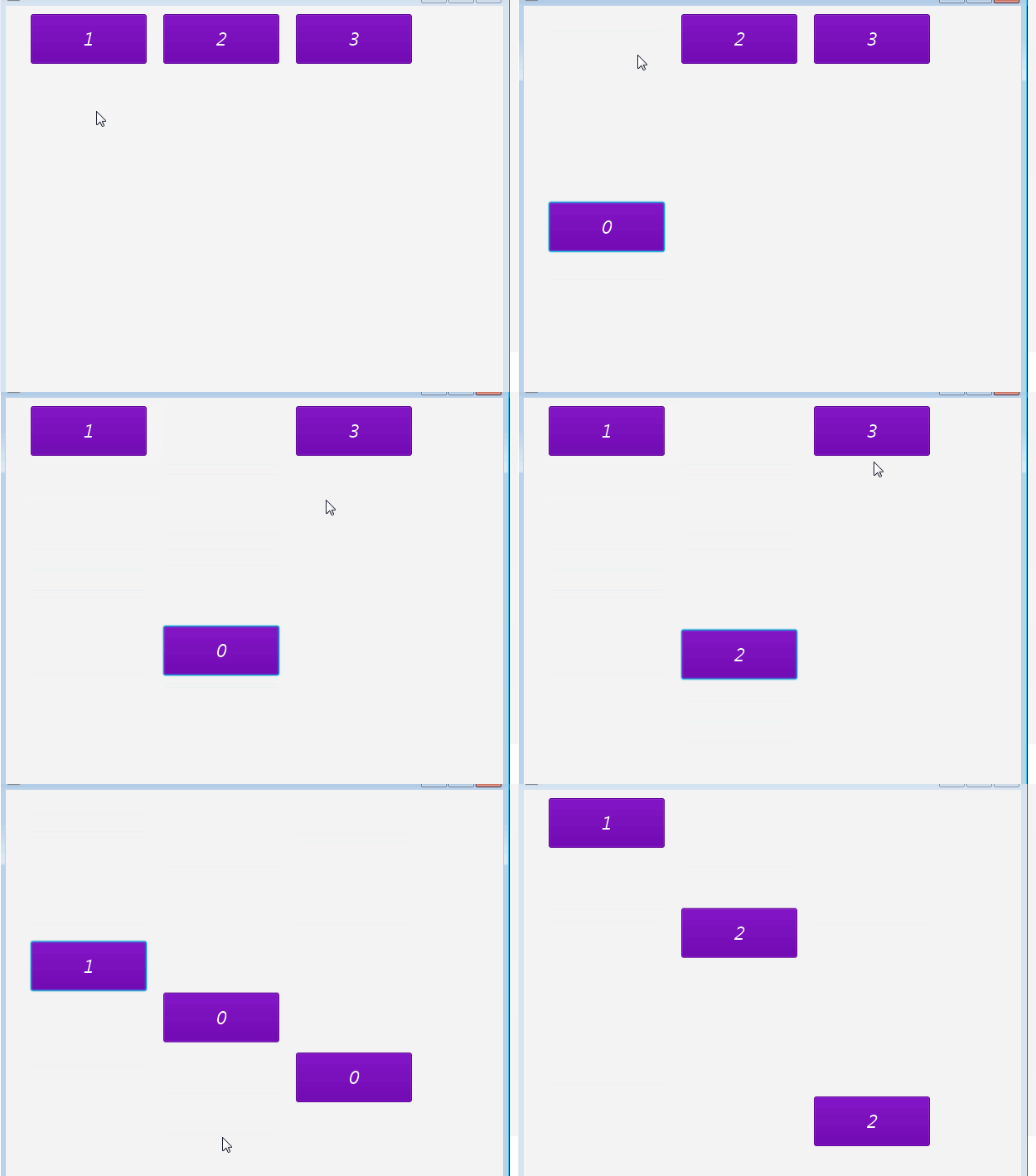
Last example for today, this time with some logic:

The number of movements is based on the button's text:
3282017.gif


B4X:
Sub b_Action
   Dim b As Button = Sender
   Dim count As Int = b.Text
   b.SetLayoutAnimated(500, b.Left, 300, b.Width, b.Height)
   Sleep(500)
   Dim i As Int = 0
   Do While i < count
     b.Text = i
     b.SetLayoutAnimated(400, b.Left, 200, b.Width, b.Height)
     Sleep(400)
     b.SetLayoutAnimated(400, b.Left, 400, b.Width, b.Height)
     Sleep(400)
     i = i + 1
   Loop
   b.Text = count
   b.SetLayoutAnimated(500, b.Left, 10, b.Width, b.Height)
End Sub

The button should have a catch event.
Button1_Catch
 

Widget

Well-Known Member
Licensed User
Longtime User
It will take some time.
It will be first implemented in B4J and probably be available in May or June (many vacations here in April).

Let me be the first to say:

Zzzzzzzzzzz :cool:

I really like the concept. It makes our work a lot easier.
When it gets ported to B4A and B4i, will it work on all (most?) versions of Android or iOS?

TIA
 

JordiCP

Expert
Licensed User
Longtime User
How do/will they work internally? Runnables with semaphores?o_O

Just trying to figure it, I made another approach to post #19 in B4A, with a little help of inline Java. It can be useful for synchronized animations which do not depend on Callsub timers, but on events raised by the same animation when finished

The myAnimatorB4a Sub acts as a state machine, and calls a simple view animator in Java which invoques back that same B4A function when it is finished. Then executes the next step, and so on.... No recorded states, all of them are passed back and forth as parameters.
B4X:
Sub myanimatorb4a(bb As Object, nStep As Int, nCount As Int)
   Dim jo As JavaObject
   jo.InitializeContext
   Dim b As Button=bb
   If nStep<=2*nCount Then
     If nStep=0 Then
       jo.RunMethod("myAnimatorJava",Array(b,500,600,1,nCount))
     Else
       If nStep Mod 2 =1 Then b.Text=Bit.ShiftRight(nStep-1,1)
       jo.RunMethod("myAnimatorJava",Array(b,400,800-400*(nStep Mod 2),nStep+1,nCount))
     End If
   Else    'Final Step
     b.Text=nCount
     jo.RunMethod("myAnimatorJava",Array(b,400,10,-1,nCount))   ' -1: no more callbacks
   End If
End Sub

Sub b_CLick
   Dim b As Button =Sender
   myanimatorb4a(b,0,b.Text)     'First step
End Sub

#if JAVA
import java.lang.Runnable;
import android.view.View;
public void myAnimatorJava(final Object v, int duration, int posY, final int nStep,final int nCount){
   ((View)v).animate().y((float)posY).setDuration((long)duration).withEndAction( new Runnable()
   {     public void   run(){ if (nStep>=0) processBA.raiseEvent(null,"myanimatorb4a",v, nStep,nCount); }   });
}
#End If
 

Erel

B4X founder
Staff member
Licensed User
Longtime User
When it gets ported to B4A and B4i, will it work on all (most?) versions of Android or iOS?
It will work on all versions.

Runnables with semaphores?
No. There are no additional threads here (only the main thread is allowed to call UI methods).

The compiler converts the resumable sub into a state machine object. The state machine can be paused and resumed.
 

Erel

B4X founder
Staff member
Licensed User
Longtime User
Quiz:
What is the output of this code:
B4X:
Sub AppStart (Form1 As Form, Args() As String)
   PrintNumber(1)
   PrintNumber(2)
   PrintNumber(3)
   Log("After")
End Sub

Sub PrintNumber(i As Int)
   Sleep(10)
   Log(i)
End Sub

And this one:
B4X:
Sub AppStart (Form1 As Form, Args() As String)
   PrintNumber(3)
   PrintNumber(2)
   PrintNumber(1)
   Log("After")
End Sub

Sub PrintNumber(i As Int)
   Sleep(i) '<--------------
   Log(i)
End Sub

???
 

JordiCP

Expert
Licensed User
Longtime User
Quiz:
What is the output of this code:
B4X:
Sub AppStart (Form1 As Form, Args() As String)
   PrintNumber(1)
   PrintNumber(2)
   PrintNumber(3)
   Log("After")
End Sub

Sub PrintNumber(i As Int)
   Sleep(10)
   Log(i)
End Sub

And this one:
B4X:
Sub AppStart (Form1 As Form, Args() As String)
   PrintNumber(3)
   PrintNumber(2)
   PrintNumber(1)
   Log("After")
End Sub

Sub PrintNumber(i As Int)
   Sleep(i) '<--------------
   Log(i)
End Sub

???
"After","1","2","3", for the first, and
"After","1","2","3" for the second ?:rolleyes:
 
D

Deleted member 103

Guest
Maybe that?
"After"
"1" (waiting 10 sec)
"2" (waiting 10 sec)
"3" (waiting 10 sec)

"After"
"3" (waiting 3 sec)
"2" (waiting 2 sec)
"1" (waiting 1 sec)
 

Erel

B4X founder
Staff member
Licensed User
Longtime User

narek adonts

Well-Known Member
Licensed User
Longtime User
Resumable subs are similar to .Net async / await feature.


It is more powerful than OBJC blocks (in relation to asynchronous programming).
Check the code in this post: https://www.b4x.com/android/forum/t...r-asynchronous-programming.77867/#post-493266
It is not possible to implement this logic with blocks.


Could be something like this )))
B4X:
Sub b_Action
   Dim b As Button = Sender
   Dim count As Int = b.Text
   b.SetLayoutAnimated(500, b.Left, 300, b.Width, b.Height)
   WaitFor AnimComplete.. '''
   Dim i As Int = 0
   Do While i < count
     b.Text = i
     b.SetLayoutAnimated(400, b.Left, 200, b.Width, b.Height)
     WaitFor AnimComplete..'''
     b.SetLayoutAnimated(400, b.Left, 400, b.Width, b.Height)
     WaitFor AnimComplete..'''
     i = i + 1
   Loop
   b.Text = count
   b.SetLayoutAnimated(500, b.Left, 10, b.Width, b.Height)
End Sub
 

Erel

B4X founder
Staff member
Licensed User
Longtime User
Good progress so far.

Here is another little example. It is already running with the debugger now:

test.gif


B4X:
Sub Btn_Action
   Dim b As Button = Sender
   For Each s As String In Array("Ten", "Nine", "Eight", "Seven", "Six", "Five", _
     "Four", "Three", "Two", "One", "TAKEOFF!!!")
     If s = "Eight" Then Continue
     b.Text = s
     Sleep(500)
   Next
End Sub
 
Top