Android Question Progress bar in 45 Degree angle

rhydo

Member
Licensed User
Longtime User
Hi Team,

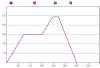
i would like to know , how can we make simple progress bar,not horizontal or vertical , but in different angles like 45 degree UP and Down. It is to be used to draw the oven temperature progress with respect to time as attached image.
 

Attachments

  • images.png
    images.png
    3.5 KB · Views: 337

klaus

Expert
Licensed User
Longtime User
What exactly do you want to do?
How is the diagram generated?
Is the diagram in your picture the target temperature and you want to superimpose the current temperature?
Etc.?
This could be done with a canvas.
But with a more detailed explanation on what exactly you want to do we could give more precise advices.
 
Last edited:
Upvote 0

rhydo

Member
Licensed User
Longtime User
Hi Team,

I want to make the progress bar same as in the image attached. Since there are 5 segments , i can use 5 progress bars. As of now i had implemented this using 5 progress bar in horizontal direction, but the client needed it as per the image. So have to rotate the progress bar as suggested by EREL. will try and let you know .Thank you very much for your time..
 
Upvote 0

rhydo

Member
Licensed User
Longtime User
You can use this code to rotate a view:
B4X:
Sub RotateView(v As View, Degrees As Float)
   Dim jo As JavaObject = v
   jo.RunMethod("setRotation", Array(Degrees))
End Sub

Supported by Android 4+

Hi,

I could be able to rotate the Progress bar as suggested , but would like to know how can i align the horizontal progress bar "end" to Angled (rotated) progress bar "start" so as to look like a line. Since i used the designer script to optimize the views layout, and code to rotate the view, i could not do the alignment properly. Could you please guide me to align it..
 
Upvote 0

DonManfred

Expert
Licensed User
Longtime User
Last edited:
Upvote 0

rhydo

Member
Licensed User
Longtime User
What exactly do you want to do?
How is the diagram generated?
Is this the diagram in your picture the target temperature and you want to superimpose the current temperature?
Etc.?
This could be done with a canvas.
But with a more detailed explanation on what exactly you want to do we could more precise advices.

Yes, Initialy we have to show a predifined diagram ( Temprature Vs Time ) as in the attache image .Then we have to superimpose the live temparature ( Different Color) on it with respect to time. (Presently doing this with 4 separate progress bar in horizontal direction) .Time scale for each segment may vary based on the user settings.

Also would like to know, is there any option to get the co-ordinates of the views and align it while executing code.

It will be really helpfull if you can guide me in right direction.
 
Upvote 0

klaus

Expert
Licensed User
Longtime User
I would do it like this:

upload_2017-2-8_15-40-44.png


It uses 3 panels and 3 canvases.
One for the reference diagram.
One for real dynamic temperature diagram
One for the dot.

A click on the control button starts a new sequence.
A Timer generates the time steps and a temperature close to the red one with a random error.

Advantage no external library, complete control of the code and customizable to your needs.

This is a skeleton, based on your diagram, up to you to adapt it to your needs.
It can be improved to make it more universal.

 

Attachments

  • TemperatureControl.zip
    8.8 KB · Views: 274
Last edited:
Upvote 0

rhydo

Member
Licensed User
Longtime User
I would do it like this:

View attachment 52683

It uses 3 panels and 3 canvases.
One for the reference diagram.
One for real dynamic temperature diagram
One for the dot.

A click on the control button starts a new sequence.
A Timer generates the time steps and a temperature close to the red one with a random error.

Advantage no external library, complete control of the code and customizable to your needs.

This is a skeleton, based on your diagram, up to you to adapt it to your needs.
It can be improved to make it more universal.

Hi klaus,

Thank you very much for your kind support.
i will try your code ...
 
Upvote 0
Top