
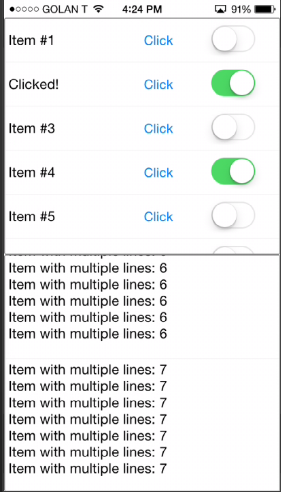
Nov 6, 2014 Replies: 50 B4i implementation of CustomListView (http://www.b4x.com/android/forum/th...xible-list-based-on-scrollview.19567/#content). Note that you should make sure that there is a live reference to all instances of CustomListView. Otherwise the instance will be released and the events will not be raised. You can use a global variable to store a live reference. New version was uploaded. CustomListView is implemented as a custom view. It should be added with the designer. V1.76 uploaded. This update brings the improvements added to B4A CustomListView: - Animated inserts. - ResizeItem method. - FirstVisibleIndex / LastVisibleIndex properties. - ScrollToItem. - ReachEnd event. - RemoveAt / ReplaceAt methods. The class will be included as a library in B4i v4.30. Attachments CustomListView.zip CustomListView.zip 6.8 KB · Views: 538 Last edited: Aug 27, 2017 Click to expand...
B4i implementation of CustomListView (http://www.b4x.com/android/forum/th...xible-list-based-on-scrollview.19567/#content). Note that you should make sure that there is a live reference to all instances of CustomListView. Otherwise the instance will be released and the events will not be raised. You can use a global variable to store a live reference. New version was uploaded. CustomListView is implemented as a custom view. It should be added with the designer. V1.76 uploaded. This update brings the improvements added to B4A CustomListView: - Animated inserts. - ResizeItem method. - FirstVisibleIndex / LastVisibleIndex properties. - ScrollToItem. - ReachEnd event. - RemoveAt / ReplaceAt methods. The class will be included as a library in B4i v4.30.
DonManfred Expert Licensed User Longtime User Nov 19, 2014 #2 Erel said: B4i implementation Click to expand... B4A implementation...
Erel B4X founder Staff member Licensed User Longtime User Nov 19, 2014 #3 I meant to say that this is the B4i implementation of B4A CustomListView.
H hzchrisfang Member Licensed User Longtime User Nov 20, 2014 #4 Hi, awesome Erel, could you please add longclick event into CustomListView ? And how to recognize swipe gestures ? Last edited: Nov 20, 2014
Hi, awesome Erel, could you please add longclick event into CustomListView ? And how to recognize swipe gestures ?
Erel B4X founder Staff member Licensed User Longtime User Nov 20, 2014 #5 Add this sub to add long click. Adding swipe gestures is more complicated. Code: Private Sub Panel_LongClick Dim p As Panel = Sender p.GetView(0).Color = HighlightColor p.GetView(0).SetColorAnimated(700, Colors.Transparent) CallSub3(CallBack, EventName & "_ItemLongClick", p.Tag, items.Get(p.Tag)) End Sub
Add this sub to add long click. Adding swipe gestures is more complicated. Code: Private Sub Panel_LongClick Dim p As Panel = Sender p.GetView(0).Color = HighlightColor p.GetView(0).SetColorAnimated(700, Colors.Transparent) CallSub3(CallBack, EventName & "_ItemLongClick", p.Tag, items.Get(p.Tag)) End Sub
H hzchrisfang Member Licensed User Longtime User Nov 20, 2014 #6 Thanks Erel. I thought the Click and LongClick have different animate effect, know now that I was wrong.
Thanks Erel. I thought the Click and LongClick have different animate effect, know now that I was wrong.
H hzchrisfang Member Licensed User Longtime User Nov 20, 2014 #7 I have add LongClick sub into my app. But when I take long press on my phone, it produce a multiple LongClick event response, how could this be?
I have add LongClick sub into my app. But when I take long press on my phone, it produce a multiple LongClick event response, how could this be?
Erel B4X founder Staff member Licensed User Longtime User Nov 20, 2014 #8 It is a bug related to LongClick event. It is fixed for the next update which will be released later today.
It is a bug related to LongClick event. It is fixed for the next update which will be released later today.
LucaMs Expert Licensed User Longtime User Nov 20, 2014 #9 hzchrisfang said: I have add LongClick sub into my app. But when I take long press on my phone, it produce a multiple LongClick event response, how could this be? Click to expand... In the meantime, you could use a boolean variable at module level, check and set it in the event, so as not to repeat it.
hzchrisfang said: I have add LongClick sub into my app. But when I take long press on my phone, it produce a multiple LongClick event response, how could this be? Click to expand... In the meantime, you could use a boolean variable at module level, check and set it in the event, so as not to repeat it.
H hzchrisfang Member Licensed User Longtime User Nov 20, 2014 #10 LucaMs said: In the meantime, you could use a boolean variable at module level, check and set it in the event, so as not to repeat it. Click to expand... OK, I got it, thank you.
LucaMs said: In the meantime, you could use a boolean variable at module level, check and set it in the event, so as not to repeat it. Click to expand... OK, I got it, thank you.
S stobi New Member Licensed User Longtime User Dec 13, 2014 #11 Is the pull to refresh feature available in this B4I version ? Also I'm Looking for a possibility to allow the User to reorder the list items. Is this possible?
Is the pull to refresh feature available in this B4I version ? Also I'm Looking for a possibility to allow the User to reorder the list items. Is this possible?
Erel B4X founder Staff member Licensed User Longtime User Dec 14, 2014 #12 Both features are not implemented. You will need to modify the class to support them.
S stobi New Member Licensed User Longtime User Dec 15, 2014 #13 As I'm new to B4I I don't think I'm able to implement this functionality ... Will these features be available once the default iOS ListView will be implemented ?
As I'm new to B4I I don't think I'm able to implement this functionality ... Will these features be available once the default iOS ListView will be implemented ?
Erel B4X founder Staff member Licensed User Longtime User Dec 16, 2014 #14 stobi said: Will these features be available once the default iOS ListView will be implemented ? Click to expand... I don't know.
stobi said: Will these features be available once the default iOS ListView will be implemented ? Click to expand... I don't know.
Alberto Iglesias Well-Known Member Licensed User Longtime User Apr 17, 2015 #15 How can I implement the ScrollViewEvents in this CLASS?
Alberto Iglesias Well-Known Member Licensed User Longtime User Apr 17, 2015 #16 You implemented the scrollChanged in CustomListView for B4A, in this thread https://www.b4x.com/android/forum/t...-and-loads-more-when-scroll-tot-bottom.35761/ Can you do this for CustomListView for B4i ? Thanks
You implemented the scrollChanged in CustomListView for B4A, in this thread https://www.b4x.com/android/forum/t...-and-loads-more-when-scroll-tot-bottom.35761/ Can you do this for CustomListView for B4i ? Thanks
Erel B4X founder Staff member Licensed User Longtime User Apr 19, 2015 #17 Almost the same code as in B4A: Code: Sub sv_ScrollChanged (OffsetX As Int, OffsetY As Int) If OffsetY + sv.Height >= sv.Panel.Height Then If DateTime.Now > lastAddItemsTime + 200 Then lastAddItemsTime = DateTime.Now CallSub(CallBack, EventName & "_AddItems") End If End If End Sub Add to Class_Globals: Code: Private lastAddItemsTime As Long Main module: Code: Sub clv1_AddItems Log("AddItems") For i = 1 To 20 clv1.AddTextItem(i, i) Next End Sub
Almost the same code as in B4A: Code: Sub sv_ScrollChanged (OffsetX As Int, OffsetY As Int) If OffsetY + sv.Height >= sv.Panel.Height Then If DateTime.Now > lastAddItemsTime + 200 Then lastAddItemsTime = DateTime.Now CallSub(CallBack, EventName & "_AddItems") End If End If End Sub Add to Class_Globals: Code: Private lastAddItemsTime As Long Main module: Code: Sub clv1_AddItems Log("AddItems") For i = 1 To 20 clv1.AddTextItem(i, i) Next End Sub
Alberto Michelis Well-Known Member Licensed User Longtime User Jun 2, 2015 #18 Hi, I have a customlistview and 1) when I add more lines than the screen height, I scrooll the list till the end, and, the last item is always showed at half its height. How to solve this? 2) any way to sort the list by any of its line components? How? Thanks
Hi, I have a customlistview and 1) when I add more lines than the screen height, I scrooll the list till the end, and, the last item is always showed at half its height. How to solve this? 2) any way to sort the list by any of its line components? How? Thanks
ilan Expert Licensed User Longtime User Feb 15, 2016 #19 Erel said: CustomListView is implemented as a custom view. It should be added with the designer. Click to expand... Does it means that we need to change old projects where we added the clv in our code and not via designer? (If we use the new class)
Erel said: CustomListView is implemented as a custom view. It should be added with the designer. Click to expand... Does it means that we need to change old projects where we added the clv in our code and not via designer? (If we use the new class)
Erel B4X founder Staff member Licensed User Longtime User Feb 15, 2016 #20 Yes. However you can keep the old implementation and only use the new implementation in new projects.
Yes. However you can keep the old implementation and only use the new implementation in new projects.