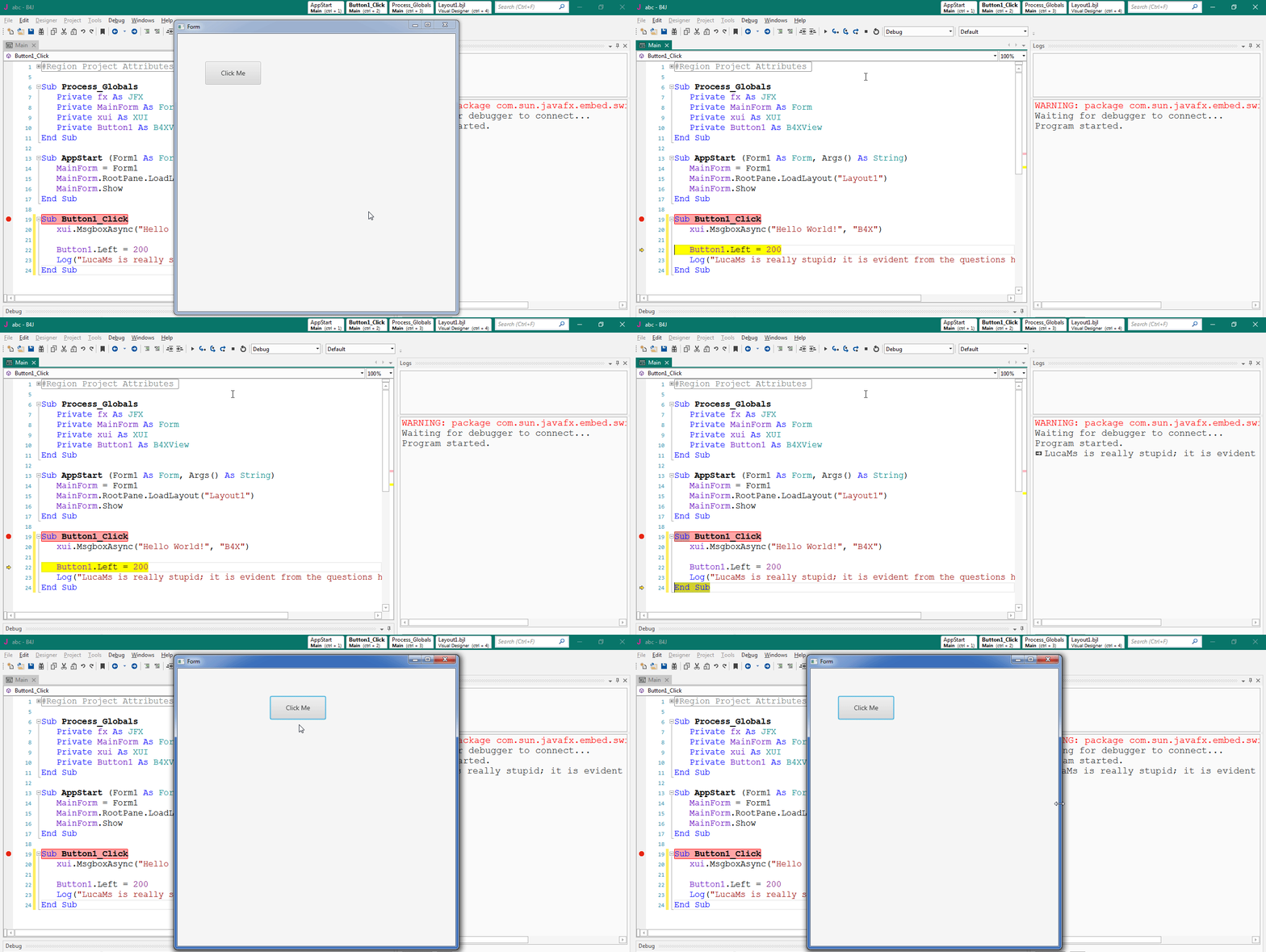
First: as you can see, the dialog is empty until "End Sub" is executed.I don't quite understand, but I can step in it to refresh UI with a basic UI project.
Sub Button1_Click
xui.MsgboxAsync("Hello World!", "B4X")
Button1.Left = 200
Log("LucaMs is really stupid; it is evident from the questions he posts.")
End Sub
Thank you for the information, but what I was asking is if there is a solution, because in this way the debugging of the graphics is difficult, at most you can use log commands.B4j UI threads are always updated last and they are not even ordered FiFo.
They will be enqueued and once all other processes finish then UI thread will be updated on no particular order.
I don't think it is a bug. if you don't handle resize event, it will stay at the original position.There is also a bug: the button returns to its original position!
It has nothing to do with it.I don't think it is a bug. if you don't handle resize event, it will stay at the original position.
Sub Button1_Click
Log("stop")
xui.MsgboxAsync("Hello World!", "B4X")
Button1.Left = 200
Sleep(300)
Log("LucaMs is really stupid; it is evident from the questions he posts.")
End Sub
As I said, the handle resize event of the MainForm is checked as default in Visual Designer. if you would not like to return to its initial position. either you can cancel the checked in Visual Designer or handle it in resize eventThe fact remains that then the button returns to its initial position.

It looks like this but it makes no sense. The layout should adjust automatically, having that setting set to True, but if you THEN move a View from code, it should stay in the new position.As I said, the handle resize event of the MainForm is checked as default in Visual Designer. if you would not like to return to its initial position. either you can cancel the checked in Visual Designer or handle it in resize event
Debugging the graphics is the incorrect approach, A refresh won't fix the underlying technology. it was build that way. you won't get any UI update because the debugger pauses all the threads.Thank you for the information, but what I was asking is if there is a solution, because in this way the debugging of the graphics is difficult, at most you can use log commands.
Maybe a MyForm.Refresh, implemented by Erel?
Vb.net is based on winforms and b4x is based on javafx, they are not even close to make a comparison.have not used VB Net for a long time
Now I need to debug the graphics; why should I consider it "wrong"?Debugging the graphics is the incorrect approach, A refresh won't fix the underlying technology
Vb.net is based on winforms and b4x is based on javafx, they are not even close to make a comparison.
In this way:
by putting breakpoints on the Log lines, executing the instruction with the msgbox by pressing F8 and then F5, at the next break the button actually goes to x 200 (but you struggle to find the form on the Desktop).B4X:Sub Button1_Click Log("stop") xui.MsgboxAsync("Hello World!", "B4X") Button1.Left = 200 Sleep(300) Log("LucaMs is really stupid; it is evident from the questions he posts.") End Sub
The fact remains that then the button returns to its initial position.
It is not that you think of, if no resize event of the designer, move a View from code, it should stay in the new position.The layout should adjust automatically
I'll stop answering, you (both) have pissed me off.It is not that you think of, if no resize event of the designer, move a View from code, it should stay in the new position.
Have try to force a refresh with sleep(0)?
In this way:
by putting breakpoints on the Log lines, executing the instruction with the msgbox by pressing F8 and then F5, at the next break the button actually goes to x 200 (but you struggle to find the form on the Desktop).B4X:Sub Button1_Click Log("stop") xui.MsgboxAsync("Hello World!", "B4X") Button1.Left = 200 Sleep(300) Log("LucaMs is really stupid; it is evident from the questions he posts.") End Sub
The fact remains that then the button returns to its initial position.